Stereo PDM microphone and a level meter
Objectives
Section titled “Objectives”- Capture the stereo PDM microphone and compute left/right sound levels
- Show the levels as a meter and explain whether it uses peak or RMS
- Test with sound from each side and confirm the channels are not swapped
Concepts
Section titled “Concepts”PDM versus PCM: why a MEMS mic sends PDM
Section titled “PDM versus PCM: why a MEMS mic sends PDM”PDM (Pulse Density Modulation) is a high-speed (1–3 MHz) 1-bit stream where pulse density represents the
signal amplitude, unlike PCM, where each sample is a multi-bit number (16/24-bit) at a much lower rate (8–48
kHz). Small MEMS microphones output PDM directly because their internal circuitry is simpler. The PSoC Edge’s
PDM/PCM converter turns PDM into PCM in hardware (lowpass + decimate) before it reaches a FIFO the CPU reads.
This episode configures 16 kHz with 160 samples per channel per frame
(PDM_MIC_FRAME_SAMPLES_PER_CHANNEL = 160), which is exactly 10 ms per frame at 16 kHz.
The real capture path is interrupt-driven FIFO reads plus a software double buffer, not DMA as the upstream README describes
Section titled “The real capture path is interrupt-driven FIFO reads plus a software double buffer, not DMA as the upstream README describes”The upstream README says “DMA-driven — the CPU stays out of it, hardware writes to a circular buffer” and “bind
the DMA channel to an IRQ handler.” The real code at commit 9a8e3ed uses no DMA at all — each channel (left
= channel 2, right = channel 3) has its own interrupt that fires when the FIFO reaches its trigger level
(PDM_RX_FIFO_TRIG_LEVEL, half the FIFO size), and process_channel_irq() reads samples out of the FIFO one at a
time with Cy_PDM_PCM_Channel_ReadFifo() into whichever buffer is currently being written
(buffer0/buffer1, ping-ponged entirely in software, not through a DMA descriptor). Once both channels
reach 160 samples (PDM_READY_BOTH), a semaphore wakes the waiting task to compute levels. The CPU really is
“busy” with every sample, through interrupts, rather than simply waiting for a DMA transfer to finish.
The “average” computed is mean(|x|), not RMS, even though it plays a similar role
Section titled “The “average” computed is mean(|x|), not RMS, even though it plays a similar role”compute_level() computes peak_abs (the maximum |sample|) and avg_abs — the sum of |sample| divided by the
sample count. That is a mean of absolute values, with no squaring or square root anywhere, so it is not
RMS (root-mean-square). It rises and falls with loudness similarly to RMS and is cheaper to compute (no
multiplication), but it always reads lower than RMS for the same signal (for a pure sine wave, mean|x| ≈ 0.9 ×
RMS).
The on-screen percentage is not peak/32767 directly — it is mapped through a floor/ceiling tuned for classroom speech
Section titled “The on-screen percentage is not peak/32767 directly — it is mapped through a floor/ceiling tuned for classroom speech”to_ui_pct() does not divide avg_abs by INT16_MAX (32767) directly, as the upstream README’s formula
suggests (and that formula there actually uses peak, not average, anyway). The real code linearly clamps
avg_abs between PDM_UI_FLOOR_ABS = 80 (giving 0%) and PDM_UI_CEIL_ABS = 8000 (giving 100%). The source
comment states the reason directly: “Tuned for classroom speech level so UI% doesn’t saturate too early.” Normal
classroom speech is far quieter than int16 full scale — dividing by 32767 directly would barely move the bar, so
the usable range has to be “compressed” to fill it.
The balance meter is already implemented, not just a suggested extension as the upstream README implies
Section titled “The balance meter is already implemented, not just a suggested extension as the upstream README implies”The upstream README’s Experiment Ideas section suggests “Balance meter — show (L-R)/(L+R) as a needle in the
center of the screen” as if it were not yet built. The real code already computes
balance_lr = (L_avg - R_avg) * 100 / (L_avg + R_avg) in pdm_probe_logger.c, and the view already shows an “L”
when balance > 3 or an “R” when balance < -3. This feature is ready from the very first build — nothing more to
write.
The UI polls a “latest sample wins” snapshot every 50 ms, not lv_async_call at “50 Hz”
Section titled “The UI polls a “latest sample wins” snapshot every 50 ms, not lv_async_call at “50 Hz””Same pattern seen in lesson 2.5 (WiFi scan): mic_presenter.c does not use lv_async_call() as the upstream
README describes (“lv_async_call at a 50 Hz cadence”). It creates an lv_timer at a 50 ms period (that is 20
times a second, not 50) that reads the latest sample written under taskENTER_CRITICAL()/EXIT. The producer
(the logger task) publishes a new sample every 10 ms, but the policy is “latest sample wins” (it overwrites the
old one) — a short click that appears and disappears within a single 10 ms frame may never be seen by the UI at
all, if the 50 ms timer reads after that frame has already been overwritten.
Worked example
Section titled “Worked example”This episode’s code lives on the Developer Hub (pinned to commit 9a8e3ed) — read the Why section of the
upstream README
to learn PDM/PCM, but the excerpts below are copied from the actual files (Apache-2.0, tesaiot/developer-hub,
same commit), because the capture mechanism and the level formulas differ from what the upstream README
describes.
app_audio/pdm/pdm_probe_logger.c — mean-abs, not RMS, and the floor/ceiling-clamped percentage:
/* Tuned for classroom speech level so UI% doesn't saturate too early. */#define PDM_UI_FLOOR_ABS              (80U)#define PDM_UI_CEIL_ABS               (8000U)
static uint32_t to_ui_pct(uint32_t avg_abs){    if (avg_abs <= PDM_UI_FLOOR_ABS) { return 0U; }    if (avg_abs >= PDM_UI_CEIL_ABS)  { return 100U; }    return ((avg_abs - PDM_UI_FLOOR_ABS) * 100U) / (PDM_UI_CEIL_ABS - PDM_UI_FLOOR_ABS);}
app_audio/pdm/pdm_mic.c — capture by interrupt-driven FIFO reads, not DMA:
static void process_channel_irq(pdm_channel_state_t *state, uint8_t channel_index, uint8_t ready_bit){ /* ... */ for (uint32_t index = 0U; index < PDM_RX_FIFO_TRIG_LEVEL; index++) { int16_t sample = (int16_t)Cy_PDM_PCM_Channel_ReadFifo(CYBSP_PDM_HW, channel_index); /* write into state->active[out_idx++] until the frame is full, then swap active/full */ } Cy_PDM_PCM_Channel_ClearInterrupt(CYBSP_PDM_HW, channel_index, CY_PDM_PCM_INTR_RX_TRIGGER);}app_ui/mic/mic_presenter.c — polling every 50 ms, latest-sample-wins:
static void mic_presenter_ui_timer_cb(lv_timer_t *timer){    mic_presenter_sample_t local = {0};    bool has_sample = false;
    taskENTER_CRITICAL();    has_sample = s_has_sample;    if (has_sample) { local = s_latest_sample; }    taskEXIT_CRITICAL();
if (has_sample && s_view_ready) { mic_view_apply(&local); }}main_example.ccallsmic_presenter_start()beforepdm_probe_logger_start(), exactly as the upstream README describes (build the consumer before the producer)- See the full folder at
int_ep06_digital_mic_probe/
Common mistakes
Section titled “Common mistakes”- Assuming DMA is used, as the upstream README describes — the real code uses interrupt-driven FIFO reads, one sample at a time, with a software-managed double buffer. Trust the real code when explaining the capture mechanism.
- Assuming the computed average is RMS — it is just the mean of absolute values (mean|x|), with no squaring at all, and always reads lower than RMS for the same signal.
- Assuming the UI percentage is
avg*100/32767directly — it is actually clamped through the 80–8000 range tuned for quiet classroom speech. Anything quieter than 80 always shows 0%, and anything louder than 8000 always shows 100%. - Assuming the UI catches every short click — the “latest sample wins” policy at the 50 ms UI timer can miss a 10 ms frame containing a click entirely if the next frame overwrites it before the UI reads.
Build and flash
Section titled “Build and flash”# In the master template folder (see lesson 1.1)# 1) Delete the old episode's files in proj_cm55/apps/# 2) Copy all of this episode's files into proj_cm55/apps/make buildmake program # flash through KitProg3Or open this example on the Developer Hub and flash the ready-made firmware.
See it work first
Section titled “See it work first”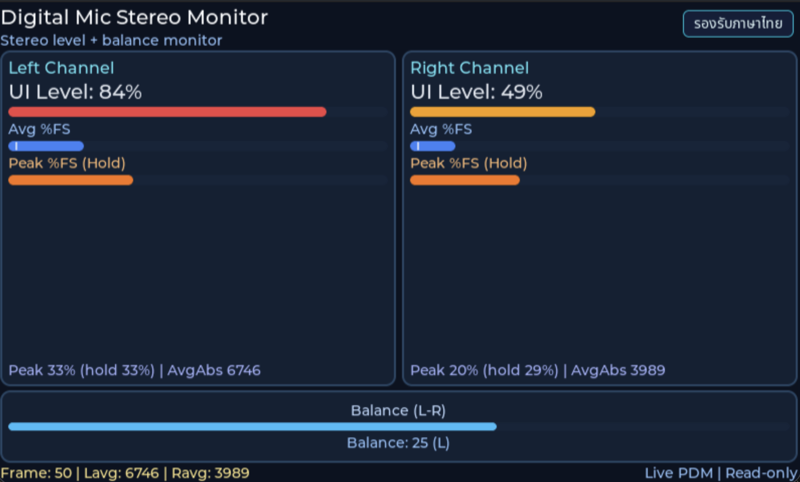
Before reading the code, guess what objects this screen has, and what changes when the user taps it or when a sensor value changes.
Try a change
Section titled “Try a change”- Guess before you change anything: pick one value the example’s README explains in the How section, and write down what you expect to change on the screen or in the log.
- Change and run: build + flash, then compare against your guess. If it does not match, find which part you misunderstood.
- Extend: add one thing the example does not yet have, and keep a photo or video in your portfolio.
Check your understanding
Section titled “Check your understanding”- How does PDM differ from PCM?
- How do RMS and peak give different pictures of the sound level?
- How do you test that the left and right channels are not swapped?
The answers are in the example’s README and in the code. If you cannot answer one, go back and read the Why / What / How section again.
References
Section titled “References”- Episode README · code folder · commit
9a8e3ed - Open this example on the Developer Hub
- The code belongs to the Developer Hub and is referenced by link, not copied into this repository
Review questions
Answer on your own first, then open the answer.
-
How does pdm_probe_logger_task know a new audio frame is ready? (Objective 1)
- poll FIFO ของ PDM ทุก 1 ms
- ISR ของแต่ละช่องอ่าน FIFO ครั้งละ 32 ตัวอย่างเติม buffer ที่กำลังเขียน เมื่อครบ 160 ตัวอย่าง (10 ms ที่ 16 kHz) ทั้งซ้ายและขวา จะสลับ ping-pong buffer แล้ว set semaphore ที่ task รออยู่
- LVGL timer เรียก task ทุก 50 ms
- DMA เขียนค่าตรงเข้า label บนจอ
Show answer
Answer: B. ISR ของแต่ละช่องอ่าน FIFO ครั้งละ 32 ตัวอย่างเติม buffer ที่กำลังเขียน เมื่อครบ 160 ตัวอย่าง (10 ms ที่ 16 kHz) ทั้งซ้ายและขวา จะสลับ ping-pong buffer แล้ว set semaphore ที่ task รออยู่
process_channel_irq() อ่าน FIFO เมื่อถึง trigger level (32) นับ block_count จนครบ PDM_INTERRUPTS_PER_FRAME แล้วสลับ active/full buffer เมื่อทั้งสองช่องพร้อม (PDM_READY_BOTH) จึงเรียก cy_rtos_semaphore_set() ฝั่ง pdm_mic_get_frame() บล็อกรอ semaphore นั้น CPU จึงคำนวณเป็นก้อน 10 ms แทนการอ่านทีละตัวอย่าง (README ของ episode พูดถึง DMA แต่โค้ดที่ commit นี้ใช้ interrupt อ่าน FIFO)
-
What is each channel's ‘UI Level’ bar computed from? (Objective 2)
- ค่า RMS ของเฟรม
- ค่า peak ของเฟรม
- ค่าเฉลี่ยของค่าสัมบูรณ์ (mean |x|) ของเฟรม 10 ms แล้วแมปช่วง 80–8000 เป็น 0–100%
- จำนวนตัวอย่างที่ไม่เป็นศูนย์
Show answer
Answer: C. ค่าเฉลี่ยของค่าสัมบูรณ์ (mean |x|) ของเฟรม 10 ms แล้วแมปช่วง 80–8000 เป็น 0–100%
compute_level() คำนวณทั้ง peak_abs และ avg_abs = ผลรวม |x| หารจำนวนตัวอย่าง ไม่มีการยกกำลังสองจึงไม่ใช่ RMS แล้ว to_ui_pct() แมป avg_abs จาก PDM_UI_FLOOR_ABS (80) ถึง PDM_UI_CEIL_ABS (8000) mean |x| ขึ้นลงตามความดังเหมือน RMS และคำนวณเบากว่า แต่ได้ค่าต่ำกว่า RMS สำหรับสัญญาณเดียวกัน (คลื่น sine ได้ราว 0.9 เท่าของ RMS)
-
You clap once near the mic. How does the Peak (Hold) bar behave? (Objective 2)
- กระโดดขึ้นทันที ค้างไว้ราว 1.5 วินาที แล้วค่อยลดลง 2% ทุก 100 ms ส่วนแถบค่าเฉลี่ยตกลงเร็วกว่ามาก
- ขึ้นช้า ๆ ตามค่าเฉลี่ย
- ขึ้นแล้วค้างจนกว่าจะรีเซ็ตบอร์ด
- ไม่ขยับ เพราะ peak ถูกกรองออก
Show answer
Answer: A. กระโดดขึ้นทันที ค้างไว้ราว 1.5 วินาที แล้วค่อยลดลง 2% ทุก 100 ms ส่วนแถบค่าเฉลี่ยตกลงเร็วกว่ามาก
update_peak_hold() รับค่าใหม่ถ้าสูงกว่า hold ค้างไว้ MIC_PEAK_HOLD_MS = 1500 ms แล้วลด MIC_PEAK_DECAY_STEP_PCT = 2% ทุก MIC_PEAK_DECAY_INTERVAL_MS = 100 ms peak บอกว่าสัญญาณเข้าใกล้ขีดจำกัด (clipping) หรือยัง ส่วนค่าเฉลี่ยบอกความดังโดยรวม จึงแสดงคู่กัน
-
The logger publishes every 10 ms but the UI timer reads every 50 ms, latest sample wins. Why might a click shorter than 10 ms never show on the peak bar? (Objective 2)
- เพราะไมโครโฟน PDM ตอบสนองช้ากว่า 10 ms
- เพราะ LVGL วาดไม่ทัน
- เพราะ ISR ทิ้งเฟรมที่ดังเกินไป
- เพราะเฟรมที่มีเสียงกระแทกอาจถูกเฟรมถัดไปเขียนทับก่อน UI มาอ่าน UI เห็นราว 1 ใน 5 เฟรม ถ้าต้องจับ peak ทุกครั้งต้องสะสมค่าสูงสุดไว้ฝั่ง producer ระหว่างรอบที่ UI อ่าน
Show answer
Answer: D. เพราะเฟรมที่มีเสียงกระแทกอาจถูกเฟรมถัดไปเขียนทับก่อน UI มาอ่าน UI เห็นราว 1 ใน 5 เฟรม ถ้าต้องจับ peak ทุกครั้งต้องสะสมค่าสูงสุดไว้ฝั่ง producer ระหว่างรอบที่ UI อ่าน
mic_presenter_publish_sample() เขียน s_latest_sample ทับทุกครั้ง ส่วน mic_presenter_ui_timer_cb() อ่านทุก MIC_UI_TIMER_PERIOD_MS = 50 ms นโยบายนี้ทำให้ UI ไม่บล็อกและไม่มีคิวค้าง แต่แลกกับการพลาดเหตุการณ์ที่สั้นมาก ต้องเลือกให้เหมาะกับงาน
-
You snap your fingers next to the left microphone. What should Balance show, and what does the opposite result mean? (Objective 3)
- Balance เป็นลบและขึ้น “R” เสมอ เพราะสูตรคือ R − L
- Balance เป็น 0 เพราะไมค์สองตัวอยู่ใกล้กัน
- Balance เป็นบวกและขึ้น “L” ถ้ากลับเป็น “R” แปลว่าการจับคู่ช่องกับไมโครโฟนสลับกัน ต้องตรวจว่าช่อง PDM ที่ตั้งเป็นซ้าย/ขวา (channel 2/3) ตรงกับไมค์ตัวจริงบนบอร์ด
- Balance ขึ้นกับความดังรวม ไม่ใช่ทิศ
Show answer
Answer: C. Balance เป็นบวกและขึ้น “L” ถ้ากลับเป็น “R” แปลว่าการจับคู่ช่องกับไมโครโฟนสลับกัน ต้องตรวจว่าช่อง PDM ที่ตั้งเป็นซ้าย/ขวา (channel 2/3) ตรงกับไมค์ตัวจริงบนบอร์ด
balance_lr = (L_avg − R_avg) × 100 / (L_avg + R_avg) และ view ขึ้น L เมื่อ > 3, R เมื่อ < −3 การทดสอบที่ดีควรทำทั้งสองฝั่งสลับกันหลายครั้งในห้องเงียบ เพราะไมค์ทั้งสองอยู่ใกล้กัน ความต่างอาจไม่มากถ้าแหล่งเสียงอยู่ไกล
Cite this lesson
If you teach from this lesson or reuse it in slides or documents, credit it with the text below. If you changed it, add (adapted) after the title.
"Stereo PDM microphone and a level meter" from TESA Open Knowledge by the Thai Embedded Systems Association (TESA), https://github.com/tesaiot/tesa-qualification-program, licensed under CC BY-NC 4.0
Thai attribution: "ไมโครโฟน PDM สเตอริโอและ level meter" จาก TESA Open Knowledge โดยสมาคมสมองกลฝังตัวไทย (Thai Embedded Systems Association: TESA) https://github.com/tesaiot/tesa-qualification-program สัญญาอนุญาต CC BY-NC 4.0
This lesson adapts the source below; keep its credit too.
https://github.com/tesaiot/developer-hub/blob/9a8e3ed1d813bfd67fabf6b7ac15c6ff9750b465/int_ep06_digital_mic_probe · Code stays in the Developer Hub and is linked at pinned commits, never copied: the episodes, practice codes and main-branch examples are Apache-2.0; the master template and the OPTIGA client carry Infineon/Cypress EULAs.
TESA Open Knowledge · © 2026 สมาคมสมองกลฝังตัวไทย (TESA) · CC BY-NC 4.0
Content is licensed CC BY-NC 4.0. Reuse it non-commercially and credit the Thai Embedded Systems Association (TESA) every time. · How to cite TESA