Buttons and event callbacks: an UP / DOWN / RESET counter
Objectives
Section titled “Objectives”- Attach event callbacks to buttons with LV_EVENT_PRESSED and LV_EVENT_LONG_PRESSED_REPEAT
- Separate UI logic from counter logic into different files and explain why that makes testing easier
- Add one new button that reuses the same logic
Concepts
Section titled “Concepts”Event-driven programming in LVGL
Section titled “Event-driven programming in LVGL”After EP01, which drew a purely static screen, EP02 adds something every embedded GUI needs: an event
callback — a function LVGL calls itself when an event matching a registered filter occurs. It is attached with
lv_obj_add_event_cb(obj, callback, filter, user_data), where filter picks which event type to receive
(LV_EVENT_PRESSED, LV_EVENT_LONG_PRESSED_REPEAT, LV_EVENT_CLICKED, etc.) and user_data is a pointer we
supply ourselves so the callback can read it back with lv_event_get_user_data(e). This technique replaces global
variables, because each button can send its own user_data while the same callback serves several buttons at
once.
Tap and hold are simply different events
Section titled “Tap and hold are simply different events”LV_EVENT_PRESSED fires the instant a finger touches the widget, with no need to wait for release.
LV_EVENT_LONG_PRESSED_REPEAT fires repeatedly every N milliseconds for as long as the press is held (N is set in
lv_conf.h via LV_INDEV_DEF_LONG_PRESS_REP_TIME). EP02 attaches the same callback to both events on the same
button (two separate lv_obj_add_event_cb() calls), and the callback checks lv_event_get_code(e) to pick a
different delta — a plain tap moves 1 unit, while a held press moves 5 units on every repeat.
Separating UI from logic: why it matters
Section titled “Separating UI from logic: why it matters”ui_button_counter.c knows LVGL fully (creates widgets, sets colors, places them), but counter_logic.c does
not call LVGL widget APIs directly — it only knows the lv_obj_t * of the label it must update text on, and
keeps its own state in a struct (counter_state_t) separate from the UI. This design lets the UP and DOWN
buttons share the exact same callback (counter_logic_button_event_cb); they differ only in the payload
passed through user_data (tap_delta/hold_repeat_delta being positive or negative). Adding a new button that
reuses the same logic therefore needs no new callback at all — just a new counter_button_action_t bound to the
existing callback.
Where state lives, and why it must be static
Section titled “Where state lives, and why it must be static”s_counter_state, s_up_action and s_down_action in ui_button_counter.c are file-scope static
variables, not local variables inside ui_button_counter_create(). The reason: lv_obj_add_event_cb() stores the
user_data pointer to call later (every time the user presses the button, long after the UI-creation function
has already returned). If s_up_action were a local variable on the stack, it would be destroyed the moment
ui_button_counter_create() returns, leaving the callback reading a dangling pointer. counter_logic_init()
likewise only stores the label’s pointer in the state rather than copying data, so it must be updated through
state->value_label for the same reason.
Laying out buttons in a row with flex layout
Section titled “Laying out buttons in a row with flex layout”The three-button row uses lv_obj_set_layout(btn_row, LV_LAYOUT_FLEX) together with
lv_obj_set_flex_flow(btn_row, LV_FLEX_FLOW_ROW) so LVGL arranges children left to right automatically, CSS
flexbox style, with no need to compute each button’s x by hand. lv_obj_set_flex_align(..., LV_FLEX_ALIGN_CENTER, LV_FLEX_ALIGN_CENTER, LV_FLEX_ALIGN_CENTER) centers both along the main axis and the cross
axis, and lv_obj_set_style_pad_column(btn_row, 20, LV_PART_MAIN) leaves 20 px of gap between buttons. Each
button still uses the label-on-button pattern: create lv_label_create(btn) as the button’s child, then
lv_obj_align(lbl, LV_ALIGN_CENTER, 0, 0) to center the text inside the button.
Scaling the logo with lv_image_set_scale
Section titled “Scaling the logo with lv_image_set_scale”lv_image_set_scale(logo, 128) shrinks the logo to half size, because LVGL uses 256 to mean 1.0x (a
fixed-point scale), so 128 equals 0.5x — unlike EP01, which used the logo at full size with no scaling at all.
Worked example
Section titled “Worked example”This episode’s code lives on the Developer Hub (pinned to commit 9a8e3ed). Read the full Why / What / How
first in the episode’s README.
The excerpts below are copied from tesaiot/developer-hub (Apache-2.0) at the same commit.
counter_logic.c — one callback handles both tap and hold, branching on the event code:
void counter_logic_button_event_cb(lv_event_t *e){    lv_event_code_t code = lv_event_get_code(e);    counter_button_action_t *action = (counter_button_action_t *)lv_event_get_user_data(e);
    if(action == NULL || action->state == NULL) {        return;    }
    if(code == LV_EVENT_PRESSED) {        counter_logic_apply_delta(action->state, action->tap_delta);        counter_logic_log_action("TAP", action->tap_delta, action->state->value);        return;    }
    if(code == LV_EVENT_LONG_PRESSED_REPEAT) {        counter_logic_apply_delta(action->state, action->hold_repeat_delta);        counter_logic_log_action("HOLD_REPEAT", action->hold_repeat_delta, action->state->value);    }}
ui_button_counter.c — the UP button binds the same callback twice, once per event:
/* Event payload: tap +1, hold-repeat +5. */s_up_action.state = &s_counter_state;s_up_action.tap_delta = 1;s_up_action.hold_repeat_delta = 5;lv_obj_add_event_cb(btn_up, counter_logic_button_event_cb, LV_EVENT_PRESSED, &s_up_action);lv_obj_add_event_cb(btn_up, counter_logic_button_event_cb, LV_EVENT_LONG_PRESSED_REPEAT, &s_up_action);Notice s_up_action is a file-scope static variable (see why in Concepts above), and the DOWN button calls the
exact same counter_logic_button_event_cb, just passing s_down_action with tap_delta = -1 instead — no
new callback to write.
counter_logic.h and main_example.c share the same shape as EP01: forward to ui_button_counter_create().
Common mistakes
Section titled “Common mistakes”- Passing
user_dataas a local (stack) variable — it must bestaticor global, becauselv_obj_add_event_cb()stores the pointer to call later. A stack variable dies as soon as the UI-creation function returns, leaving the callback reading a dangling pointer. - Forgetting that RESET checks both
LV_EVENT_PRESSEDandLV_EVENT_CLICKED— unlike UP/DOWN, which check onlyLV_EVENT_PRESSED. If you copy the UP/DOWN callback for a new button that needs RESET-like behavior, check which event codes actually match the behavior you want. - Assuming one
lv_obj_add_event_cb()call can catch both tap and hold — you must register twice, once perfilter(LV_EVENT_PRESSEDandLV_EVENT_LONG_PRESSED_REPEAT), because each call’sfiltertakes a single event code. - Forgetting
lv_image_set_scaleis base-256, not base-100 — 256 means 1.0x, not a percentage; 128 is 0.5x, not “128%”.
Build and flash
Section titled “Build and flash”# In the master template folder (see lesson 1.1)# 1) Delete the old episode's files in proj_cm55/apps/# 2) Copy all of this episode's files into proj_cm55/apps/make buildmake program # flash through KitProg3Or open this example on the Developer Hub and flash the ready-made firmware.
See it work first
Section titled “See it work first”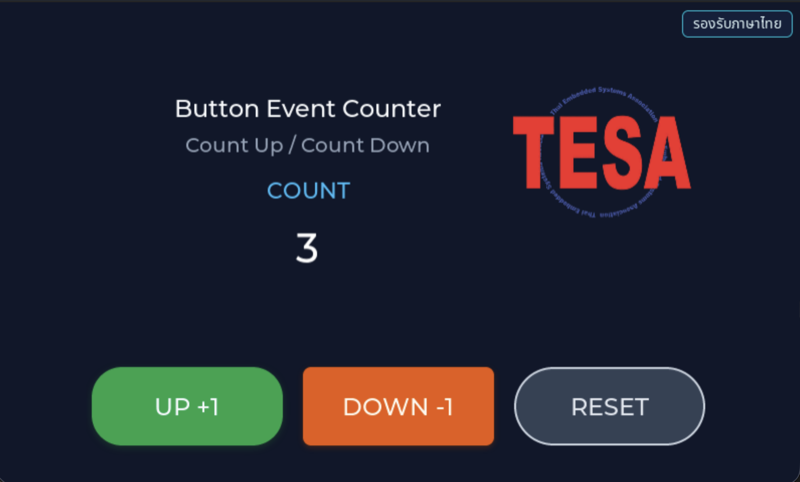
Before reading the code, guess what objects this screen has, and what changes when the user taps it or when a sensor value changes.
Try a change
Section titled “Try a change”- Guess before you change anything: pick one value the example’s README explains in the How section, and write down what you expect to change on the screen or in the log.
- Change and run: build + flash, then compare against your guess. If it does not match, find which part you misunderstood.
- Extend: add one thing the example does not yet have, and keep a photo or video in your portfolio.
Check your understanding
Section titled “Check your understanding”- How do LV_EVENT_PRESSED and LV_EVENT_LONG_PRESSED_REPEAT differ when a button is held down?
- Does counter_logic.c know about LVGL at all, and why was it designed that way?
- If the counter must never go negative, which file should you change?
The answers are in the example’s README and in the code. If you cannot answer one, go back and read the Why / What / How section again.
References
Section titled “References”- Episode README · code folder · commit
9a8e3ed - Open this example on the Developer Hub
- The code belongs to the Developer Hub and is referenced by link, not copied into this repository
Review questions
Answer on your own first, then open the answer.
-
The counter is 0. The user holds UP until LV_EVENT_LONG_PRESSED_REPEAT has fired twice, then releases. What value is shown? (Objective 1)
- 10
- 11
- 2
- 12
Show answer
Answer: B. 11
LV_EVENT_PRESSED ยิงครั้งเดียวตอนเริ่มกด (tap_delta = +1) เมื่อกดค้างเกินเวลา long press แล้ว LV_EVENT_LONG_PRESSED_REPEAT จะยิงซ้ำเป็นระยะ ครั้งละ hold_repeat_delta = +5 จึงได้ 1 + 5 + 5 = 11 ทั้งสอง event ใช้ callback ตัวเดียวกันคือ counter_logic_button_event_cb() ที่แยกด้วย lv_event_get_code()
-
The value is 0 and the user taps DOWN once. What is shown, and why? (Objective 2)
- -1 เพราะ tap_delta ของ DOWN คือ -1
- -5 เพราะ DOWN ใช้ hold_repeat_delta
- 0 เพราะ ui_button_counter.c ปิดปุ่ม DOWN เมื่อค่าเป็น 0
- 0 เพราะ counter_logic_init() ถูกเรียกด้วย allow_negative = false และ counter_logic_apply_delta() บีบค่าที่ติดลบกลับเป็น 0
Show answer
Answer: D. 0 เพราะ counter_logic_init() ถูกเรียกด้วย allow_negative = false และ counter_logic_apply_delta() บีบค่าที่ติดลบกลับเป็น 0
state ถูก init ด้วย allow_negative = false หลังบวก delta แล้ว apply_delta ตรวจว่าค่าติดลบหรือไม่ ถ้าติดลบจะตั้งเป็น 0 ก่อน refresh label กฎนี้อยู่ใน counter_logic.c ที่เดียว ส่วนฝั่ง UI ไม่ได้ปิดปุ่มใด
-
Does counter_logic.c depend on LVGL? (Objective 2)
- รู้จัก: รับ lv_event_t อ่าน user_data และเรียก lv_label_set_text_fmt() เอง สิ่งที่แยกออกไปคือการจัดวาง widget ส่วนกฎของตัวนับอยู่ใน counter_logic_apply_delta() ที่เดียว
- ไม่รู้จักเลย เป็น C ล้วนที่ทดสอบบนคอมพิวเตอร์ได้ทันที
- ไม่รู้จัก เพราะ ui_button_counter.c เป็นผู้อัปเดต label ทุกครั้ง
- รู้จักเฉพาะตอน init หลังจากนั้นไม่เรียก LVGL อีก
Show answer
Answer: A. รู้จัก: รับ lv_event_t อ่าน user_data และเรียก lv_label_set_text_fmt() เอง สิ่งที่แยกออกไปคือการจัดวาง widget ส่วนกฎของตัวนับอยู่ใน counter_logic_apply_delta() ที่เดียว
counter_logic.h include lvgl.h, state เก็บ lv_obj_t *value_label และ callback รับ lv_event_t จึงยังผูกกับ LVGL การแยกไฟล์ทำให้เปลี่ยนหน้าตาปุ่มได้โดยไม่แตะกฎ และรู้ว่ากฎอยู่ที่ไหน ถ้าอยากทดสอบกฎบนคอมพิวเตอร์โดยไม่มี LVGL ต้องแยกส่วนคำนวณค่าใน apply_delta ออกเป็นฟังก์ชันที่ไม่เรียก LVGL อีกชั้น
-
You want a ‘+10’ button (tap +10, hold +50) that reuses the same logic. Which approach is right? (Objective 3)
- เพิ่ม case ใหม่ใน counter_logic_button_event_cb() สำหรับปุ่มนี้โดยเฉพาะ
- สร้าง counter_state_t ตัวใหม่ให้ปุ่มนี้แล้ว init ด้วย label เดียวกัน
- สร้าง counter_button_action_t แบบ static ตัวใหม่ (state = &s_counter_state, tap 10, hold 50) แล้วผูก counter_logic_button_event_cb กับทั้ง LV_EVENT_PRESSED และ LV_EVENT_LONG_PRESSED_REPEAT โดยส่ง pointer ของมันเป็น user_data
- เขียน callback ใหม่ใน ui_button_counter.c ที่แก้ s_counter_state.value ตรง ๆ
Show answer
Answer: C. สร้าง counter_button_action_t แบบ static ตัวใหม่ (state = &s_counter_state, tap 10, hold 50) แล้วผูก counter_logic_button_event_cb กับทั้ง LV_EVENT_PRESSED และ LV_EVENT_LONG_PRESSED_REPEAT โดยส่ง pointer ของมันเป็น user_data
ปุ่ม UP และ DOWN ต่างกันแค่ค่าใน counter_button_action_t ที่ส่งเป็น user_data ปุ่มใหม่จึงไม่ต้องแตะ counter_logic.c เลย ถ้าสร้าง state ใหม่จะมีตัวนับสองชุดเขียน label เดียวกันแข่งกัน ส่วนการแก้ value ตรง ๆ ข้ามกฎ allow_negative และไม่ refresh label
-
If the new button's counter_button_action_t is a local variable inside ui_button_counter_create() (not static), what happens when the user presses the button? (Objective 3)
- ทำงานปกติ เพราะ LVGL คัดลอก user_data เก็บไว้ให้
- compile ไม่ผ่าน
- LVGL จะไม่เรียก callback เพราะ user_data เป็นตัวแปร local
- callback ได้ pointer ที่ชี้ไปยัง stack ที่หมดอายุแล้วหลังฟังก์ชัน return ค่า delta ที่อ่านได้เป็นขยะหรือโปรแกรมพัง
Show answer
Answer: D. callback ได้ pointer ที่ชี้ไปยัง stack ที่หมดอายุแล้วหลังฟังก์ชัน return ค่า delta ที่อ่านได้เป็นขยะหรือโปรแกรมพัง
lv_obj_add_event_cb() เก็บแค่ pointer ที่ส่งให้ ไม่ได้คัดลอกข้อมูล ตัวอย่างจึงประกาศ s_up_action และ s_down_action เป็น static ให้อยู่ตลอดอายุโปรแกรม ตัวแปร local หายไปเมื่อ ui_button_counter_create() return แต่ callback ถูกเรียกทีหลังเสมอ
Cite this lesson
If you teach from this lesson or reuse it in slides or documents, credit it with the text below. If you changed it, add (adapted) after the title.
"Buttons and event callbacks: an UP / DOWN / RESET counter" from TESA Open Knowledge by the Thai Embedded Systems Association (TESA), https://github.com/tesaiot/tesa-qualification-program, licensed under CC BY-NC 4.0
Thai attribution: "ปุ่มและ event callback: ตัวนับ UP / DOWN / RESET" จาก TESA Open Knowledge โดยสมาคมสมองกลฝังตัวไทย (Thai Embedded Systems Association: TESA) https://github.com/tesaiot/tesa-qualification-program สัญญาอนุญาต CC BY-NC 4.0
This lesson adapts the source below; keep its credit too.
https://github.com/tesaiot/developer-hub/blob/9a8e3ed1d813bfd67fabf6b7ac15c6ff9750b465/hmi_ep02_button_event · Code stays in the Developer Hub and is linked at pinned commits, never copied: the episodes, practice codes and main-branch examples are Apache-2.0; the master template and the OPTIGA client carry Infineon/Cypress EULAs.
TESA Open Knowledge · © 2026 สมาคมสมองกลฝังตัวไทย (TESA) · CC BY-NC 4.0
Content is licensed CC BY-NC 4.0. Reuse it non-commercially and credit the Thai Embedded Systems Association (TESA) every time. · How to cite TESA