MQTT with a self-hosted platform: telemetry and commands
Module 4 — IoT Platform Connectivity · Slides: slides.md · Module overview · Course page
Use the six names of the mqtt module to send JSON from the board to your own TESAIoT CE and take commands back, knowing the port-1883 trap, device registration and each function’s silent limits.
Objectives
Section titled “Objectives”By the end of this lesson you will be able to:
- Send the first JSON message to the broker with 03_connect_and_publish.py, checking what mqtt.connect() returns before going on, and state what each of the three outcomes of mqtt.publish() (True, False, OSError) means
- Make TESAIoT CE reachable from the board on the LAN by changing the port mapping to 0.0.0.0:1883:1883, registering the device with a short device_id of at most 31 characters and setting client_id == username == device_id, until MQTT Explorer subscribed to device/# sees the team’s messages
- Take commands from MQTT Explorer by subscribing once and asking get_message() on every 100 ms loop pass, checking is not None, decoding the bytes with .decode() and wrapping json.loads() in try/except ValueError, so a non-JSON message does not stop the program
- Explain why port 1883 is only a closed practice ground, and why calling mqtt.disconnect() when you stop on purpose lets you reconnect with the same client_id at once
Before you start
Section titled “Before you start”Review lesson 4.4: the two topic patterns (bento/<team>/telemetry on a public broker and device/<device_id>/telemetry on TESAIoT CE),
the 31-character ceiling for client_id / username / password, and the single-slot receive box. Have ready a computer with Docker and at least 8 GB RAM
for installing TESAIoT Community Edition; install MQTT Explorer too,
and make sure the board and computer are on the same WiFi network (your home WiFi or phone hotspot). If learning in a group, your organiser may already have CE or a broker prepared.
- Equipment: an Eva Kit or TESAIoT Dev Kit board with the BENTO MicroPython firmware installed, or the BENTO Emulator in BENTO IDE (code and screens can be rehearsed on the Emulator — file 05 never touches the network at all — but no message reaches TESAIoT CE on your LAN, and while not connected,
publish()on the Emulator returns False instead of raising OSError; seeing the result in MQTT Explorer needs a real board) - Before this: Lesson 4.4 — MQTT: pub/sub, topics, QoS and the data budget
Concepts
Section titled “Concepts”This set of lessons’ code is much shorter than lessons 3.7–3.9, but the decisions are heavier. What is already done for us: TCP/IP, encoding MQTT packets,
sending keepalives, and the whole platform side (the EMQX broker, a bridge subscribed to device/+/telemetry waiting, a time-series database,
and charts built from JSON key names). Our job is four questions: what to send, what to name it, how often, and what to do with a command taken back.
The mqtt module has only six names, and every one of them can fail silently. connect() returns True/False without raising an exception — skip the check
and the program keeps running, then every publish vanishes silently. The keyword is keepalive, not keep_alive, and username=, not user=
(a typo raises TypeError immediately). publish() has three outcomes: not yet connected gives OSError · connected but the send fails gives False · handed off to the network layer gives True,
which at QoS 0 does not mean the broker received it. publish() only takes three arguments; passing retain=True raises TypeError.
subscribe() rejected by the broker also just returns False. get_message() never blocks; it returns None or a tuple (topic, payload),
with payload as bytes, at most 255 bytes. disconnect() returns None, so never put it in an if. The port key can be set,
but this module always sends TLS credentials as empty, so it can only connect to the plain-text port.
The second half of the lesson is the platform you own yourself. Install TESAIoT CE with make install (flag PREBUILT=1), about 15–30 minutes.
make up must come before make init-pki. Every document says port 1883, but docker-compose.yml actually publishes as
127.0.0.1:11883:1883 — a board on the LAN can never reach it at all. It must be changed to 0.0.0.0:1883:1883 and brought up with docker compose up -d emqx
(restart does not re-read the port). The config file is the truth, because it is what the machine actually reads. This platform has no automatic registration —
you must add a device at Devices → Add device and set your own short device_id, such as team03. Leave it to be randomly assigned and you get a 36-character UUID,
silently truncated at 31, then failing to connect with no reason given. Get a password with POST /api/v1/devices/<id>/reset-mqtt-password
(not /reset-password), check the device is active and in server_tls mode, then fill in client_id == username == device_id, exactly matching.
The main code has three moves. Move 1 connects WiFi, then mqtt.connect(..., keepalive=60), which means going silent for more than 60 seconds gets you cut off — sending every 5 seconds is safe.
Move 2 reads sensors.bmi270.motion() once, getting six values from the same moment, inside a try, using round() because 0.12 takes 4 bytes
instead of 12, then json.dumps() flat. The bridge wraps it and adds device_id and timestamp itself; wrapping it again gives measurement names starting with data_.
Move 3 subscribes once, then asks get_message() every 100 ms round. A command from outside is data we did not write ourselves,
so it is .decode()d and json.loads() is wrapped in try, and the LED state is remembered ourselves in a variable. The light is chosen by name, with
led_named("RGB_GREEN", "LED2"), because the index number differs by board. Move 4, missing from this structure, is mqtt.disconnect().
Pressing Ctrl-C or rerunning without calling the broker still counts as us being there until keepalive runs out, and our old client_id stays reserved.
Port 1883 has no encryption. username, password and every byte of payload travel over WiFi as readable text; anyone who intercepts it can impersonate our device,
sending fake data into the platform right away. CE’s own docs state 1883 is for local/dev only — today is practice on a closed field.
“Can connect” and “can connect safely” are different questions. When data does not show on a chart, find the last box that still shows the data:
if MQTT Explorer sees the message, the problem is a wrongly shaped topic or invalid JSON; if it does not, the problem is still on the board’s side.
Worked example
Section titled “Worked example”The first three files must be done in this lesson, opened in this order, about 35 minutes total. Predict what the screen will show before running every one.
01_topic_design.py(8 minutes) — look at the green cards that can be published to and the orange wildcard cards, and answer why+and#cannot be used in a publish03_connect_and_publish.py(15 minutes) — edit the values at the top of the file to your own (the IP of the computer running CE and the device_id and MQTT password from adding the device). Watch the three-step labels (WiFi, broker, publish) turn green in order, then count in MQTT Explorer whether all ten messages arrived. Then try a wrong broker IP once, to remember which step fails and what that failure looks like04_subscribe_command.py(12 minutes) — send{"cmd":"beep"}or{"cmd":"count"}from MQTT Explorer, then try sending a non-JSON message and watch the program not stop. Toggling the LED with{"cmd":"toggle"}is really done in lesson 4.6’s practice file
Whatever you’re stuck on, open the file that answers it: sending works but a command back gets no response — open 05_send_every_5s_still_listen.py (needs no network — try changing LOOP_MS
and SEND_EVERY_MS and running again) · unsure what fields to include — open 02_payload_shape.py · the code says it sent but MQTT Explorer sees nothing —
open 06_sent_is_not_delivered.py, which counts at the destination, not the source · want to see disconnect() really free the name — open 07_disconnect_frees_id.py
Files 04, 06, 07 are set up for the public practice broker broker.hivemq.com (backup test.mosquitto.org), which does not ask for username= or password=.
Other learners use this same broker, so before running, change team03 in both DEVICE_ID and the topic bento/team03/... to a unique code,
such as a lowercase English nickname followed by a random 4-digit number (nok4821), or colliding client_ids will kick each other off and messages will mix with others’.
Connect MQTT Explorer to the same broker on port 1883. If you want to run these three files against your own CE instead, you must add username= and password=
(CE rejects an unknown device right at CONNECT), and use the topic pattern device/<device_id>/....
| File | What this file teaches |
|---|---|
| examples/01_topic_design.py | Design a topic name before writing send code |
| examples/02_payload_shape.py | A payload’s shape decides whether the receiving side has an easy or hard time |
| examples/03_connect_and_publish.py | Connect to the broker and send one set of values up |
| examples/04_subscribe_command.py | Take a command from outside and act on it |
| examples/05_send_every_5s_still_listen.py | Send every 5 seconds, but still take commands every 100 ms |
| examples/06_sent_is_not_delivered.py | What publish() returning True means, and what it does not mean |
| examples/07_disconnect_frees_id.py | Say goodbye to the broker properly, then reconnect with the same name at once |
The slides for this lesson also refer to files that live in other lessons:
- m04-iot-connectivity/l06-mqtt-telemetry-lab/practice/s10_mqtt_telemetry.py — send telemetry to the broker and take a command back (fill-in version)
- m04-iot-connectivity/l08-tesaiot-module/examples/06_secure_publish_loop.py — send to the platform over TLS and show the evidence on screen
Screens from the BENTO Emulator for this lesson’s examples (click a file name to open the code)
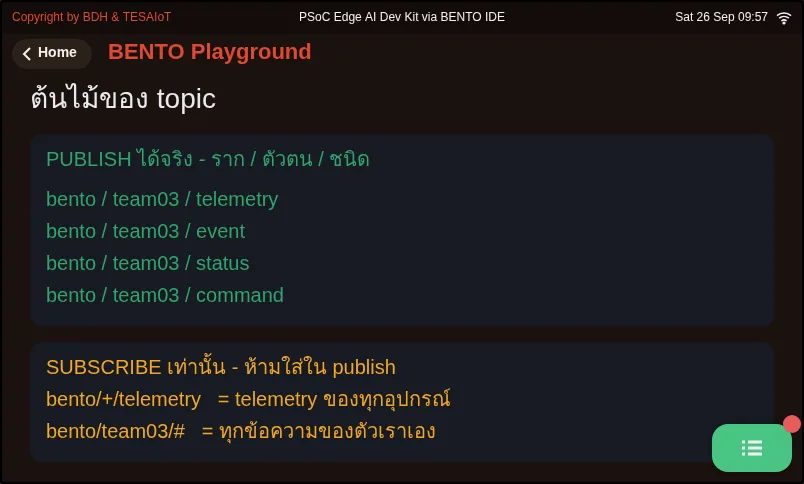
01_topic_design.py Design a topic name before writing send code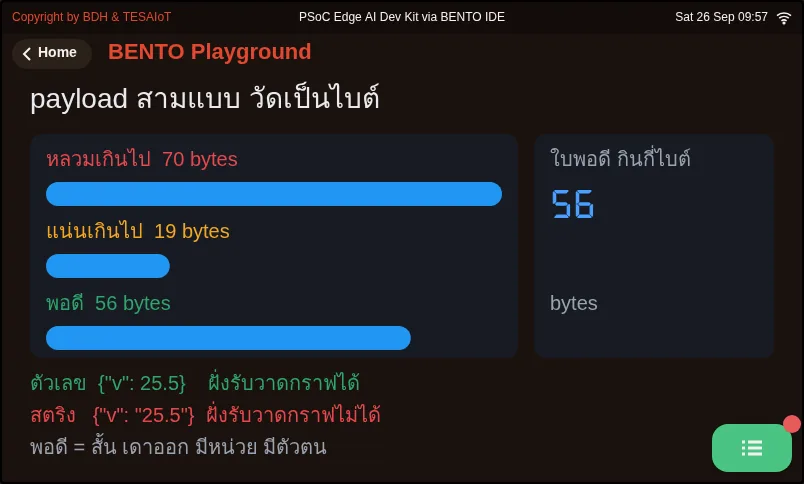
02_payload_shape.py A payload's shape decides whether the receiving side has an easy or hard time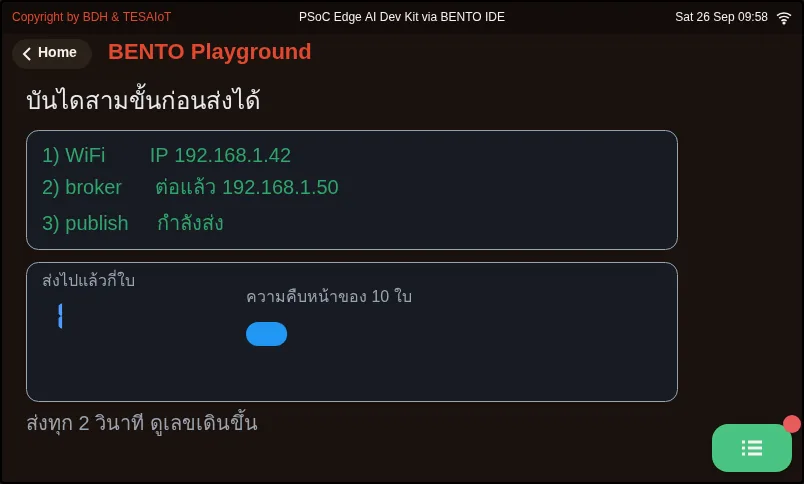
03_connect_and_publish.py Connect to the broker and send one set of values up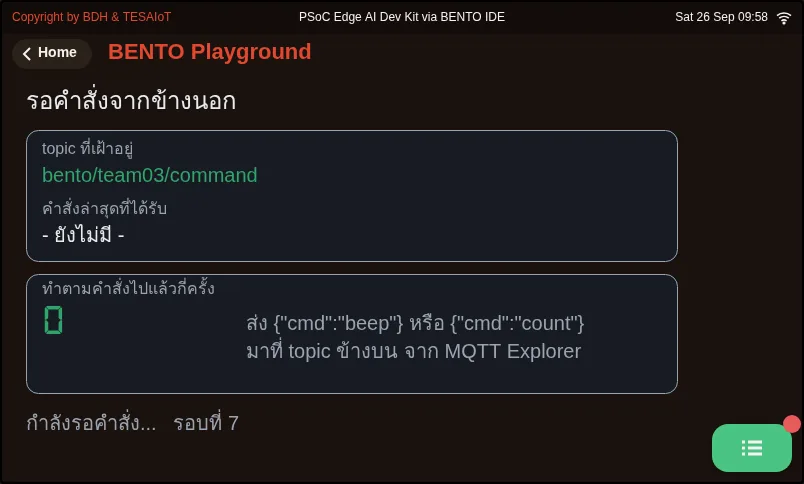
04_subscribe_command.py Take a command from outside and act on it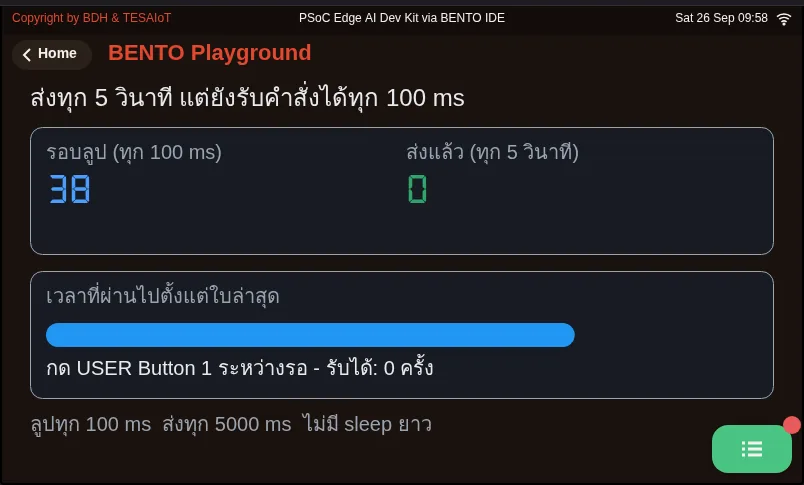
05_send_every_5s_still_listen.py Send every 5 seconds, but still take commands every 100 ms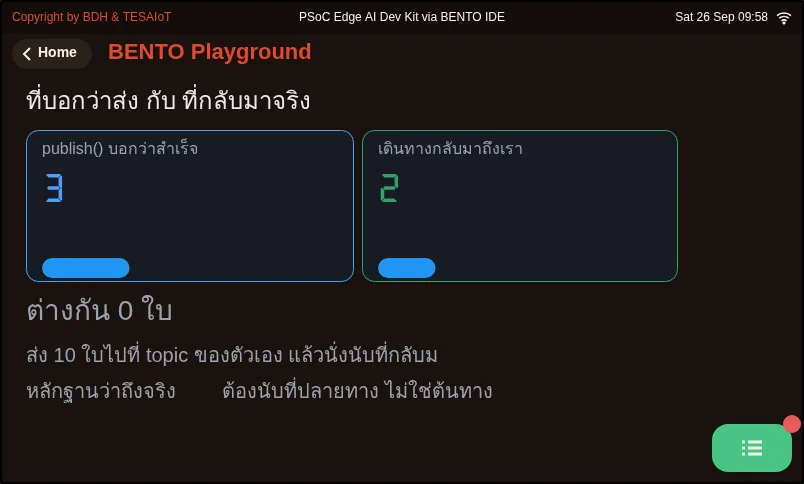
06_sent_is_not_delivered.py What publish() returning True means, and what it does not mean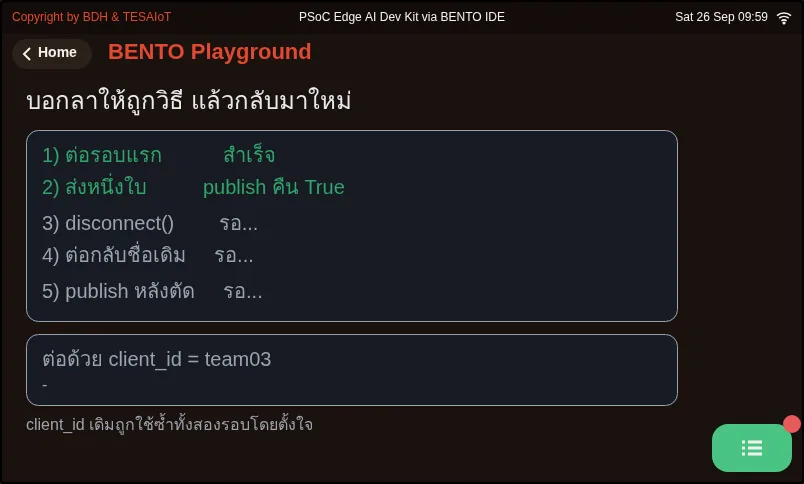
07_disconnect_frees_id.py Say goodbye to the broker properly, then reconnect with the same name at onceCheck your understanding
Section titled “Check your understanding”The same questions are in quiz.yaml for automatic marking.
-
Which statements about what
mqtt.publish(topic, payload)returns are correct? Choose every correct one. (choose all that apply · objective 1)- A) Calling it before connecting to a broker raises OSError, not False
- B) Connected but the send fails gives False
- C) Getting True definitely means the broker has received the message
- D) Adding
retain=Trueis fine if you want the broker to remember the latest message
Solution
A, B — publish() has three outcomes: OSError when not connected, False when connected but the send fails, and True which only means it was handed off to the network layer. At QoS 0, there is no confirmation from the broker at all, and retain is not a parameter — passing it raises TypeError.
-
A team finishes installing TESAIoT CE. The docs say port 1883, but a board on the same LAN cannot connect to the broker at all. What should they do? (choose one · objective 2)
- A) Change docker-compose.yml from 127.0.0.1:11883:1883 to 0.0.0.0:1883:1883, then run docker compose up -d emqx
- B) Edit the same file, then just run docker compose restart
- C) Set BROKER = “localhost” in the board’s code
- D) Switch to connecting on port 8884 with the mqtt module
Solution
A — The config file actually publishes as 11883 and binds to loopback, so the board can never reach it. It must be changed to 0.0.0.0:1883 and brought up with up -d, because restart does not re-read the port. localhost points to the board itself, and the mqtt module cannot connect to a TLS port.
-
Put the steps of taking a toggle command from the broker to switching the LED in the correct order. (order · objective 3)
- A) Decode
msg[1].decode()thenjson.loads()insidetry/except ValueError - B) Call
mqtt.subscribe(TOPIC_CMD)once before entering the loop - C) If
cmd.get("cmd") == "toggle", flip theled_onvariable remembered ourselves, then commandlamp.value(...) - D) Call
mqtt.get_message()every 100 ms loop round - E) Check that
msg is not None
Solution
B → D → E → A → C — Subscribe once, then ask get_message() every round, which returns None when there is no message, so you must check first. The payload is bytes, so it must be decoded before json.loads, wrapped in try because a sender can always send garbage. LED state must be remembered ourselves, because the pin’s value only tells you the level at the instant you ask.
- A) Decode
-
A team presses Ctrl-C and immediately reruns the same file. The board connects and drops alternately, though the code is not wrong. What is the exact cause and fix? (choose one · objective 4)
- A) The broker still counts the old session as present until keepalive runs out, and the old client_id stays reserved; call
mqtt.disconnect()inexcept KeyboardInterrupt: - B) keepalive is too short; set
keep_alive=600 - C) You must call
if mqtt.disconnect():before every connect - D) The board is broken; reflash the firmware
Solution
A — Without saying goodbye to the broker, it waits until keepalive runs out before it agrees we have left. disconnect() frees the name immediately, but returns None so it cannot be put in an if, and the correct keyword is keepalive, not keep_alive.
- A) The broker still counts the old session as present until keepalive runs out, and the old client_id stays reserved; call
-
Someone intercepting WiFi traffic on the same network as the board — what can they do while our board sends over port 1883? Choose every correct one. (choose all that apply · objective 4)
- A) Read the device’s username and password
- B) Read the sensor values in the payload
- C) Impersonate our device and send fake data into the platform
- D) Nothing at all, because the broker asks for a password before connecting
Solution
A, B, C — Port 1883 has no encryption; every byte, including the password, travels as readable text. Asking for a password does not help when the password itself can be read. So 1883 is only usable on a practice field — “can connect” and “can connect safely” are different questions.
Prepare your own platform. Do this on your computer and a real board, and record the results in your learning log.
- Install TESAIoT CE with
make install, callingmake upbeforemake init-pki - Edit
docker-compose.ymlfrom127.0.0.1:11883:1883to0.0.0.0:1883:1883, rundocker compose up -d emqx, and checkdocker compose psshows the port really as0.0.0.0:1883 - Devices → Add device with your own short
device_id, get a password withreset-mqtt-password, and check it is active andserver_tls - Find the computer’s IP on the LAN (not localhost), and get a successful
wifi.ping()from the board before touching MQTT - Connect MQTT Explorer to that same IP, port 1883, with the device’s name and password, and subscribe to
device/# - Run
03_connect_and_publish.pywithclient_id == username == device_idand topicdevice/<device_id>/telemetryuntil you see the message in MQTT Explorer - Write one sentence in your learning log about what someone eavesdropping on the same WiFi network sees while we use port 1883
Going further
Section titled “Going further”Lesson 4.6 assembles every move into one program, s10_mqtt_telemetry.py, sending real values every 5 seconds and taking {"cmd":"toggle"} back to switch the LED.
Optional further reading at 06_secure_publish_loop.py in lesson 4.8, which is the same loop on an encrypted channel — read it to compare the structure, but do not run it yet.
Next lesson: Lesson 4.6 — Hands-on: two-way telemetry
Reflect
Section titled “Reflect”- CE’s docs and
docker-compose.ymldisagree about the port. What would you check first the next time you meet a new system? - If someone on the same WiFi network intercepted our device’s MQTT password, what could they do to our platform?
- The counter of True from
publish()— is it proof the message really arrived? If not, what evidence can be trusted?
Review questions
Answer on your own first, then open the answer.
-
Which statements about what mqtt.publish(topic, payload) returns are correct? Choose all that apply. (Objective 1)
- เรียกตอนยังไม่ได้ต่อ broker จะได้ OSError ไม่ใช่ False
- ต่ออยู่แต่ส่งไม่ผ่านจะได้ False
- ได้ True แปลว่า broker ได้รับข้อความแล้วแน่นอน
- ใส่ `retain=True` เพิ่มได้ถ้าอยากให้ broker จำข้อความล่าสุด
Show answer
Answer: A. เรียกตอนยังไม่ได้ต่อ broker จะได้ OSError ไม่ใช่ False · B. ต่ออยู่แต่ส่งไม่ผ่านจะได้ False
publish() มีสามทางออก OSError เมื่อยังไม่ได้ต่อ False เมื่อต่ออยู่แต่ส่งไม่ผ่าน และ True ที่แปลแค่ว่าส่งต่อให้ชั้นเครือข่ายแล้ว ที่ QoS 0 ไม่มีการยืนยันจาก broker ส่วน retain ไม่ใช่พารามิเตอร์ ใส่ไปได้ TypeError
-
A team has installed TESAIoT CE. The docs say port 1883, but the board on the same LAN cannot reach the broker at all. What should they fix? (Objective 2)
- แก้ `docker-compose.yml` จาก `127.0.0.1:11883:1883` เป็น `0.0.0.0:1883:1883` แล้วสั่ง `docker compose up -d emqx`
- แก้ไฟล์เดียวกันแล้วสั่ง `docker compose restart` ก็พอ
- ใส่ `BROKER = "localhost"` ในโค้ดบนบอร์ด
- เปลี่ยนไปต่อพอร์ต 8884 ด้วยโมดูล `mqtt`
Show answer
Answer: A. แก้ `docker-compose.yml` จาก `127.0.0.1:11883:1883` เป็น `0.0.0.0:1883:1883` แล้วสั่ง `docker compose up -d emqx`
ไฟล์ตั้งค่าเผยแพร่จริงเป็น 11883 และผูกกับ loopback บอร์ดจึงเข้าไม่ถึง ต้องแก้เป็น 0.0.0.0:1883 และใช้ up -d เพราะ restart ไม่อ่านพอร์ตใหม่ localhost ชี้ไปที่ตัวบอร์ดเอง และโมดูล mqtt ต่อพอร์ต TLS ไม่ได้
-
Put the steps of taking a toggle command from the broker to switching the LED in order. (Objective 3)
- แปลง `msg[1].decode()` แล้ว `json.loads()` ภายใน `try/except ValueError`
- เรียก `mqtt.subscribe(TOPIC_CMD)` ครั้งเดียวก่อนเข้าลูป
- ถ้า `cmd.get("cmd") == "toggle"` สลับตัวแปร `led_on` ที่จำไว้เอง แล้วสั่ง `lamp.value(...)`
- เรียก `mqtt.get_message()` ทุกรอบลูป 100 ms
- ตรวจว่า `msg is not None`
Show answer
Correct order: B. เรียก `mqtt.subscribe(TOPIC_CMD)` ครั้งเดียวก่อนเข้าลูป → D. เรียก `mqtt.get_message()` ทุกรอบลูป 100 ms → E. ตรวจว่า `msg is not None` → A. แปลง `msg[1].decode()` แล้ว `json.loads()` ภายใน `try/except ValueError` → C. ถ้า `cmd.get("cmd") == "toggle"` สลับตัวแปร `led_on` ที่จำไว้เอง แล้วสั่ง `lamp.value(...)`
subscribe ครั้งเดียวแล้วถาม get_message() ทุกรอบ ซึ่งคืน None เมื่อไม่มีข้อความจึงต้องตรวจก่อน payload เป็น bytes ต้อง decode ก่อน json.loads และครอบ try เพราะคนส่งมั่วได้เสมอ สถานะ LED ต้องจำเอง เพราะค่าของขาบอกแค่ระดับ ณ วินาทีที่ถาม
-
A team presses Ctrl-C and reruns the same file at once. The board connects and drops in turns though the code is correct. What is the most direct cause and fix? (Objective 4)
- broker ยังนับว่าตัวเก่าอยู่จนครบ keepalive และ client_id เดิมยังถูกจอง ให้เรียก `mqtt.disconnect()` ใน `except KeyboardInterrupt:`
- keepalive สั้นเกินไป ให้ตั้ง `keep_alive=600`
- ต้องเรียก `if mqtt.disconnect():` ก่อน connect ทุกครั้ง
- บอร์ดเสีย ต้องลงเฟิร์มแวร์ใหม่
Show answer
Answer: A. broker ยังนับว่าตัวเก่าอยู่จนครบ keepalive และ client_id เดิมยังถูกจอง ให้เรียก `mqtt.disconnect()` ใน `except KeyboardInterrupt:`
ถ้าไม่บอกลา broker รอจนครบ keepalive กว่าจะยอมรับว่าเราไปแล้ว disconnect() คืนชื่อให้ว่างทันที แต่คืน None จึงใส่ใน if ไม่ได้ และคีย์เวิร์ดที่ถูกคือ keepalive ไม่ใช่ keep_alive
-
What can someone who captures the WiFi the board is on do while our board sends over port 1883? Choose all that apply. (Objective 4)
- อ่าน username และ password ของอุปกรณ์ได้
- อ่านค่าเซนเซอร์ใน payload ได้
- ปลอมเป็นอุปกรณ์ของเราส่งข้อมูลปลอมเข้าแพลตฟอร์มได้
- ไม่ได้อะไรเลย เพราะ broker ขอรหัสผ่านก่อนต่อ
Show answer
Answer: A. อ่าน username และ password ของอุปกรณ์ได้ · B. อ่านค่าเซนเซอร์ใน payload ได้ · C. ปลอมเป็นอุปกรณ์ของเราส่งข้อมูลปลอมเข้าแพลตฟอร์มได้
พอร์ต 1883 ไม่มีการเข้ารหัส ทุกไบต์รวมถึงรหัสผ่านเดินเป็นข้อความอ่านออก การขอรหัสผ่านไม่ช่วยเมื่อรหัสเองถูกอ่านได้ จึงใช้ 1883 ได้แค่ในสนามซ้อม ต่อได้กับต่อได้อย่างปลอดภัยเป็นคนละคำถาม
Cite this lesson
If you teach from this lesson or reuse it in slides or documents, credit it with the text below. If you changed it, add (adapted) after the title.
"MQTT with a self-hosted platform: telemetry and commands" from TESA Open Knowledge by the Thai Embedded Systems Association (TESA), https://github.com/tesaiot/tesa-qualification-program, licensed under CC BY-NC 4.0
Thai attribution: "MQTT กับแพลตฟอร์มที่ติดตั้งเอง: telemetry และ command" จาก TESA Open Knowledge โดยสมาคมสมองกลฝังตัวไทย (Thai Embedded Systems Association: TESA) https://github.com/tesaiot/tesa-qualification-program สัญญาอนุญาต CC BY-NC 4.0
This lesson adapts the source below; keep its credit too.
https://github.com/Advance-Innovation-Centre-AIC/embedded-systems-for-aiot-developer/blob/a80bbe88a34bcb9bb8d991f42f9252b77cdab079/session-10.html (slides 16–27)
TESA Open Knowledge · © 2026 สมาคมสมองกลฝังตัวไทย (TESA) · CC BY-NC 4.0
Content is licensed CC BY-NC 4.0. Reuse it non-commercially and credit the Thai Embedded Systems Association (TESA) every time. · How to cite TESA