Humidity and temperature indicator from the SHT4x
Objectives
Section titled “Objectives”- Read relative humidity and temperature from the SHT4x over I2C and show them as indicators
- Set the indicator colour thresholds from a comfort humidity range and justify them
- Compare the SHT4x and DPS368 temperatures and explain why they may differ
Concepts
Section titled “Concepts”What the SHT4x is, and what its spec numbers mean
Section titled “What the SHT4x is, and what its spec numbers mean”The SHT4x (SHT40/41/45) is Sensirion’s relative-humidity (RH%) and temperature sensor. The SHT40 variant is
accurate to ±1.8 %RH and ±0.2 °C, measures RH across 0–100% and temperature from -40 to +125 °C, and averages
under 0.4 µA at a 1-reading-per-second rate. Unlike the DPS368/BMI270, the SHT4x has no register map to read or
write addresses on — it talks over a command-based protocol: send a 1-byte command to start a measurement,
wait out the conversion delay (up to about 8.2 ms at high precision), then read back 6 bytes with a CRC-8 check
(polynomial 0x31, Sensirion’s standard). That protocol is real knowledge about this sensor family, but none of
it is written in this episode’s own files.
Why it matters to know which code layer actually does what
Section titled “Why it matters to know which code layer actually does what”This episode’s sht4x_driver.c does not send a command byte, wait out a delay, or compute the CRC-8/conversion
formula itself — it calls a single Infineon middleware function,
mtb_sht4x_measure_high_precision(i2c_bus, &temp_milli_c, &hum_milli_rh), which already does every step (sending
command 0xFD, waiting, reading 6 bytes, checking the CRC, converting using Sensirion’s formulas) and returns the
result in milli-units (milli-°C, milli-%RH). The episode’s own code just divides by 1000 to get normal units
(temperature_c, humidity_rh). The byte-level protocol the upstream README describes in detail really does
happen on the I2C wire — it is just hidden inside the middleware, not in the code this episode shows the student.
This is the same pattern as the DPS368 (lesson 3.1) using xensiv_dps3xx_read() and the BMI270 (lesson 3.2)
uploading Bosch’s config file: this series consistently wraps byte-level sensor protocol inside the vendor’s own
library.
The real color thresholds have three zones, not the four the upstream README describes
Section titled “The real color thresholds have three zones, not the four the upstream README describes”sht4x_view.c has hum_level_color() and set_comfort_chip(), which both use the same thresholds: RH < 40% =
Dry (amber), 40–60% = Comfort (green), RH > 60% = Humid (blue) — only two cut points (40 and 60), not three
(30/60/80), and there is no separate red “danger” zone as the upstream README describes. The 40–60% comfort range
matches common HVAC/ASHRAE guidance for indoor humidity that feels comfortable while limiting mold and dust-mite
growth.
The threshold is defined twice, and both copies must be edited together
Section titled “The threshold is defined twice, and both copies must be edited together”hum_level_color() (sets the chip’s color) and set_comfort_chip() (sets the “Dry”/“Comfort”/“Humid” text) are
two separate functions, each hard-coding its own 40.0f and 60.0f — they do not share one constant. Edit the
threshold in one function and forget the other, and the text and the color will disagree (for example, the text
reads “Humid” while the chip is still colored “Comfort” green).
Worked example
Section titled “Worked example”This episode’s code lives on the Developer Hub (pinned to commit 9a8e3ed) — read the Why section of the
upstream README
to learn the SHT4x’s protocol, but the excerpts below are copied from the actual files (Apache-2.0,
tesaiot/developer-hub, same commit), because the byte-level protocol lives in the middleware, not in the
episode’s own files, and the real color thresholds differ from what the upstream README describes.
app_sensor/sht4x/sht4x_driver.c — a single middleware call, no command byte or CRC in this file:
cy_rslt_t sht4x_driver_read_sample(sht4x_sample_t *sample){    int32_t temp_milli_c = 0;    int32_t hum_milli_rh = 0;
    cy_rslt_t rslt = mtb_sht4x_measure_high_precision(s_i2c_bus, &temp_milli_c, &hum_milli_rh);    if (CY_RSLT_SUCCESS != rslt)    {        return rslt;    }
    /* Middleware returns milli-units; convert once here for UI/presenter layers. */    sample->temperature_c = ((float)temp_milli_c) / 1000.0f;    sample->humidity_rh = ((float)hum_milli_rh) / 1000.0f;    return CY_RSLT_SUCCESS;}
app_ui/sht4x/sht4x_view.c — the real thresholds, three zones, two cut points:
static lv_color_t hum_level_color(float humidity_rh){    if (humidity_rh < 40.0f)    {        return lv_color_hex(0xD97706);   /* Dry */    }
    if (humidity_rh <= 60.0f)    {        return lv_color_hex(0x16A34A);   /* Comfort */    }
return lv_color_hex(0x2563EB); /* Humid */}main_example.chands the I2C handle tosht4x_presenter_start(), exactly as the upstream README describesapp_sensor/sht4x/sht4x_config.h—SHT4X_SAMPLE_PERIOD_MS = 1000(polled by a singlelv_timeron the LVGL thread, the same pattern as lessons 3.1–3.2) plus the primary/alternate I2C addresses- See the full folder at
int_ep03_sht40_indicator/
Common mistakes
Section titled “Common mistakes”- Assuming you must write the command byte/CRC-8 yourself in this episode’s code — the byte-level protocol
is already done inside
mtb_sht4x_measure_high_precision();sht4x_driver.conly calls it and converts milli-units to normal ones. - Misremembering the color thresholds as four zones (30/60/80%) — the real thresholds have only three zones at the 40% and 60% cut points, with no separate red “danger” zone.
- Editing the threshold in only one function —
hum_level_color()andset_comfort_chip()each hard-code 40.0f/60.0f separately; both must be changed together or the text and the color will disagree.
Build and flash
Section titled “Build and flash”# In the master template folder (see lesson 1.1)# 1) Delete the old episode's files in proj_cm55/apps/# 2) Copy all of this episode's files into proj_cm55/apps/make buildmake program # flash through KitProg3Or open this example on the Developer Hub and flash the ready-made firmware.
See it work first
Section titled “See it work first”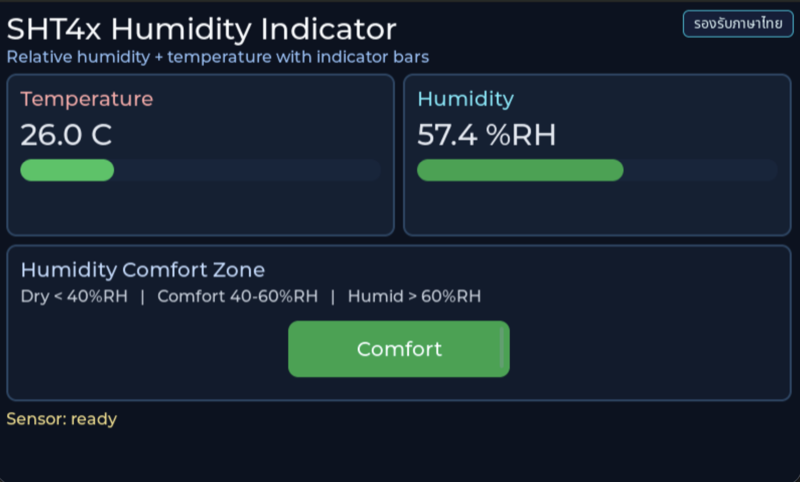
Before reading the code, guess what objects this screen has, and what changes when the user taps it or when a sensor value changes.
Try a change
Section titled “Try a change”- Guess before you change anything: pick one value the example’s README explains in the How section, and write down what you expect to change on the screen or in the log.
- Change and run: build + flash, then compare against your guess. If it does not match, find which part you misunderstood.
- Extend: add one thing the example does not yet have, and keep a photo or video in your portfolio.
Check your understanding
Section titled “Check your understanding”- How does relative humidity depend on temperature?
- Why do two sensors on the same board read different temperatures?
- What humidity range does your colour threshold use, and what did you base it on?
The answers are in the example’s README and in the code. If you cannot answer one, go back and read the Why / What / How section again.
References
Section titled “References”- Episode README · code folder · commit
9a8e3ed - Open this example on the Developer Hub
- The code belongs to the Developer Hub and is referenced by link, not copied into this repository
Review questions
Answer on your own first, then open the answer.
-
A humidifier raises RH from 35 → 50 → 65 %RH. What does the comfort chip show at each step? (Objective 2)
- Comfort → Comfort → Humid
- Dry → Comfort → Comfort
- Dry → Comfort → Humid
- Dry → Humid → Humid
Show answer
Answer: C. Dry → Comfort → Humid
set_comfort_chip() ใช้เกณฑ์ < 40 = Dry, 40–60 = Comfort, > 60 = Humid (ข้อความ range_hint บนจอเขียนไว้ตรงกัน) README ของ episode ยังเขียนเกณฑ์ 30/60/80 ซึ่งไม่ตรงกับโค้ดที่ commit นี้
-
If the upper threshold is changed from 60 to 65 only inside hum_level_color(), what does the screen show at 62 %RH? (Objective 2)
- ชิปขึ้น Comfort สีเขียว ตรงกันทั้งหมด
- ชิปขึ้นข้อความ Humid แต่เป็นสีเขียว เพราะข้อความใน set_comfort_chip() ยังใช้เกณฑ์ 60 ของตัวเอง
- ชิปขึ้น Humid สีน้ำเงิน ตรงกันทั้งหมด
- build ไม่ผ่าน
Show answer
Answer: B. ชิปขึ้นข้อความ Humid แต่เป็นสีเขียว เพราะข้อความใน set_comfort_chip() ยังใช้เกณฑ์ 60 ของตัวเอง
สีมาจาก hum_level_color() แต่ข้อความมาจาก if ใน set_comfort_chip() และ range_hint ก็พิมพ์ตัวเลขไว้อีกที่ เกณฑ์เดียวกันจึงซ้ำอยู่สามจุด การย้ายเกณฑ์ไปเป็นค่าคงที่ตัวเดียวแล้วให้ทุกจุดอ่านจากที่เดียวกันป้องกันความไม่ตรงกันแบบนี้ และทำให้อธิบายที่มาของเกณฑ์ได้ในที่เดียว
-
A loose connection makes the sensor fail for several seconds and then recover. What does the presenter do? (Objective 1)
- แสดง error ใหม่ทุกวินาทีจนกว่าจะหาย
- หยุด timer ถาวรหลัง error แรก
- รีเซ็ตบอร์ด
- ขึ้นข้อความ error และ log READ_FAIL ครั้งเดียวเมื่อรหัสเปลี่ยน อ่านต่อทุก 1 วินาที และเมื่ออ่านได้อีกครั้งจะกลับเป็นสถานะ ready พร้อมค่าใหม่
Show answer
Answer: D. ขึ้นข้อความ error และ log READ_FAIL ครั้งเดียวเมื่อรหัสเปลี่ยน อ่านต่อทุก 1 วินาที และเมื่ออ่านได้อีกครั้งจะกลับเป็นสถานะ ready พร้อมค่าใหม่
sht4x_poll_sensor_cb() ถูกเรียกทุก SHT4X_SAMPLE_PERIOD_MS (1000 ms) ตลอด การแสดง error ถูกกันซ้ำด้วย s_last_status_error และเมื่อ has_new_sample เป็น true จะเรียก sht4x_view_set_ready() อีกครั้ง ผู้ใช้จึงเห็นสถานะจริงโดยจอไม่กระพริบ
-
On the same board the SHT4x reads 31.2 °C and the DPS368 reads 33.0 °C. What is the most reasonable explanation? (Objective 3)
- เซนเซอร์แต่ละตัววัดอุณหภูมิของตัวเองตรงตำแหน่งที่มันอยู่บนบอร์ด ความร้อนจากชิ้นส่วนใกล้เคียง เช่นตัวประมวลผล วงจร Wi-Fi หรือจอ ไม่เท่ากัน และความแม่นยำของแต่ละตัวก็ต่างกัน
- DPS368 เสีย เพราะสองตัวควรอ่านได้เท่ากันทุกครั้ง
- ตัวหนึ่งรายงานเป็น °F
- โค้ดแปลงหน่วยจาก milli-degree ผิด
Show answer
Answer: A. เซนเซอร์แต่ละตัววัดอุณหภูมิของตัวเองตรงตำแหน่งที่มันอยู่บนบอร์ด ความร้อนจากชิ้นส่วนใกล้เคียง เช่นตัวประมวลผล วงจร Wi-Fi หรือจอ ไม่เท่ากัน และความแม่นยำของแต่ละตัวก็ต่างกัน
SHT4x ออกแบบมาวัดอุณหภูมิและความชื้นของอากาศ (README ระบุ ±0.2 °C) ส่วน DPS368 วัดอุณหภูมิเพื่อใช้ชดเชยการวัดความดันด้วย ทั้งคู่อยู่คนละตำแหน่งบน PCB ที่มีความร้อนสะสม ถ้าต้องการอุณหภูมิห้องจริงควรแยกเซนเซอร์ออกจากแหล่งความร้อน หรือเทียบกับเทอร์โมมิเตอร์อ้างอิง
-
If heat from the board warms the air around the SHT4x above room temperature, how does the measured RH compare with the room's RH? (Objective 3)
- สูงกว่า เพราะอากาศร้อนมีไอน้ำมากกว่า
- ต่ำกว่า เพราะปริมาณไอน้ำเท่าเดิม แต่อากาศที่อุ่นขึ้นรับไอน้ำได้มากขึ้น ความชื้นสัมพัทธ์จึงลดลง
- เท่ากัน เพราะ RH ไม่ขึ้นกับอุณหภูมิ
- สุ่ม ขึ้นกับจังหวะการอ่าน
Show answer
Answer: B. ต่ำกว่า เพราะปริมาณไอน้ำเท่าเดิม แต่อากาศที่อุ่นขึ้นรับไอน้ำได้มากขึ้น ความชื้นสัมพัทธ์จึงลดลง
RH คือสัดส่วนไอน้ำที่มีอยู่เทียบกับไอน้ำที่อากาศอุณหภูมินั้นรับได้เต็มที่ อากาศอุ่นรับได้มากขึ้น ถ้าไอน้ำเท่าเดิม RH จึงลดลง นี่คือเหตุที่ต้องอ่านอุณหภูมิคู่กับ RH เสมอ และต้องระวังความร้อนจากบอร์ดเมื่อเทียบกับเครื่องวัดในห้อง
Cite this lesson
If you teach from this lesson or reuse it in slides or documents, credit it with the text below. If you changed it, add (adapted) after the title.
"Humidity and temperature indicator from the SHT4x" from TESA Open Knowledge by the Thai Embedded Systems Association (TESA), https://github.com/tesaiot/tesa-qualification-program, licensed under CC BY-NC 4.0
Thai attribution: "ตัวบ่งชี้ความชื้นและอุณหภูมิจาก SHT4x" จาก TESA Open Knowledge โดยสมาคมสมองกลฝังตัวไทย (Thai Embedded Systems Association: TESA) https://github.com/tesaiot/tesa-qualification-program สัญญาอนุญาต CC BY-NC 4.0
This lesson adapts the source below; keep its credit too.
https://github.com/tesaiot/developer-hub/blob/9a8e3ed1d813bfd67fabf6b7ac15c6ff9750b465/int_ep03_sht40_indicator · Code stays in the Developer Hub and is linked at pinned commits, never copied: the episodes, practice codes and main-branch examples are Apache-2.0; the master template and the OPTIGA client carry Infineon/Cypress EULAs.
TESA Open Knowledge · © 2026 สมาคมสมองกลฝังตัวไทย (TESA) · CC BY-NC 4.0
Content is licensed CC BY-NC 4.0. Reuse it non-commercially and credit the Thai Embedded Systems Association (TESA) every time. · How to cite TESA