First LVGL screen: logo, title and subtitle
Objectives
Section titled “Objectives”- Build and flash this episode to the TESAIoT Dev Kit and get the screen shown in the screenshot
- Explain when the master template calls example_main(parent) and why we do not write main ourselves
- Build a screen → image → label object tree and place it with align
Concepts
Section titled “Concepts”Every LVGL widget is an lv_obj_t *
Section titled “Every LVGL widget is an lv_obj_t *”LVGL (Light and Versatile Graphics Library) represents every kind of widget — screen, image, label, button, menu —
with the same struct, lv_obj_t. So we create, style and place every kind of widget with the same API regardless
of what it is. lv_screen_active() (formerly lv_scr_act()) returns the lv_obj_t * of the screen currently
shown, and we use it as the parent when creating an episode’s first widget.
The object tree: screen → image → label
Section titled “The object tree: screen → image → label”EP01 creates three widgets in a tree rooted at the screen: screen (the background) → logo (an image, a child
of screen) → title and subtitle (two labels). Placement uses two functions with different meanings —
lv_obj_align(obj, align, x, y) places obj relative to its own parent, while lv_obj_align_to(obj, target, align, x, y) places obj relative to another widget (target) as the anchor. For example, title is placed
below the logo with LV_ALIGN_OUT_BOTTOM_MID, not below the screen directly — if the logo’s size changes, title
moves with it automatically, because the anchor is a widget, not a fixed coordinate. The offsets used are 24 px
(logo from the top edge), 48 px (title below the logo) and 24 px (subtitle below title).
Color and fonts: the units the code actually uses
Section titled “Color and fonts: the units the code actually uses”Every color is set with lv_color_hex(0xRRGGBB), which converts a hex literal into an lv_color_t — the
background uses 0x0F172A (slate-900 from the Tailwind palette) together with lv_obj_set_style_bg_opa(screen, LV_OPA_COVER, LV_PART_MAIN) so the fill is fully opaque (LV_OPA_COVER is the maximum opacity value).
LV_PART_MAIN means the main part of the widget that this style targets. Fonts must already be enabled in the
master’s lv_conf.h (this episode uses 30 px for the title and 20 px for the subtitle) — picking a size that is
not enabled will either fail to build or silently fall back to a different font.
Why the logo is embedded as a C array instead of loaded from a file
Section titled “Why the logo is embedded as a C array instead of loaded from a file”This board has no filesystem or SD card for LVGL to open an image file from at runtime. The logo image is
converted ahead of time into lv_image_dsc_t APP_LOGO — a struct holding both the header (size, color format) and
the raw pixel data — compiled straight into the same flash image as the program. lv_image_set_src(logo, &APP_LOGO) therefore takes a pointer directly into flash: no file read, no I/O latency, and no dependency on any
filesystem.
The episode’s entry/exit contract
Section titled “The episode’s entry/exit contract”The master template (see lesson 1.1) calls example_main(lv_scr_act()) exactly once, after FreeRTOS, the display
driver, the VGLite GPU and LVGL are all ready. This episode’s main_example.c provides a strong definition of
example_main() and immediately forwards to ui_ep01_basic_label_create(), without using the parent value it
receives directly (marked with (void)parent;), because the UI-creation function calls lv_screen_active()
itself internally — designed this way so other episodes can copy the UI-creation code without changing its
signature. main_example.c also calls tesaiot_add_thai_support_badge() before building the episode’s screen —
a master helper function that confirms Noto Sans Thai font files were bundled; it is not part of the UI tree EP01
teaches. After example_main() returns, the master loops lv_timer_handler() forever to redraw — EP01 has no
event or timer of its own, so it draws once and holds that image.
Worked example
Section titled “Worked example”This episode’s code lives on the Developer Hub (pinned to commit 9a8e3ed). Read the full Why / What / How
first in the episode’s README.
The excerpts below are copied from tesaiot/developer-hub (Apache-2.0) at the same commit.
main_example.c — where the master hands control to the episode:
void example_main(lv_obj_t *parent){    /* Master template bundles Noto Sans Thai fonts — this badge     * confirms to the developer that Thai rendering is available. */    tesaiot_add_thai_support_badge();
    (void)parent;   /* The episode manages its own screen composition via lv_screen_active(). */
    ui_ep01_basic_label_create();}
ui_ep01_basic_label.c — builds the episode’s whole object tree:
lv_obj_t *screen = lv_screen_active();lv_obj_set_style_bg_color(screen, lv_color_hex(0x0F172A), LV_PART_MAIN);lv_obj_set_style_bg_opa(screen, LV_OPA_COVER, LV_PART_MAIN);
lv_obj_t *logo = lv_image_create(screen);lv_image_set_src(logo, &APP_LOGO);lv_obj_align(logo, LV_ALIGN_TOP_MID, 0, 24);
lv_obj_t *title = lv_label_create(screen);lv_label_set_text(title, "EP01 - Basic Label");lv_obj_set_style_text_color(title, lv_color_hex(0xF8FAFC), LV_PART_MAIN);lv_obj_set_style_text_font(title, &lv_font_montserrat_30, LV_PART_MAIN);lv_obj_align_to(title, logo, LV_ALIGN_OUT_BOTTOM_MID, 0, 48);
Notice the key API calls — lv_image_create(parent) creates an image widget with screen as its parent,
lv_image_set_src() takes a pointer to an lv_image_dsc_t embedded in flash (not a file path), lv_obj_align()
places relative to the parent, while lv_obj_align_to() places relative to another widget as anchor. The full
file also has a subtitle label placed the same way — see the full file on the Developer Hub.
ui_ep01_basic_label.h— declares the singleui_ep01_basic_label_create(void)
Common mistakes
Section titled “Common mistakes”- Using
lv_obj_align()instead oflv_obj_align_to()— to place title relative to the logo (which may change size), you must uselv_obj_align_to(title, logo, ...), notlv_obj_align(title, ...), which would place it relative toscreeninstead. - Forgetting to enable the font size in
lv_conf.h—lv_font_montserrat_30/_20must already be enabled in the master project. Picking a size that is not enabled either fails to build or silently substitutes a different font with no clear error. - Assuming you must use the
parentyou were handed directly —main_example.chas(void)parent;because the UI-creation function callslv_screen_active()itself internally; both values are the same active screen, but not usingparentdirectly lets the episode be dropped into another project without changing the UI-creation function’s signature.
Build and flash
Section titled “Build and flash”# In the master template folder (see lesson 1.1)# 1) Delete the old episode's files in proj_cm55/apps/# 2) Copy all of this episode's files into proj_cm55/apps/make buildmake program # flash through KitProg3Or open this example on the Developer Hub and flash the ready-made firmware.
See it work first
Section titled “See it work first”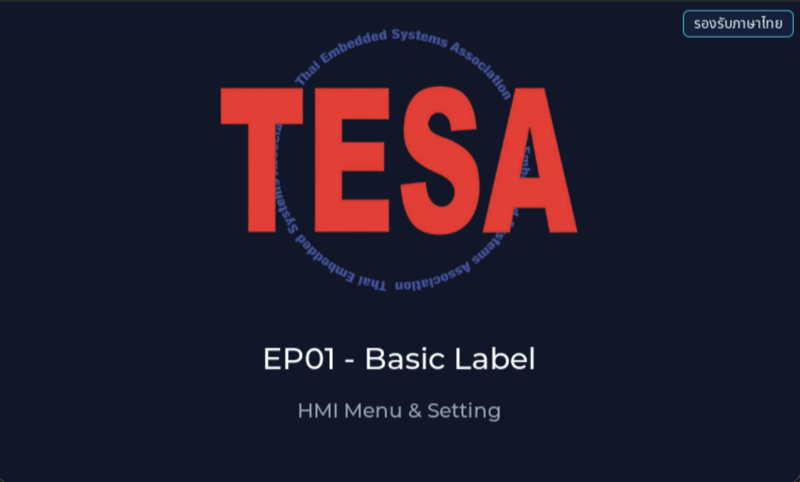
Before reading the code, guess what objects this screen has, and what changes when the user taps it or when a sensor value changes.
Try a change
Section titled “Try a change”- Guess before you change anything: pick one value the example’s README explains in the How section, and write down what you expect to change on the screen or in the log.
- Change and run: build + flash, then compare against your guess. If it does not match, find which part you misunderstood.
- Extend: add one thing the example does not yet have, and keep a photo or video in your portfolio.
Check your understanding
Section titled “Check your understanding”- What has the master template already done for us before it calls example_main()?
- Why is the logo embedded as a C array (APP_LOGO) instead of being loaded from a file?
- If you wanted to move the title down by 20 px, which value in the code would you change?
The answers are in the example’s README and in the code. If you cannot answer one, go back and read the Why / What / How section again.
References
Section titled “References”- Episode README · code folder · commit
9a8e3ed - Open this example on the Developer Hub
- The code belongs to the Developer Hub and is referenced by link, not copied into this repository
Review questions
Answer on your own first, then open the answer.
-
When does the master template call example_main(parent)? (Objective 2)
- ทุกรอบของ lv_timer_handler() เพื่อให้ episode วาดจอใหม่
- ครั้งเดียว ภายใน cm55_gfx_task หลังเตรียม VGLite, LVGL, จอ และ touch เสร็จ
- ก่อนเริ่ม FreeRTOS scheduler เพื่อให้ episode ตั้งค่า clock เอง
- ทุกครั้งที่ผู้ใช้แตะจอ
Show answer
Answer: B. ครั้งเดียว ภายใน cm55_gfx_task หลังเตรียม VGLite, LVGL, จอ และ touch เสร็จ
main.c ของ master เรียก lv_init(), lv_port_disp_init(), lv_port_indev_init() แล้วเรียก example_main(lv_scr_act()) ครั้งเดียว จากนั้นวนเรียก lv_timer_handler() ให้เอง episode จึงแค่สร้าง object tree แล้ว return
-
Why does an episode only write example_main() instead of its own main()? (Objective 2)
- เพราะ ModusToolbox ไม่อนุญาตให้โปรแกรมภาษา C มี main()
- เพราะ main() ต้องรันบน CM33 ส่วน episode รันบน CM55
- เพราะ example_main() ทำงานเร็วกว่า main()
- เพราะ main.c ของ master เตรียมบอร์ด FreeRTOS GPU LVGL จอ และ touch ไว้แล้ว และไม่เปลี่ยนเลยระหว่าง episode ทุก episode จึงเสียบเข้าที่จุดเดียวกันได้
Show answer
Answer: D. เพราะ main.c ของ master เตรียมบอร์ด FreeRTOS GPU LVGL จอ และ touch ไว้แล้ว และไม่เปลี่ยนเลยระหว่าง episode ทุก episode จึงเสียบเข้าที่จุดเดียวกันได้
comment ใน main.c เขียนว่า main.c NEVER changes per episode และ episode ให้แค่ example_main(parent) ถ้าทุก episode ต้องเขียนการเตรียมฮาร์ดแวร์เองจะซ้ำและพังง่าย อีกทั้ง proj_cm55 มี main() ของ master อยู่แล้ว (CM55 มี main() ของตัวเอง ไม่ได้รันบน CM33)
-
If APP_LOGO is replaced by an image 40 px taller and no other number changes, what happens on screen? (Objective 3)
- title และ subtitle เลื่อนลงตามโลโก้ ระยะห่าง 48 px และ 24 px ยังเท่าเดิม
- title ทับโลโก้ เพราะ title ถูกวางที่พิกัด y คงที่
- เฉพาะ title เลื่อนลง ส่วน subtitle อยู่ที่เดิมจึงทับ title
- โลโก้ถูกย่อให้พอดีพื้นที่เดิมโดยอัตโนมัติ
Show answer
Answer: A. title และ subtitle เลื่อนลงตามโลโก้ ระยะห่าง 48 px และ 24 px ยังเท่าเดิม
title ใช้ lv_obj_align_to(title, logo, LV_ALIGN_OUT_BOTTOM_MID, 0, 48) และ subtitle ใช้ align_to กับ title อีกทอด ทั้งคู่จึงยึดตำแหน่งกับ object ที่อยู่เหนือตัวเอง ไม่ใช่พิกัดตายตัว comment ในโค้ดเขียนไว้ว่าทำเพื่อกันการทับเมื่อขนาดโลโก้เปลี่ยน
-
To move the title down 20 px you change the title's lv_obj_align_to y offset from 48 to 68. What happens? (choose all that apply) (Objective 3)
- โลโก้เลื่อนลง 20 px ด้วย
- title เลื่อนลง 20 px
- subtitle เลื่อนลง 20 px ตาม title
- ระยะระหว่าง title กับ subtitle ยังเป็น 24 px
Show answer
Answer: B. title เลื่อนลง 20 px · C. subtitle เลื่อนลง 20 px ตาม title · D. ระยะระหว่าง title กับ subtitle ยังเป็น 24 px
offset 48 วัดจากขอบล่างของโลโก้ การเพิ่มเป็น 68 ย้ายเฉพาะ title ส่วน subtitle ถูก align_to กับ title จึงเลื่อนตามด้วยระยะ 24 px เดิม โลโก้ยึดกับ screen ด้วย LV_ALIGN_TOP_MID จึงไม่ขยับ
-
You switch the title font to lv_font_montserrat_48 and the build fails with ‘lv_font_montserrat_48 undeclared’. Why? (Objective 1)
- ต้อง include ไฟล์ฟอนต์ใน main_example.c เอง
- ต้องรัน make getlibs ใหม่เพื่อดาวน์โหลดฟอนต์
- master เปิดฟอนต์ Montserrat ไว้เฉพาะบางขนาดระหว่าง 12–40 ขนาด 48 ต้องเปิด LV_FONT_MONTSERRAT_48 ใน lv_conf.h ก่อน
- ฟอนต์ที่ใหญ่กว่า 40 px ใช้กับจอ 4.3 นิ้วไม่ได้
Show answer
Answer: C. master เปิดฟอนต์ Montserrat ไว้เฉพาะบางขนาดระหว่าง 12–40 ขนาด 48 ต้องเปิด LV_FONT_MONTSERRAT_48 ใน lv_conf.h ก่อน
README ของ master ระบุฟอนต์ที่เปิดไว้แล้วคือ 12, 14, 16, 18, 20, 22, 24, 28, 30, 40 และ EXTENDING.md ข้อ 4.1 บอกว่าขนาดอื่นต้องเปิดเพิ่มด้วย #define LV_FONT_MONTSERRAT_XX 1 ใน lv_conf.h README ของ EP01 เองก็เตือนไว้ในหัวข้อทดลองเปลี่ยนฟอนต์
Cite this lesson
If you teach from this lesson or reuse it in slides or documents, credit it with the text below. If you changed it, add (adapted) after the title.
"First LVGL screen: logo, title and subtitle" from TESA Open Knowledge by the Thai Embedded Systems Association (TESA), https://github.com/tesaiot/tesa-qualification-program, licensed under CC BY-NC 4.0
Thai attribution: "หน้าจอ LVGL แรก: โลโก้ หัวเรื่อง และคำบรรยาย" จาก TESA Open Knowledge โดยสมาคมสมองกลฝังตัวไทย (Thai Embedded Systems Association: TESA) https://github.com/tesaiot/tesa-qualification-program สัญญาอนุญาต CC BY-NC 4.0
This lesson adapts the source below; keep its credit too.
https://github.com/tesaiot/developer-hub/blob/9a8e3ed1d813bfd67fabf6b7ac15c6ff9750b465/hmi_ep01_basic_label · Code stays in the Developer Hub and is linked at pinned commits, never copied: the episodes, practice codes and main-branch examples are Apache-2.0; the master template and the OPTIGA client carry Infineon/Cypress EULAs.
TESA Open Knowledge · © 2026 สมาคมสมองกลฝังตัวไทย (TESA) · CC BY-NC 4.0
Content is licensed CC BY-NC 4.0. Reuse it non-commercially and credit the Thai Embedded Systems Association (TESA) every time. · How to cite TESA