Store the Wi-Fi profile in non-volatile memory
Objectives
Section titled “Objectives”- Build an SSID and password form with the password field in password mode
- Save, load and clear the profile through the NVM profile store, and keep it across a board reset
- Explain the risk of keeping a password in flash and ways to reduce it
Concepts
Section titled “Concepts”The real storage is the PSoC Edge’s RRAM, not generic flash
Section titled “The real storage is the PSoC Edge’s RRAM, not generic flash”The episode’s README speaks broadly of an implementation that “uses a PSoC flash API such as cyhal_flash_*,
cy_em_eeprom, or MCUboot NVS, depending on the board.” The actual code at commit 9a8e3ed instead calls
Cy_RRAM_TSReadByteArray() and Cy_RRAM_NvmWriteByteArray() directly against RRAMC0 — RRAM (Resistive
RAM) is the on-chip non-volatile memory of the PSoC Edge E84 itself. The write address is
CYMEM_CM55_0_user_nvm_C_START (CM55’s user NVM region), not an EEPROM emulation layer or a separate MCUboot NVS.
Saved as a fixed 256-byte record with a magic value and a CRC32
Section titled “Saved as a fixed 256-byte record with a magic value and a CRC32”The wifi_profile_record_t written to RRAM actually has magic (0x57465031, “WFP1” — not “WIFI” as the
upstream README states), version, payload_len, crc32, valid, plus the ssid/password/security/auto_connect
data, all fitting exactly within WIFI_PROFILE_SLOT_SIZE = 256 bytes (checked by the compile-time assertion
wifi_profile_record_size_check). The CRC32 covers only the payload, not the record header, and is used to
confirm the data read back has not been corrupted. The public struct wifi_profile_data_t that the UI sees only
has ssid, password, security and auto_connect — it has no magic field at all (magic lives only in the
internal record, not in the struct passed in and out by the UI, contrary to what the upstream README implies).
Write, then read back to verify — and skip the write if nothing changed
Section titled “Write, then read back to verify — and skip the write if nothing changed”wifi_profile_store_save() first compares the block it is about to write against the block currently stored; if
every byte matches, it skips the write entirely (SAVE_SKIP_SAME) to reduce the number of write cycles (wear).
After a real write, it reads the data back and compares it byte-for-byte against the intended block
(verify_block); a mismatch is treated as a failure (SAVE_VERIFY_FAIL) even though Cy_RRAM_NvmWriteByteArray()
itself reported success — a double check for data that matters.
Telling an “erased” slot apart from “no data” using the 0xFF pattern
Section titled “Telling an “erased” slot apart from “no data” using the 0xFF pattern”RRAM/flash that has never been written reads back as 0xFF across the whole block. wifi_profile_is_erased()
always checks for this pattern before attempting to parse a record. Skip that check and read 0xFF bytes straight
into the struct, and you risk (however unlikely) a magic value that happens to match. “Clearing” therefore means
writing 0xFF over the whole slot — there is no separate erase API.
Auto-fill from Scan to Profile needs a button press, not just a tap
Section titled “Auto-fill from Scan to Profile needs a button press, not just a tap”The upstream README describes tapping a row in the scan list as auto-jumping to the Profile page with the SSID
pre-filled immediately. The real code splits this into two steps: tapping a row only selects it
(s_ctx.selected_idx); a separate “Use this AP” button must then be pressed to actually copy the selected AP
over to the Profile page (ui_wifi_use_selected_ap_cb() calls a registered callback, which in turn calls
ui_wifi_profile_page_apply_ap() to copy the SSID and security into the form). The scan page and the profile page
do not know about each other directly — they are wired together only through a callback registered when the shell
is built, not through a global pending_ssid field on menu_nav_state_t as the upstream README describes (the
real menu_nav_state_t in this episode has no SSID field at all).
Worked example
Section titled “Worked example”This episode’s code lives on the Developer Hub (pinned to commit 9a8e3ed) — read the Why section of the
upstream README
to understand its purpose, but the excerpts below are copied from the actual files (Apache-2.0,
tesaiot/developer-hub, same commit), because the storage details and the cross-page flow differ from the upstream
README.
wifi_profile/wifi_profile_store.c — writes to real RRAM, with skip-if-same and verify-after-write:
/* Skip write if content is unchanged to reduce NVM wear. */if(wifi_profile_read_slot(WIFI_PROFILE_PRIMARY_ADDR, current_block)) {    if(0 == memcmp(current_block, block, sizeof(block))) {        wifi_profile_log("SAVE_SKIP_SAME");        return true;    }}
if(!wifi_profile_write_slot(WIFI_PROFILE_PRIMARY_ADDR, block)) {    return false;}
if(!wifi_profile_read_slot(WIFI_PROFILE_PRIMARY_ADDR, verify_block)) {    return false;}
if(0 != memcmp(verify_block, block, sizeof(block))) { wifi_profile_log("SAVE_VERIFY_FAIL"); return false;}wifi_profile_read_slot()/write_slot() call the PSoC Edge’s RRAM API directly:
static bool wifi_profile_read_slot(uint32_t addr, uint8_t *out){    cy_en_rram_status_t st = Cy_RRAM_TSReadByteArray(RRAMC0, addr, out, WIFI_PROFILE_SLOT_SIZE);    return (st == CY_RRAM_SUCCESS);}
static bool wifi_profile_write_slot(uint32_t addr, const uint8_t *in){    cy_en_rram_status_t st = Cy_RRAM_NvmWriteByteArray(RRAMC0, addr, (uint8_t *)in, WIFI_PROFILE_SLOT_SIZE);    return (st == CY_RRAM_SUCCESS);}
wifi_list/ui_wifi_list_page.c — a row must be selected first, then a separate Use button:
static void ui_wifi_use_selected_ap_cb(lv_event_t *e){    uint16_t count;    const wifi_scan_ap_t *aps = wifi_scan_service_get_list(&s_ctx.service, &count);
    if((aps == NULL) || (count == 0U) || (s_ctx.selected_idx >= count)) {        lv_label_set_text(s_ctx.hint_label, "Select an AP row before using it in profile page.");        return;    }
s_use_ap_cb(&aps[s_ctx.selected_idx], s_use_ap_user_data); lv_label_set_text(s_ctx.hint_label, "AP copied to profile page.");}main_example.cpre-inits the WiFi scan service then forwards intoui_wifi_profile_nvm_create(), exactly as the upstream README describeswifi_profile/wifi_profile_types.h— the real public struct (nomagic)- See the full folder at
hmi_ep06_wifi_profile_nvm/
Common mistakes
Section titled “Common mistakes”- Assuming a generic flash API is used — the upstream README speaks broadly of
cyhal_flash_*/cy_em_eeprom/MCUboot NVS, but the real code calls the RRAM API (Cy_RRAM_TSReadByteArray,Cy_RRAM_NvmWriteByteArray) directly against CM55’s user NVM region. - Not checking whether a slot is erased versus holding real data — you must always check for the
0xFFpattern across the whole block first, or you risk misreading never-written memory as a usable profile. - Writing without verifying afterward — the source code does this in two layers: checking the write’s return code, and reading the data back to compare byte-for-byte. Skip this and you cannot know whether a write was actually corrupted.
- Assuming tapping a scan row auto-jumps to the profile page — the real code needs a separate “Use this AP” button press after selecting a row, not the auto-jump the upstream README describes.
Build and flash
Section titled “Build and flash”# In the master template folder (see lesson 1.1)# 1) Delete the old episode's files in proj_cm55/apps/# 2) Copy all of this episode's files into proj_cm55/apps/make buildmake program # flash through KitProg3Or open this example on the Developer Hub and flash the ready-made firmware.
See it work first
Section titled “See it work first”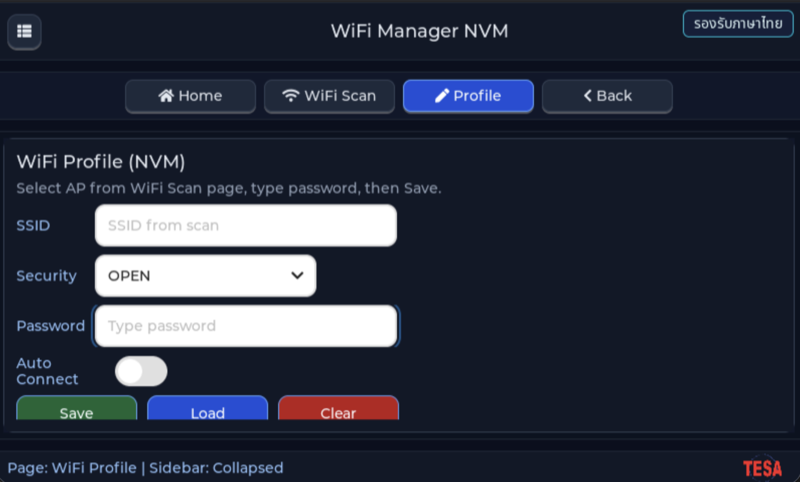
Before reading the code, guess what objects this screen has, and what changes when the user taps it or when a sensor value changes.
Try a change
Section titled “Try a change”- Guess before you change anything: pick one value the example’s README explains in the How section, and write down what you expect to change on the screen or in the log.
- Change and run: build + flash, then compare against your guess. If it does not match, find which part you misunderstood.
- Extend: add one thing the example does not yet have, and keep a photo or video in your portfolio.
Check your understanding
Section titled “Check your understanding”- How does data in NVM differ from a variable in RAM when the board resets?
- Why must the password field hide its characters?
- If you need to erase every profile, which profile-store function must you call?
The answers are in the example’s README and in the code. If you cannot answer one, go back and read the Why / What / How section again.
References
Section titled “References”- Episode README · code folder · commit
9a8e3ed - Open this example on the Developer Hub
- The code belongs to the Developer Hub and is referenced by link, not copied into this repository
Review questions
Answer on your own first, then open the answer.
-
What does lv_textarea_set_password_mode(password_ta, true) protect against, and what not? (Objective 1)
- เข้ารหัสรหัสผ่านก่อนบันทึกลง NVM
- ซ่อนตัวอักษรบนจอจากคนที่มองอยู่ แต่ lv_textarea_get_text() ยังคืนรหัสจริง และค่าที่บันทึกลง NVM เป็นข้อความจริง
- ป้องกันไม่ให้โค้ดส่วนอื่นอ่านค่าจาก textarea
- ลบรหัสผ่านออกจาก RAM หลังพิมพ์เสร็จ
Show answer
Answer: B. ซ่อนตัวอักษรบนจอจากคนที่มองอยู่ แต่ lv_textarea_get_text() ยังคืนรหัสจริง และค่าที่บันทึกลง NVM เป็นข้อความจริง
password mode เปลี่ยนแค่การแสดงผล ui_profile_read_to_data() ยังอ่านค่าด้วย lv_textarea_get_text() แล้ว strncpy ลงโครงสร้าง profile และ wifi_profile_store_save() เขียนข้อความนั้นลง NVM ตรง ๆ
-
In which cases does pressing Save actually store the profile in NVM? (choose all that apply) (Objective 1)
- SSID “Lab”, security OPEN, รหัสผ่านว่าง
- SSID “Lab”, security WPA2-AES-PSK, รหัสผ่านว่าง
- SSID ว่าง, security OPEN
- SSID “Lab”, security WPA3-SAE, รหัสผ่าน “abcd1234”
Show answer
Answer: A. SSID “Lab”, security OPEN, รหัสผ่านว่าง · D. SSID “Lab”, security WPA3-SAE, รหัสผ่าน “abcd1234”
ui_profile_validate_before_save() ปฏิเสธ SSID ว่าง (Save failed: SSID is empty) และปฏิเสธรหัสผ่านว่างเมื่อ security ไม่ใช่ OPEN (Save failed: Password is required) ด่านนี้อยู่ก่อนเรียก wifi_profile_store_save() ข้อมูลที่ไม่ครบจึงไม่ถูกเขียน
-
Power fails mid-write, leaving the NVM slot half new and half old. On the next boot, what does wifi_profile_store_load() do? (Objective 2)
- โหลดข้อมูลครึ่ง ๆ นั้นมาใช้
- ซ่อมข้อมูลให้เองจาก CRC
- ตรวจ magic, version, valid, payload_len และ CRC32 ของ payload เมื่อไม่ตรงจะไม่ใช้ slot นั้น (แล้วลอง slot legacy) ถ้าไม่มี slot ใดผ่านจะรายงานว่าไม่มีโปรไฟล์
- ลบ NVM ทั้งหมดแล้วรีเซ็ตบอร์ด
Show answer
Answer: C. ตรวจ magic, version, valid, payload_len และ CRC32 ของ payload เมื่อไม่ตรงจะไม่ใช้ slot นั้น (แล้วลอง slot legacy) ถ้าไม่มี slot ใดผ่านจะรายงานว่าไม่มีโปรไฟล์
wifi_profile_parse_record() ตรวจ header แล้วคำนวณ CRC32 ใหม่เทียบกับค่าที่เก็บ ถ้าไม่ตรงจะ log CRC_FAIL และคืน false หน้า Profile จึงขึ้นว่าไม่มีโปรไฟล์ แทนการนำ SSID หรือรหัสผ่านที่เสียไปใช้ CRC ตรวจจับความเสียหายได้ แต่ซ่อมไม่ได้
-
Save is pressed again with identical data. What does wifi_profile_store_save() do, and why? (Objective 2)
- อ่าน slot ปัจจุบันมาเทียบ ถ้าเหมือนทุกไบต์จะข้ามการเขียน (SAVE_SKIP_SAME) เพื่อลดการสึกของหน่วยความจำ ถ้าต่างจะเขียนแล้วอ่านกลับมาตรวจอีกครั้ง
- เขียนทับทุกครั้งเพื่อให้แน่ใจว่าข้อมูลเป็นปัจจุบัน
- เขียนลง slot ใหม่ถัดไปเพื่อเก็บประวัติ
- ล้าง slot ก่อนแล้วค่อยเขียน
Show answer
Answer: A. อ่าน slot ปัจจุบันมาเทียบ ถ้าเหมือนทุกไบต์จะข้ามการเขียน (SAVE_SKIP_SAME) เพื่อลดการสึกของหน่วยความจำ ถ้าต่างจะเขียนแล้วอ่านกลับมาตรวจอีกครั้ง
โค้ดเทียบ current_block กับ block ใหม่ด้วย memcmp ก่อนเขียน เพราะหน่วยความจำไม่ลบเลือนมีจำนวนรอบการเขียนจำกัด หลังเขียนยังอ่าน slot กลับมาเทียบ (SAVE_VERIFY_FAIL ถ้าไม่ตรง) เพื่อยืนยันว่าเขียนสำเร็จจริง ไม่ใช่แค่ฟังก์ชันคืนค่าสำเร็จ
-
The NVM record already carries a CRC32. Which statement correctly sums up the risk of storing the password this way? (Objective 3)
- ปลอดภัยแล้ว เพราะ CRC32 ทำให้อ่านรหัสผ่านไม่ออก
- ปลอดภัยแล้ว เพราะ password mode เข้ารหัสไว้ก่อนเขียน
- ความเสี่ยงอยู่ที่จอเท่านั้น เพราะหน่วยความจำภายในชิปอ่านจากภายนอกไม่ได้
- CRC32 แค่ตรวจว่าข้อมูลเสียหรือไม่ รหัสผ่านยังเป็นข้อความจริงใน NVM ใครอ่านหน่วยความจำได้ (debugger หรือ dump เฟิร์มแวร์) ก็ได้รหัสไป ควรเข้ารหัสด้วยกุญแจที่เก็บในที่ปลอดภัย เช่น secure element และปิดทาง debug ในเครื่องที่ส่งมอบ
Show answer
Answer: D. CRC32 แค่ตรวจว่าข้อมูลเสียหรือไม่ รหัสผ่านยังเป็นข้อความจริงใน NVM ใครอ่านหน่วยความจำได้ (debugger หรือ dump เฟิร์มแวร์) ก็ได้รหัสไป ควรเข้ารหัสด้วยกุญแจที่เก็บในที่ปลอดภัย เช่น secure element และปิดทาง debug ในเครื่องที่ส่งมอบ
wifi_profile_make_record() ใช้ strncpy ใส่รหัสผ่านลง record ตรง ๆ แล้วคิด CRC32 ทับ CRC ไม่ใช่การเข้ารหัส ใครก็คำนวณใหม่ได้ บทเรียน OPTIGA Trust M ในโมดูล 5 แสดงแนวทางเก็บความลับไว้ในชิปที่อ่านกุญแจออกไม่ได้
Cite this lesson
If you teach from this lesson or reuse it in slides or documents, credit it with the text below. If you changed it, add (adapted) after the title.
"Store the Wi-Fi profile in non-volatile memory" from TESA Open Knowledge by the Thai Embedded Systems Association (TESA), https://github.com/tesaiot/tesa-qualification-program, licensed under CC BY-NC 4.0
Thai attribution: "เก็บโปรไฟล์ Wi-Fi ลงหน่วยความจำถาวร" จาก TESA Open Knowledge โดยสมาคมสมองกลฝังตัวไทย (Thai Embedded Systems Association: TESA) https://github.com/tesaiot/tesa-qualification-program สัญญาอนุญาต CC BY-NC 4.0
This lesson adapts the source below; keep its credit too.
https://github.com/tesaiot/developer-hub/blob/9a8e3ed1d813bfd67fabf6b7ac15c6ff9750b465/hmi_ep06_wifi_profile_nvm · Code stays in the Developer Hub and is linked at pinned commits, never copied: the episodes, practice codes and main-branch examples are Apache-2.0; the master template and the OPTIGA client carry Infineon/Cypress EULAs.
TESA Open Knowledge · © 2026 สมาคมสมองกลฝังตัวไทย (TESA) · CC BY-NC 4.0
Content is licensed CC BY-NC 4.0. Reuse it non-commercially and credit the Thai Embedded Systems Association (TESA) every time. · How to cite TESA