Connected things: MQTT and a dashboard
Objectives
Section titled “Objectives”- Explain the roles of broker, topic, publish and subscribe
- Run the example so sensor values reach the reader web page, or say where it stopped
- Name at least two risks of an unencrypted public broker
Before you start
Section titled “Before you start”- In the previous lesson, which key of
sensors.snapshot()held the knob value? - If you want a friend in another province to see the knob value on our board, what does the data need to travel through?
See it work first
Section titled “See it work first”This lesson is a guided example. Follow it step by step.
- Open examples/01_send_to_dashboard.py in BENTO IDE
- Change the line
TEAM = "teamXX"to a two-digit number of your own choosing, for example"team37"(do not useteam00) - If you are using a real board, change
WIFI_SSIDandWIFI_PASSto a WiFi network the board can connect to (WiFi that needs a web login usually does not work with a board; use a phone hotspot instead). If you are using the BENTO Emulator, you do not need to change these two lines; WiFi in the emulator is simulated. - Open a new browser tab, go to the AIoT in Action course’s reader page, and add the same team number at the end, for example
https://advance-innovation-centre-aic.github.io/embedded-systems-for-aiot-developer/examples/web/my_first_reader.html?team=team37 - Come back and run the program. Watch the three-step label on screen turn green, then check the web page: the
knobandaznumber boxes should appear and change every 2 seconds - Turn the knob or tilt the board (use the HW panel in the emulator) and watch the numbers on the web page move along
Something you should know if you use the emulator The emulator tries to connect to the real public broker through the browser. If it cannot connect within a few seconds, it reports this in the Console drawer and falls back to a simulated broker in the browser instead. In that case the message never leaves your machine, and the web page will not show anything. If this happens, it is not the code’s fault; try again later, or try from a different network.
Concepts
Section titled “Concepts”1. A central post office called broker
Section titled “1. A central post office called broker”MQTT is a very popular way to send short messages between devices in IoT work. Its heart is the broker, which you can think of as a central post office.
- A device with data will publish (send) a message to the broker, along with a topic, for example
bento-aiot/team37/telemetry - Anyone who wants to know about that subject will subscribe to that topic with the broker
- The broker forwards the message to everyone who subscribed to that topic. The sender and the receiver never need to know each other
board ──publish──► broker ──forwards──► web page that subscribed bento-aiot/team37/telemetryIn this example, the board (or the emulator) is the publisher, and the reader web page is the subscriber to the topic bento-aiot/team37/#.
The # symbol means “every sub-topic underneath this one”.
2. Three steps you cannot skip or reorder
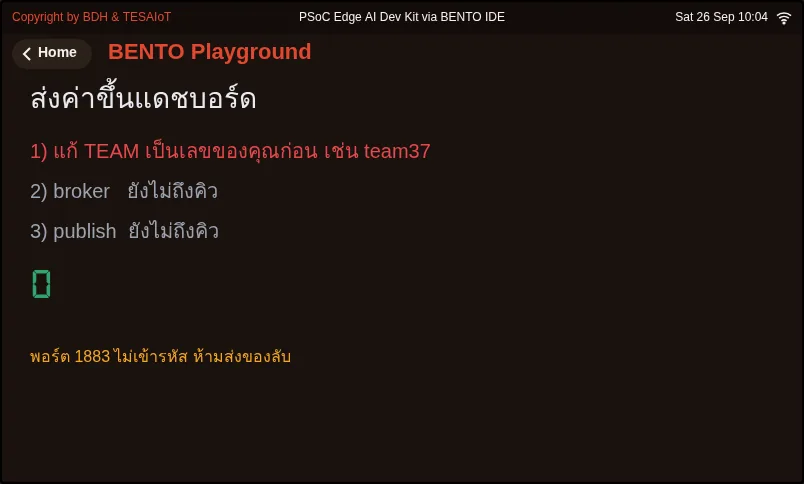
Section titled “2. Three steps you cannot skip or reorder”For data to leave the board, it must pass through three steps in order. WiFi must first get an IP address, only then can it introduce itself to the broker, and only then can it publish. The example draws a three-step label on screen: a step that passes turns green, a step that fails turns red along with a reason. A good program can always say which step it stopped at.
3. What the message looks like
Section titled “3. What the message looks like”The value sent is packaged as a JSON message with json.dumps(), for example
{"id": "team37", "n": 5, "knob": 42, "az": 9.79}The reader web page draws one box per key, so we do not need to edit the web page when we add a new key.
4. A public broker is not a place to send secrets
Section titled “4. A public broker is not a place to send secrets”broker.hivemq.com on port 1883 is open for anyone to use for free, and it is unencrypted. Anyone can subscribe to our topic, and anyone can publish fake data into the same topic.
If someone else picks the same team number as you, you might see their values mixed in with yours. This is fine for learning only.
Real work uses MQTTs (MQTT over encrypted TLS) with a broker that requires authentication, which is a topic for the next-level course.
Worked example
Section titled “Worked example”examples/01_send_to_dashboard.py is a shortened version of
examples/s02/05_value_leaves_the_board.py
from the AIoT in Action course. The reader web page is
examples/web/my_first_reader.html
from the same course.
- Move 1: check TEAM If it is still
teamXX, the program refuses to run, because a name shared with someone else would make the broker kick the other side off - Move 2: WiFi
wifi.connect(ssid, password)returnsTrueorFalse, then askswifi.ip()whether it actually has an IP address ("0.0.0.0"means not yet) - Move 3: broker
mqtt.connect(BROKER, port=1883, client_id=..., keepalive=60)returnsTruewhen connected successfully - Move 4: publish Read the sensors, build the JSON, then
mqtt.publish(TOPIC, body)every 2 seconds, catching bothFalseandOSError - Move 5: summarise
mqtt.is_connected()answers whether it is still connected “right now”
Screens from the BENTO Emulator for this lesson’s examples (click a file name to open the code)
Check your understanding
Section titled “Check your understanding”Answer the questions in quiz.yaml. A score of 80% or more passes.
Draw your own diagram on paper showing the path of one message, from the knob all the way to the number on the web page, including the words broker, topic, publish and subscribe. Photograph the diagram together with a screenshot of the web page showing your value (or a screenshot of the on-screen label showing which step it reached), and keep it in your portfolio.
Going further
Section titled “Going further”- The AIoT in Action course builds on this, all the way to receiving commands back from the web page and sending encrypted data up to the TESAIoT Platform
- Read more about MQTT at https://mqtt.org/
Reflect
Section titled “Reflect”If you were to use a system like this to watch a shop’s refrigerator, what data would you be willing to let others see, and what data must never be allowed to leak out?
Review questions
Answer on your own first, then open the answer.
-
In MQTT, who forwards a message from the sender to everyone subscribed to that topic? (Objective 1)
- บอร์ดที่ publish
- broker
- เราเตอร์ WiFi
- หน้าเว็บที่ subscribe
Show answer
Answer: B. broker
broker เป็นตัวกลาง ผู้ส่งกับผู้รับไม่ต้องรู้จักกันเลย รู้แค่ชื่อหัวข้อก็พอ
-
A page subscribed to bento-aiot/team37/# receives messages from which topic? (Objective 1)
- bento-aiot/team38/telemetry
- bento-aiot/team37/telemetry
- team37/bento-aiot/telemetry
- ทุกหัวข้อบน broker
Show answer
Answer: B. bento-aiot/team37/telemetry
# แปลว่าทุกหัวข้อย่อยที่อยู่ใต้ bento-aiot/team37/ เท่านั้น ไม่รวมทีมอื่น
-
Order the three steps data must pass before leaving the board. (Objective 2)
- publish ข้อความ
- WiFi ได้เลข IP
- แนะนำตัวกับ broker
Show answer
Correct order: B. WiFi ได้เลข IP → C. แนะนำตัวกับ broker → A. publish ข้อความ
ไม่มี IP ก็คุยกับ broker ไม่ได้ ไม่ได้แนะนำตัวกับ broker ก็ publish ไม่ได้
-
Step 1 is green but step 2 is red saying the broker could not be reached. What is the most likely cause? (Objective 2)
- รหัส WiFi ผิด
- เครือข่ายที่ใช้อยู่ปิดกั้นพอร์ต 1883 หรือ broker ไม่ตอบ
- ลูกบิดเสีย
- หน้าเว็บยังไม่ได้เปิด
Show answer
Answer: B. เครือข่ายที่ใช้อยู่ปิดกั้นพอร์ต 1883 หรือ broker ไม่ตอบ
ขั้นที่ 1 ผ่านแปลว่า WiFi กับ IP ใช้ได้แล้ว ปัญหาอยู่ระหว่างบอร์ดกับ broker เช่นเครือข่ายองค์กรที่กันพอร์ตนี้ หน้าเว็บไม่เกี่ยวกับขั้นนี้
-
Which are risks of using a public broker on port 1883? (choose all that apply) (Objective 3)
- คนอื่น subscribe อ่านข้อมูลของเราได้
- คนอื่น publish ข้อมูลปลอมเข้ามาในหัวข้อเดียวกันได้
- ข้อมูลเดินทางโดยไม่เข้ารหัส
- บอร์ดจะเสียหายทางกายภาพ
Show answer
Answer: A. คนอื่น subscribe อ่านข้อมูลของเราได้ · B. คนอื่น publish ข้อมูลปลอมเข้ามาในหัวข้อเดียวกันได้ · C. ข้อมูลเดินทางโดยไม่เข้ารหัส
broker สาธารณะไม่ยืนยันตัวตนและพอร์ต 1883 ไม่เข้ารหัส เหมาะกับการเรียนเท่านั้น งานจริงใช้ MQTTs กับ broker ที่ยืนยันตัวตน
Cite this lesson
If you teach from this lesson or reuse it in slides or documents, credit it with the text below. If you changed it, add (adapted) after the title.
"Connected things: MQTT and a dashboard" from TESA Open Knowledge by the Thai Embedded Systems Association (TESA), https://github.com/tesaiot/tesa-qualification-program, licensed under CC BY-NC 4.0
Thai attribution: "ของที่คุยกันได้: MQTT และแดชบอร์ด" จาก TESA Open Knowledge โดยสมาคมสมองกลฝังตัวไทย (Thai Embedded Systems Association: TESA) https://github.com/tesaiot/tesa-qualification-program สัญญาอนุญาต CC BY-NC 4.0
Lesson link: https://tesaiot.github.io/tesa-qualification-program/en/courses/explorer/m02-sense-and-connect/l02-connected-things/
This lesson adapts the source below; keep its credit too.
https://github.com/Advance-Innovation-Centre-AIC/embedded-systems-for-aiot-developer/blob/a80bbe88a34bcb9bb8d991f42f9252b77cdab079/examples/s02/05_value_leaves_the_board.py · ตัวอย่างโค้ดทุกไฟล์ในหลักสูตรนี้ย่อและดัดแปลงจากตัวอย่างของ AIoT in Action (MIT) ใช้ API ของ BENTO MicroPython ตามที่ตัวอย่างต้นฉบับใช้ ไม่มีการเพิ่มคำสั่งใหม่
TESA Open Knowledge · © 2026 สมาคมสมองกลฝังตัวไทย (TESA) · CC BY-NC 4.0
Content is licensed CC BY-NC 4.0. Reuse it non-commercially and credit the Thai Embedded Systems Association (TESA) every time. · How to cite TESA