Text input with a textarea and keyboard
Objectives
Section titled “Objectives”- Connect lv_textarea to lv_keyboard and take input both in real time and on OK
- Switch the keyboard between normal and number modes from a dropdown
- Explain when a value should update immediately and when it should wait for confirmation
Concepts
Section titled “Concepts”Why an on-screen keyboard at all
Section titled “Why an on-screen keyboard at all”This board has no hardware keyboard. Every time the user must type something (a Wi-Fi name, a password, a
setpoint value), the code shows lv_keyboard, LVGL’s ready-made keyboard widget. It does not work independently
of a textarea — it must be bound to one with lv_keyboard_set_textarea(kb, ta) so the keyboard knows which
textarea it is currently typing into.
Two input modes: real-time versus commit-on-OK
Section titled “Two input modes: real-time versus commit-on-OK”EP03 places two textareas side by side to compare behavior. Input A (Realtime) binds the
LV_EVENT_VALUE_CHANGED event straight to its display label, so the label changes on every keypress on the
keyboard (good for a search box or a live preview). Input B (Confirmed on OK) does not sync its label while
typing at all — the value updates only when LV_EVENT_READY fires (the user pressed OK on the keyboard), which
suits a form that needs validation before it is applied, such as the Wi-Fi password in a later module. Which mode
to pick depends on whether an in-progress, possibly-incomplete value would cause a problem immediately — if not,
real time is fine; if it would, wait for commit.
One callback, several events: branch on event code and target
Section titled “One callback, several events: branch on event code and target”text_input_logic_textarea_event_cb is bound to both textareas and receives three events
(LV_EVENT_CLICKED, LV_EVENT_FOCUSED, LV_EVENT_VALUE_CHANGED) inside a single function. The callback branches
using lv_event_get_code(e) and lv_event_get_target(e) — on CLICKED or FOCUSED it opens the keyboard and sets
state->active_textarea = target regardless of which textarea fired it, but on VALUE_CHANGED it updates the label
only when target == state->realtime_textarea. Input B subscribes to VALUE_CHANGED too, but the callback
simply does nothing with it. That is the entire reason A’s value changes on every keystroke while B’s does not
change until OK is pressed, even though the exact same events fire for both.
On OK: which label updates depends on which textarea was active
Section titled “On OK: which label updates depends on which textarea was active”text_input_logic_keyboard_event_cb is bound to the keyboard widget itself (not to a textarea) and receives
LV_EVENT_READY and LV_EVENT_CANCEL. When READY fires, the code checks whether state->active_textarea was the
confirmed or the realtime textarea at that moment and updates that side’s label — in other words, one keyboard
serves both textareas by knowing which one it is currently typing for from the state the textarea callback set
on FOCUSED, not from a separate callback bound per textarea.
The dropdown changes more than the keyboard’s face
Section titled “The dropdown changes more than the keyboard’s face”text_input_apply_mode_for_target() runs both when the dropdown changes and when a textarea gains focus. Picking
“Number” calls lv_keyboard_set_mode(kb, LV_KEYBOARD_MODE_NUMBER) and
lv_textarea_set_accepted_chars(target, "0123456789") together — so Number mode does not just relabel the keys,
it also blocks every other character from being typed into the textarea at all, even from a physical
keyboard. text_input_apply_mode_for_all() applies this to both textareas every time the dropdown changes, even
if neither one is currently focused.
Worked example
Section titled “Worked example”This episode’s code lives on the Developer Hub (pinned to commit 9a8e3ed). Read the full Why / What / How
first in the episode’s README.
The excerpts below are copied from tesaiot/developer-hub (Apache-2.0) at the same commit — the callback names here
follow the actual source code, which names things slightly differently from the How section of the upstream
README.
text_input_logic.c — the textarea callback separates CLICKED/FOCUSED from VALUE_CHANGED:
void text_input_logic_textarea_event_cb(lv_event_t *e){    lv_event_code_t code = lv_event_get_code(e);    text_input_state_t *state = (text_input_state_t *)lv_event_get_user_data(e);    lv_obj_t *target = (lv_obj_t *)lv_event_get_target(e);
    if(state == NULL || target == NULL) {        return;    }
    /* Keyboard opens only from input widgets (not from dropdown). */    if(code == LV_EVENT_CLICKED || code == LV_EVENT_FOCUSED) {        state->active_textarea = target;        lv_keyboard_set_textarea(state->keyboard, target);        text_input_apply_mode_for_target(state, target);        text_input_show_keyboard(state);        return;    }
    /* Realtime output is bound only to Input A. */    if(code == LV_EVENT_VALUE_CHANGED && target == state->realtime_textarea) {        text_input_update_realtime_label(state);    }}
The keyboard’s own callback separates READY (commit) from CANCEL:
if(code == LV_EVENT_READY) {    /* Confirm behavior depends on which input currently owns keyboard focus. */    if(state->active_textarea == state->confirmed_textarea) {        text_input_update_confirmed_label(state);    } else if(state->active_textarea == state->realtime_textarea) {        text_input_update_realtime_label(state);    }    text_input_hide_keyboard(state);    return;}
if(code == LV_EVENT_CANCEL) {    text_input_hide_keyboard(state);}
ui_text_input_keyboard.c — binding all three of Input A’s events to one callback:
/* Input A: open keyboard + realtime update while typing. */lv_obj_add_event_cb(realtime_input, text_input_logic_textarea_event_cb, LV_EVENT_CLICKED, &s_text_input_state);lv_obj_add_event_cb(realtime_input, text_input_logic_textarea_event_cb, LV_EVENT_FOCUSED, &s_text_input_state);lv_obj_add_event_cb(realtime_input, text_input_logic_textarea_event_cb, LV_EVENT_VALUE_CHANGED, &s_text_input_state);Input B registers the exact same three events (see the full file) — the callback simply chooses to do nothing with its VALUE_CHANGED.
main_example.c,text_input_logic.h,ui_text_input_keyboard.handui_text_input_layout.h(all the layout constants, to avoid magic numbers)
Common mistakes
Section titled “Common mistakes”- Assuming Cancel restores the textarea’s original value — the actual
LV_EVENT_CANCELhandler only hides the keyboard; it calls no API to revert already-typed characters, because the textarea’s text is edited for real as you type, not held in a temporary buffer. If you want “cancel reverts to the original value,” you must back up the text yourself on FOCUSED and restore it yourself in the callback. - Forgetting Number mode also blocks characters at the textarea, not just the key labels —
lv_textarea_set_accepted_chars()is always called alongsidelv_keyboard_set_mode(). To allow other characters again, you must calllv_textarea_set_accepted_chars(ta, NULL)to clear the filter. - Binding Input A’s callback to Input B without checking
target— because one callback serves both textareas, forgetting to checktarget == state->realtime_textareabefore updating a label will update the wrong input’s label. - Mixing up callback names between the upstream How section and the real code — the upstream README describes
separate callbacks such as
text_input_logic_focus_cbandtext_input_logic_realtime_change_cb, but the actual code at commit9a8e3edcombines every textarea event into the single functiontext_input_logic_textarea_event_cb. When reading the code, trust the code.
Build and flash
Section titled “Build and flash”# In the master template folder (see lesson 1.1)# 1) Delete the old episode's files in proj_cm55/apps/# 2) Copy all of this episode's files into proj_cm55/apps/make buildmake program # flash through KitProg3Or open this example on the Developer Hub and flash the ready-made firmware.
See it work first
Section titled “See it work first”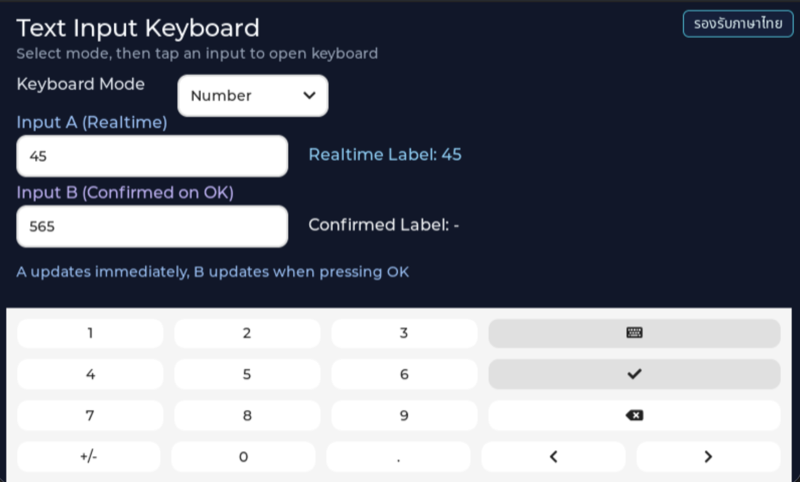
Before reading the code, guess what objects this screen has, and what changes when the user taps it or when a sensor value changes.
Try a change
Section titled “Try a change”- Guess before you change anything: pick one value the example’s README explains in the How section, and write down what you expect to change on the screen or in the log.
- Change and run: build + flash, then compare against your guess. If it does not match, find which part you misunderstood.
- Extend: add one thing the example does not yet have, and keep a photo or video in your portfolio.
Check your understanding
Section titled “Check your understanding”- Which event tells you the user pressed OK on the keyboard?
- Should the Wi-Fi password field use real-time or commit-on-OK input, and why?
- What kind of mistake does number mode prevent?
The answers are in the example’s README and in the code. If you cannot answer one, go back and read the Why / What / How section again.
References
Section titled “References”- Episode README · code folder · commit
9a8e3ed - Open this example on the Developer Hub
- The code belongs to the Developer Hub and is referenced by link, not copied into this repository
Review questions
Answer on your own first, then open the answer.
-
The user types ‘abc’ into Input B (commit on OK) but has not pressed OK. What does the Confirmed Label show? (Objective 1)
- ค่าที่ยืนยันครั้งล่าสุด (ตอนเริ่มคือ “-”) เพราะ label B อัปเดตเฉพาะเมื่อแป้นพิมพ์ส่ง LV_EVENT_READY
- “abc” ทันทีที่พิมพ์แต่ละตัว
- “abc” เมื่อผู้ใช้แตะช่องอื่น
- ข้อความว่างเสมอจนกว่าจะรีเซ็ตบอร์ด
Show answer
Answer: A. ค่าที่ยืนยันครั้งล่าสุด (ตอนเริ่มคือ “-”) เพราะ label B อัปเดตเฉพาะเมื่อแป้นพิมพ์ส่ง LV_EVENT_READY
ใน text_input_logic.c มีแค่ realtime textarea ที่ผูก LV_EVENT_VALUE_CHANGED กับ label A ส่วน label B ถูกอัปเดตใน text_input_logic_keyboard_event_cb() เมื่อ code == LV_EVENT_READY และช่องที่ถือแป้นพิมพ์อยู่คือ confirmed_textarea
-
You want to validate an IP address typed in Input B before it is used. Where should the check go? (Objective 1)
- ใน handler ของ LV_EVENT_VALUE_CHANGED ของช่อง B
- ใน handler ของ LV_EVENT_FOCUSED ของช่อง B
- ในกิ่ง LV_EVENT_READY ของ text_input_logic_keyboard_event_cb() ก่อนเรียก text_input_update_confirmed_label()
- ใน text_input_logic_mode_event_cb() ของ dropdown
Show answer
Answer: C. ในกิ่ง LV_EVENT_READY ของ text_input_logic_keyboard_event_cb() ก่อนเรียก text_input_update_confirmed_label()
LV_EVENT_READY คือจังหวะที่ผู้ใช้กด OK บนแป้นพิมพ์ เป็นจุดเดียวที่ค่าของช่อง B ถูก commit การตรวจตอน VALUE_CHANGED จะตรวจค่าที่ยังพิมพ์ไม่เสร็จทุกตัวอักษร ส่วน FOCUSED เกิดตอนเปิดแป้นพิมพ์ซึ่งยังไม่มีค่าให้ตรวจ
-
The user edits Input B and then presses Cancel on the keyboard. According to text_input_logic.c, what happens? (Objective 1)
- ข้อความในช่อง B ถูกคืนเป็นค่าที่ยืนยันล่าสุด
- แป้นพิมพ์ซ่อน label B ยังเป็นค่าเดิม แต่ข้อความที่แก้ยังค้างอยู่ในช่อง B ถ้าเปิดแป้นพิมพ์แล้วกด OK ภายหลังจะ commit ข้อความนั้น
- label B เปลี่ยนเป็นข้อความที่แก้ เพราะ Cancel ก็ถือเป็นการยืนยัน
- ทั้งช่อง B และ label B ถูกล้างเป็นค่าว่าง
Show answer
Answer: B. แป้นพิมพ์ซ่อน label B ยังเป็นค่าเดิม แต่ข้อความที่แก้ยังค้างอยู่ในช่อง B ถ้าเปิดแป้นพิมพ์แล้วกด OK ภายหลังจะ commit ข้อความนั้น
กิ่ง LV_EVENT_CANCEL ในโค้ดแค่ log แล้วเรียก text_input_hide_keyboard() ไม่มีการคืนค่า textarea แม้ README ของ episode จะเขียนว่า Cancel คืนค่าเดิม ถ้าต้องการพฤติกรรมนั้นต้องเก็บค่าที่ยืนยันล่าสุดไว้ แล้วเรียก lv_textarea_set_text() คืนค่าเองในกิ่ง CANCEL
-
In Number mode the code calls both lv_keyboard_set_mode(…, LV_KEYBOARD_MODE_NUMBER) and lv_textarea_set_accepted_chars(target, "0123456789"). Why is the second call needed? (Objective 2)
- เพื่อให้แป้นพิมพ์เปลี่ยนเป็นโหมดตัวเลขเร็วขึ้น
- เพื่อให้ dropdown เปิดแป้นพิมพ์ได้
- เพราะ lv_keyboard_set_mode() ใช้ไม่ได้ถ้าไม่มีตัวกรอง
- แป้นพิมพ์โหมดตัวเลขยังมีปุ่มอย่าง +/- และจุด ตัวกรองที่ textarea จึงเป็นด่านที่รับประกันว่าช่องนั้นรับเฉพาะตัวเลข
Show answer
Answer: D. แป้นพิมพ์โหมดตัวเลขยังมีปุ่มอย่าง +/- และจุด ตัวกรองที่ textarea จึงเป็นด่านที่รับประกันว่าช่องนั้นรับเฉพาะตัวเลข
โหมดของแป้นพิมพ์เปลี่ยนแค่ปุ่มที่แสดง ตัวกรอง accepted_chars ทำงานที่ textarea เองไม่ว่าอักขระจะมาจากปุ่มใด และเมื่อกลับโหมด Normal โค้ดตั้ง accepted_chars เป็น NULL เพื่อยกเลิกตัวกรอง การกันค่าผิดรูปแบบตั้งแต่ตอนรับเข้าช่วยให้ไม่ต้องไปแก้ทีหลัง
-
Which fields should commit on OK rather than update in real time? (choose all that apply) (Objective 3)
- รหัสผ่าน Wi-Fi ที่จะใช้เชื่อมต่อ
- ช่องค้นหาที่กรองรายชื่อเครือข่ายขณะพิมพ์
- ค่า setpoint อุณหภูมิที่ส่งไปสั่งฮีตเตอร์
- ช่องพรีวิวที่แสดงว่าชื่ออุปกรณ์จะหน้าตาอย่างไรบนจอ
- หมายเลข IP ที่ต้องตรวจรูปแบบก่อนใช้
Show answer
Answer: A. รหัสผ่าน Wi-Fi ที่จะใช้เชื่อมต่อ · C. ค่า setpoint อุณหภูมิที่ส่งไปสั่งฮีตเตอร์ · E. หมายเลข IP ที่ต้องตรวจรูปแบบก่อนใช้
README ของ episode แยกไว้ว่า realtime เหมาะกับช่องค้นหาที่อยากเห็นผลทุกตัวอักษร ส่วน commit-on-OK เหมาะกับค่าที่ต้องตรวจก่อนนำไปใช้หรือมีผลต่อระบบจริง ค่าที่ยังพิมพ์ไม่เสร็จ เช่นรหัสผ่านครึ่งเดียว หรือ setpoint ที่เพิ่งพิมพ์เลขแรก ไม่ควรถูกนำไปใช้ทันที
Cite this lesson
If you teach from this lesson or reuse it in slides or documents, credit it with the text below. If you changed it, add (adapted) after the title.
"Text input with a textarea and keyboard" from TESA Open Knowledge by the Thai Embedded Systems Association (TESA), https://github.com/tesaiot/tesa-qualification-program, licensed under CC BY-NC 4.0
Thai attribution: "รับข้อความด้วย textarea และ keyboard" จาก TESA Open Knowledge โดยสมาคมสมองกลฝังตัวไทย (Thai Embedded Systems Association: TESA) https://github.com/tesaiot/tesa-qualification-program สัญญาอนุญาต CC BY-NC 4.0
This lesson adapts the source below; keep its credit too.
https://github.com/tesaiot/developer-hub/blob/9a8e3ed1d813bfd67fabf6b7ac15c6ff9750b465/hmi_ep03_text_input_keyboard · Code stays in the Developer Hub and is linked at pinned commits, never copied: the episodes, practice codes and main-branch examples are Apache-2.0; the master template and the OPTIGA client carry Infineon/Cypress EULAs.
TESA Open Knowledge · © 2026 สมาคมสมองกลฝังตัวไทย (TESA) · CC BY-NC 4.0
Content is licensed CC BY-NC 4.0. Reuse it non-commercially and credit the Thai Embedded Systems Association (TESA) every time. · How to cite TESA