Complete Wi-Fi manager: connect, retry and auto-connect
Objectives
Section titled “Objectives”- Combine scan, profile and connect into a Wi-Fi manager that auto-connects from the stored profile
- Design a connection state machine (connect, drop, retry) and show its state on screen
- Ping the gateway to check that the network really answers, and explain that in this example the ping result does not trigger a reconnect
Concepts
Section titled “Concepts”The service owns all the state; the UI is just an observer copying a snapshot
Section titled “The service owns all the state; the UI is just an observer copying a snapshot”The heart of EP07 is wifi_connection_service, which runs as its own background task, owns the state machine
(wifi_conn_state_t: IDLE, CONNECTING, CONNECTED, DISCONNECTING, RECONNECT_WAIT, ERROR), and holds all
the data (SSID, RSSI, IP, retry stage, and so on) itself. The UI page (ui_wifi_status_page.c) does not keep
any connection state of its own — it only creates an lv_timer that periodically calls
wifi_connection_service_get_snapshot() to copy values out for display. The reason for this design: the UI page
can be switched away by lv_menu_set_page() (see lesson 2.4). If the state lived in a UI widget, it would vanish
whenever the page switched, but the service survives no matter where the UI goes.
wifi_connection_service_get_snapshot() locks a FreeRTOS semaphore (xSemaphoreTake/xSemaphoreGive) before
memcpy-ing the internal state into the caller’s wifi_connection_snapshot_t struct, then unlocks. This is safe
from races because the background task also locks that same semaphore every time before it changes the state.
The real retry ladder is 1s → 2s → 5s → 10s, not 1s → 5s → 15s → 60s as the upstream README says
Section titled “The real retry ladder is 1s → 2s → 5s → 10s, not 1s → 5s → 15s → 60s as the upstream README says”The real code declares static const uint32_t s_reconnect_backoff_ms[] = { 1000U, 2000U, 5000U, 10000U };, with a
comment stating it directly: “Reconnect backoff: 1s -> 2s -> 5s -> 10s (cap at max stage).”
wifi_conn_schedule_retry_locked() uses retry_stage as an index into this table; if the index would run past
the end of the array, it clamps to the last entry (10s) instead of growing without bound. This is a bounded,
exponential-ish backoff: it stops the code from hammering cy_wcm_connect_ap() when an AP has been gone a long
time, but it also does not wait too long when the AP comes back quickly.
The ping watchdog already checks the gateway, and it does not trigger a reconnect
Section titled “The ping watchdog already checks the gateway, and it does not trigger a reconnect”wifi_conn_probe_internet_once() calls cy_wcm_ping() against the gateway address (obtained from DHCP when
the AP connection was made) every WIFI_CONN_PING_INTERVAL_MS = 20000 (20 seconds) by default — not a fixed
public IP such as 8.8.8.8, which is what the upstream README suggests trying as a change. More importantly,
the ping result never changes the state machine at all. If ping fails
WIFI_CONN_PING_FAIL_THRESHOLD = 3 times in a row, the code only sets internet_ok = false for the UI to
display (“ping fail 3”) — it never calls wifi_conn_schedule_retry_locked() or touches state. What actually
moves the state to RECONNECT_WAIT is a real disconnect event from WCM (wifi_conn_handle_disconnect_event) or
discovering cy_wcm_is_connected_to_ap() == 0 while refreshing connection info. In other words, the ping watchdog
is only a gauge shown to the user, not the thing driving reconnection.
Every user command is serialized through one command queue
Section titled “Every user command is serialized through one command queue”The Connect/Disconnect/Retry now buttons in the UI never mutate the state directly. They call
wifi_connection_service_connect_profile() / _disconnect() / _retry_now(), each of which pushes a command
into a queue that the single background task (wifi_conn_task) processes one at a time
(wifi_conn_process_cmd). This serialization prevents two commands from colliding — for example, the user
pressing Disconnect at the exact moment the retry ladder is about to call connect on its own.
wifi_connection_service_init() auto-connects at boot if a profile exists
Section titled “wifi_connection_service_init() auto-connects at boot if a profile exists”main_example.c calls wifi_connection_service_init() before building the UI. Inside, it calls cy_wcm_init(),
loads the profile from NVM (lesson 2.6) through wifi_profile_store_load(), and if that succeeds and is valid,
sets have_profile = true and immediately queues a connect command — the user does not need to tap anything if a
profile was saved earlier.
Worked example
Section titled “Worked example”This episode’s code lives on the Developer Hub (pinned to commit 9a8e3ed) — read the Why section of the
upstream README
to understand its purpose, but the excerpts below are copied from the actual files (Apache-2.0,
tesaiot/developer-hub, same commit), because the retry ladder values and the ping behavior differ from what the
upstream README describes.
wifi_conn/wifi_connection_service.c — the real retry ladder with its cap:
static const uint32_t s_reconnect_backoff_ms[] = { 1000U, 2000U, 5000U, 10000U };
/* Reconnect backoff: 1s -> 2s -> 5s -> 10s (cap at max stage). */static bool wifi_conn_schedule_retry_locked(void){    uint8_t idx = s_ctx.retry_stage;    if(idx >= (uint8_t)(sizeof(s_reconnect_backoff_ms) / sizeof(s_reconnect_backoff_ms[0]))) {        idx = (uint8_t)(sizeof(s_reconnect_backoff_ms) / sizeof(s_reconnect_backoff_ms[0])) - 1U;    }
    s_ctx.retry_wait_ms = s_reconnect_backoff_ms[idx];    if(s_ctx.retry_stage < ((uint8_t)(sizeof(s_reconnect_backoff_ms) / sizeof(s_reconnect_backoff_ms[0])) - 1U)) {        s_ctx.retry_stage++;    }
    wifi_conn_set_state_locked(WIFI_CONN_STATE_RECONNECT_WAIT);    return true;}
The ping watchdog only changes internet_ok, never the state machine:
if(0 == wifi_conn_ping_ok) {    if(s_ctx.ping_fail_streak < 0xFFU) {        s_ctx.ping_fail_streak++;    }
    if(s_ctx.ping_fail_streak >= WIFI_CONN_PING_FAIL_THRESHOLD) {        s_ctx.internet_ok = false;   /* display only — no state transition here */    }}
The snapshot getter locks a semaphore before copying out:
bool wifi_connection_service_get_snapshot(wifi_connection_snapshot_t *out_snapshot){    if((out_snapshot == NULL) || (!s_ctx.initialized) || (s_ctx.lock == NULL)) {        return false;    }
    if(pdTRUE != xSemaphoreTake(s_ctx.lock, portMAX_DELAY)) {        return false;    }
    (void)memset(out_snapshot, 0, sizeof(*out_snapshot));    out_snapshot->state = s_ctx.state;    /* ... copy every field ... */
(void)xSemaphoreGive(s_ctx.lock); return true;}main_example.ccallswifi_connection_service_init()then forwards into the UI, exactly as the upstream README describeswifi_conn/wifi_connection_service.h— the realwifi_conn_state_tenum (matches what the upstream README states)- See the full folder at
hmi_ep07_final_wifi_manager/
Common mistakes
Section titled “Common mistakes”- Misremembering the retry ladder as 1s/5s/15s/60s — the real values in the code are 1s/2s/5s/10s, straight from the source’s own comment.
- Assuming a ping failure triggers an immediate retry — in this code, ping only sets the
internet_okflag for the UI to display; it never changes the state or triggers a reconnect. Reconnection comes only from a WCM disconnect event orcy_wcm_is_connected_to_ap(). - Letting the UI mutate the connection state directly — every button must go through the service API, which pushes a command into the queue, rather than editing the service’s struct directly, because the background task is the true owner of that state.
- Reading a service state field without locking the semaphore — you must go through
wifi_connection_service_get_snapshot()only; reading directly would race with the background task changing the same value.
Build and flash
Section titled “Build and flash”# In the master template folder (see lesson 1.1)# 1) Delete the old episode's files in proj_cm55/apps/# 2) Copy all of this episode's files into proj_cm55/apps/make buildmake program # flash through KitProg3Or open this example on the Developer Hub and flash the ready-made firmware.
See it work first
Section titled “See it work first”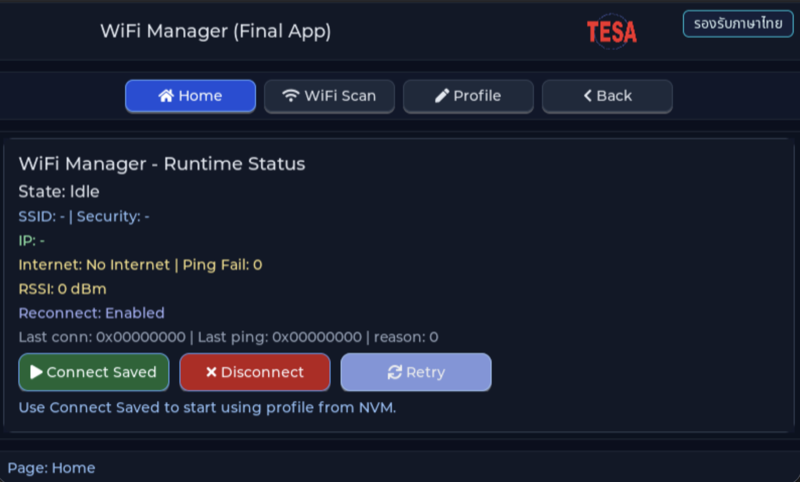
Before reading the code, guess what objects this screen has, and what changes when the user taps it or when a sensor value changes.
Try a change
Section titled “Try a change”- Guess before you change anything: pick one value the example’s README explains in the How section, and write down what you expect to change on the screen or in the log.
- Change and run: build + flash, then compare against your guess. If it does not match, find which part you misunderstood.
- Extend: add one thing the example does not yet have, and keep a photo or video in your portfolio.
Check your understanding
Section titled “Check your understanding”- Why is “connected to the AP” not enough on its own to say the internet works?
- Which states does the connection state machine need?
- What goes wrong if retries happen too often?
The answers are in the example’s README and in the code. If you cannot answer one, go back and read the Why / What / How section again.
References
Section titled “References”- Episode README · code folder · commit
9a8e3ed - Open this example on the Developer Hub
- The code belongs to the Developer Hub and is referenced by link, not copied into this repository
Review questions
Answer on your own first, then open the answer.
-
After power-on, when does the Wi-Fi Manager connect automatically? (Objective 1)
- ทุกครั้ง โดยเลือก AP ที่สัญญาณแรงที่สุดจากการสแกน
- ทุกครั้งที่มีโปรไฟล์ใน NVM ไม่ว่าจะตั้งค่าอย่างไร
- เมื่อโหลดโปรไฟล์จาก NVM ได้ และโปรไฟล์นั้นเปิด auto_connect ไว้ จึงส่งคำสั่ง CONNECT_PROFILE (user_initiated = false) เข้าคิวของ wifi_conn_task
- เมื่อผู้ใช้กด Connect Saved เท่านั้น
Show answer
Answer: C. เมื่อโหลดโปรไฟล์จาก NVM ได้ และโปรไฟล์นั้นเปิด auto_connect ไว้ จึงส่งคำสั่ง CONNECT_PROFILE (user_initiated = false) เข้าคิวของ wifi_conn_task
ui_wifi_status_page_startup_auto_connect() ทำงานครั้งเดียวหลังสร้างหน้า ถ้าไม่มีโปรไฟล์จะ log AUTO_CONNECT skip no profile ถ้า auto_connect ปิดจะ log AUTO_CONNECT disabled in profile นอกนั้นจึงเรียก wifi_connection_service_connect_profile(&profile, false)
-
Why do the Connect, Disconnect and Retry buttons and cy_wcm events only post commands to one queue instead of calling cy_wcm_connect_ap() themselves? (Objective 2)
- ให้ wifi_conn_task เป็นผู้เดียวที่เรียก cy_wcm ทีละคำสั่ง การเชื่อมต่อจึงไม่ซ้อนกัน และ UI ไม่ค้างระหว่าง cy_wcm_connect_ap() ที่อาจใช้เวลาหลายวินาที
- เพราะ cy_wcm_connect_ap() เรียกจากโค้ดของ LVGL ไม่ได้ในทางเทคนิค
- เพื่อให้เชื่อมต่อหลาย AP พร้อมกันได้
- เพื่อประหยัด RAM ของ LVGL
Show answer
Answer: A. ให้ wifi_conn_task เป็นผู้เดียวที่เรียก cy_wcm ทีละคำสั่ง การเชื่อมต่อจึงไม่ซ้อนกัน และ UI ไม่ค้างระหว่าง cy_wcm_connect_ap() ที่อาจใช้เวลาหลายวินาที
comment ในโค้ดเขียนว่า Commands are serialized through one queue to avoid overlapping WiFi operations ส่วน WCM callback แค่ post คำสั่ง และหน้าสถานะอ่านค่าผ่าน wifi_connection_service_get_snapshot() ที่คัดลอกข้อมูลภายใต้ mutex UI จึงเป็นแค่ผู้สังเกต ไม่ถือ state เอง
-
The AP disappears and every attempt fails. Per the code at this commit, how long does the manager wait before each retry? (Objective 2)
- 1 → 5 → 15 → 60 วินาที
- 1 วินาทีทุกครั้ง
- เพิ่มเป็นสองเท่าไปเรื่อย ๆ ไม่มีเพดาน
- 1 → 2 → 5 → 10 วินาที แล้วค้างที่ 10 วินาที
Show answer
Answer: D. 1 → 2 → 5 → 10 วินาที แล้วค้างที่ 10 วินาที
s_reconnect_backoff_ms[] = {1000, 2000, 5000, 10000} และ wifi_conn_schedule_retry_locked() ไม่ให้ index เกินตัวสุดท้าย (README ของ episode ยังเขียนลำดับ 1/5/15/60 ซึ่งไม่ตรงกับโค้ด) การรอนานขึ้นช่วยไม่ให้ยิงคำขอใส่ driver และ AP ถี่เกินไป ส่วนเพดานทำให้กลับมาต่อได้ภายในราว 10 วินาทีเมื่อ AP กลับมา
-
The user presses Disconnect while connected. Which state does the machine end in, and will it retry by itself? (Objective 2)
- RECONNECT_WAIT แล้วลองใหม่ใน 1 วินาที
- IDLE และไม่ลองใหม่ เพราะ manual_disconnect = true และ reconnect_enabled = false ทำให้ event DISCONNECTED ที่ตามมาไม่ถูกนับเป็นการหลุด
- ERROR เพราะการตัดการเชื่อมต่อถือเป็นความผิดพลาด
- CONNECTED ต่อไปจนกว่าจะรีเซ็ตบอร์ด
Show answer
Answer: B. IDLE และไม่ลองใหม่ เพราะ manual_disconnect = true และ reconnect_enabled = false ทำให้ event DISCONNECTED ที่ตามมาไม่ถูกนับเป็นการหลุด
wifi_conn_do_user_disconnect() ตั้ง DISCONNECTING เรียก cy_wcm_disconnect_ap() แล้วตั้ง IDLE ส่วน wifi_conn_handle_disconnect_event() เห็น manual_disconnect จึงไม่เรียก schedule_retry การแยก ‘หลุดเอง’ กับ ‘ผู้ใช้สั่งตัด’ ทำให้ปุ่ม Disconnect มีความหมายจริง
-
Which statements about this episode's ping watchdog are correct? (choose all that apply) (Objective 3)
- ping ไปที่ default gateway ทุก 20 วินาที (timeout 1.2 วินาที)
- ping ล้มติดกัน 3 ครั้ง service จะสั่งตัดการเชื่อมต่อแล้วเข้า retry ladder
- ping ล้มติดกัน 3 ครั้ง internet_ok เป็น false หน้าจอขึ้น No Internet แต่ state ยังเป็น Connected
- ถ้าอินเทอร์เน็ตภายนอกล่มแต่ router ยังตอบ ping จอยังแสดง Online
- ping ใช้แทนการตรวจว่ายังต่อ AP อยู่หรือไม่
Show answer
Answer: A. ping ไปที่ default gateway ทุก 20 วินาที (timeout 1.2 วินาที) · C. ping ล้มติดกัน 3 ครั้ง internet_ok เป็น false หน้าจอขึ้น No Internet แต่ state ยังเป็น Connected · D. ถ้าอินเทอร์เน็ตภายนอกล่มแต่ router ยังตอบ ping จอยังแสดง Online
wifi_conn_probe_internet_once() เรียก cy_wcm_get_gateway_ip_address() แล้ว cy_wcm_ping() ทุก WIFI_CONN_PING_INTERVAL_MS และตั้ง internet_ok = false เมื่อ ping_fail_streak ถึง 3 โดยไม่เปลี่ยน state การหลุดจาก AP ตรวจอีกทางผ่าน cy_wcm_is_connected_to_ap() และ event DISCONNECTED การ ping gateway บอกได้ว่าเครือข่ายชั้น IP ใช้ได้จริงถึง router ซึ่งมากกว่าแค่ต่อ AP ได้ แต่ยังไม่ใช่การพิสูจน์ว่าออกอินเทอร์เน็ตได้
Cite this lesson
If you teach from this lesson or reuse it in slides or documents, credit it with the text below. If you changed it, add (adapted) after the title.
"Complete Wi-Fi manager: connect, retry and auto-connect" from TESA Open Knowledge by the Thai Embedded Systems Association (TESA), https://github.com/tesaiot/tesa-qualification-program, licensed under CC BY-NC 4.0
Thai attribution: "Wi-Fi Manager สมบูรณ์: เชื่อมต่อ ลองใหม่ และต่ออัตโนมัติ" จาก TESA Open Knowledge โดยสมาคมสมองกลฝังตัวไทย (Thai Embedded Systems Association: TESA) https://github.com/tesaiot/tesa-qualification-program สัญญาอนุญาต CC BY-NC 4.0
This lesson adapts the source below; keep its credit too.
https://github.com/tesaiot/developer-hub/blob/9a8e3ed1d813bfd67fabf6b7ac15c6ff9750b465/hmi_ep07_final_wifi_manager · Code stays in the Developer Hub and is linked at pinned commits, never copied: the episodes, practice codes and main-branch examples are Apache-2.0; the master template and the OPTIGA client carry Infineon/Cypress EULAs.
TESA Open Knowledge · © 2026 สมาคมสมองกลฝังตัวไทย (TESA) · CC BY-NC 4.0
Content is licensed CC BY-NC 4.0. Reuse it non-commercially and credit the Thai Embedded Systems Association (TESA) every time. · How to cite TESA