Wi-Fi scan and a network list
Objectives
Section titled “Objectives”- Scan Wi-Fi through WHD/cy_wcm and list networks with RSSI and security type
- Keep the scan service apart from the UI page and hand results to the page safely
- Read RSSI values and judge which network is strong enough to join
Concepts
Section titled “Concepts”Scanning Wi-Fi goes through a three-layer stack
Section titled “Scanning Wi-Fi goes through a three-layer stack”Scanning on the PSoC Edge passes through whd (the WiFi Host Driver, talking SDIO to the radio module) →
cy_wcm (the Connection Manager, wrapping whd in a higher-level scan/connect API) → the application’s own
callback, which cy_wcm calls every time it discovers a new AP. This episode wraps all three layers in a
service layer (wifi_scan_service.c) so the UI page (ui_wifi_list_page.c) only ever calls
wifi_scan_service_start() / wifi_scan_service_process(), without needing to know cy_wcm at all.
Pre-init: warm up the radio at boot, not on the button press
Section titled “Pre-init: warm up the radio at boot, not on the button press”example_main() calls wifi_scan_service_preinit() before the UI is even created. This function does the SDIO
bring-up (setting up the SDIO and host-wake interrupt handlers, registering the SDHC controller’s deep-sleep
callback) and cy_wcm_init(), all at boot time. If that were done on the first “Scan” tap instead, the user would
see the UI freeze for 1–3 seconds while the radio bring-up runs. This pre-init pattern makes the first tap just as
fast as every later one. If pre-init fails, the code merely logs it and lets the UI open anyway (only Scan itself
will then fail when tried).
The WHD callback never touches LVGL at all — unlike what the upstream README describes
Section titled “The WHD callback never touches LVGL at all — unlike what the upstream README describes”The episode’s README on the Developer Hub says it uses lv_async_call() to hand work from the WHD callback back
to the LVGL thread. The actual code at commit 9a8e3ed uses a different pattern instead: a critical section
plus a poll timer. wifi_scan_callback() (called from the WCM’s own internal task, not the LVGL task) only
copies each AP’s result into an array inside FreeRTOS’s taskENTER_CRITICAL() / taskEXIT_CRITICAL(), then sets
the scan_done_pending/scan_error_pending flags — it never calls a single LVGL widget API. This is just as safe
from races as lv_async_call(), just a different mechanism.
The LVGL side polls the flag instead of being woken up
Section titled “The LVGL side polls the flag instead of being woken up”ui_wifi_list_page_create() creates lv_timer_create(ui_wifi_poll_timer_cb, UI_WIFI_POLL_MS, NULL) with
UI_WIFI_POLL_MS = 150. Every 150 milliseconds, ui_wifi_poll_timer_cb() — which already runs on the LVGL thread
and so may safely call widget APIs — calls wifi_scan_service_process(), which reads and clears the
scan_done_pending/scan_error_pending flags inside the same critical section. If the flag says the scan is
done, it then reads the result list and re-renders. In short: data crosses threads through a critical section,
notification crosses threads through periodic polling, rather than being pushed into LVGL immediately the way
lv_async_call() would. Both approaches are equally correct and safe; they are simply different mechanisms — this
lesson follows the actual code.
Preventing overlapping scans lives in the service, not just at the button
Section titled “Preventing overlapping scans lives in the service, not just at the button”wifi_scan_service_start() checks service->scanning first and returns false right away if a scan is already
running. The UI side also sets LV_STATE_DISABLED on the Scan button while waiting for results. This two-layer
guard (the service layer inside, the UI button outside) keeps the system safe even if the UI side ever forgets to
disable the button itself.
RSSI, invisible SSIDs, and sorting the results
Section titled “RSSI, invisible SSIDs, and sorting the results”Scan results are sorted strongest-to-weakest signal (wifi_scan_sort_by_rssi_desc) before being displayed. An AP
whose SSID is not printable text (a hidden network) is shown as the literal text <hidden>
(WIFI_SCAN_HIDDEN_SSID_TEXT) instead. The wifi_scan_ap_t struct holds only ssid, rssi (an int16_t in
dBm) and security (a string already converted from the cy_wcm_security_t enum) — it has no bssid field, as
the upstream README mentions — and holds at most WIFI_SCAN_MAX_APS = 12 networks per scan.
Worked example
Section titled “Worked example”This episode’s code lives on the Developer Hub (pinned to commit 9a8e3ed) — read the Why section of the
upstream README
to understand its purpose, but the excerpts below are copied from the actual files (Apache-2.0,
tesaiot/developer-hub, same commit), because the real thread-safety mechanism differs from what the upstream
README describes.
wifi_list/wifi_scan_service.c — the WHD callback only writes data and flags inside a critical section, never touching LVGL:
if(status == CY_WCM_SCAN_COMPLETE) { taskENTER_CRITICAL(); wifi_scan_sort_by_rssi_desc(service); service->scan_done_pending = true; taskEXIT_CRITICAL();}wifi_scan_service_process(), called by the poll timer every 150 ms — reads and clears the flag atomically:
bool wifi_scan_service_process(wifi_scan_service_t *service){    bool done;    bool error;
    taskENTER_CRITICAL();    done = service->scan_done_pending;    error = service->scan_error_pending;    service->scan_done_pending = false;    service->scan_error_pending = false;    taskEXIT_CRITICAL();
    if(done) {        service->scanning = false;        service->scan_sequence++;        return true;    }    /* ... error handling ... */    return false;}
wifi_list/ui_wifi_list_page.c — the LVGL-side poll timer that calls process() and re-renders:
static void ui_wifi_poll_timer_cb(lv_timer_t *timer){    uint16_t count = 0U;    LV_UNUSED(timer);
if(wifi_scan_service_process(&s_ctx.service)) { lv_obj_clear_state(s_ctx.scan_btn, LV_STATE_DISABLED); (void)wifi_scan_service_get_list(&s_ctx.service, &count); ui_wifi_update_status_labels(); ui_wifi_render_ap_list(); }}/* ... */s_ctx.poll_timer = lv_timer_create(ui_wifi_poll_timer_cb, UI_WIFI_POLL_MS, NULL);main_example.ccallswifi_scan_service_preinit()then forwards into the UI, exactly as the upstream README describeswifi_list/wifi_scan_types.h— the realwifi_scan_ap_tstruct (nobssid)- See the full folder at
hmi_ep05_wifi_list/— EP04’s shell (nav/) is reused, with the Home page replaced by the WiFi List page
Common mistakes
Section titled “Common mistakes”- Assuming this episode uses
lv_async_call()— the upstream README says so, but the real code uses a critical section plus anlv_timerpolling every 150 ms. Trust the real code when explaining the thread-safety mechanism. - Calling LVGL widget APIs directly from the
cy_wcm/whdcallback — the callback runs on the WCM’s internal task, not the LVGL task. Callinglv_label_set_text()right there would race withlv_timer_handler(), which may be drawing at the same time. It must go through a critical section plus polling (orlv_async_call()). - Forgetting to guard against overlapping scans — without checking
service->scanningbeforecy_wcm_start_scan(), mashing the Scan button repeatedly would fire multiple overlapping scans. - Mixing up the struct’s field names — the upstream README mentions
bssid, but the realwifi_scan_ap_tonly hasssid,rssiandsecurity.
Build and flash
Section titled “Build and flash”# In the master template folder (see lesson 1.1)# 1) Delete the old episode's files in proj_cm55/apps/# 2) Copy all of this episode's files into proj_cm55/apps/make buildmake program # flash through KitProg3Or open this example on the Developer Hub and flash the ready-made firmware.
See it work first
Section titled “See it work first”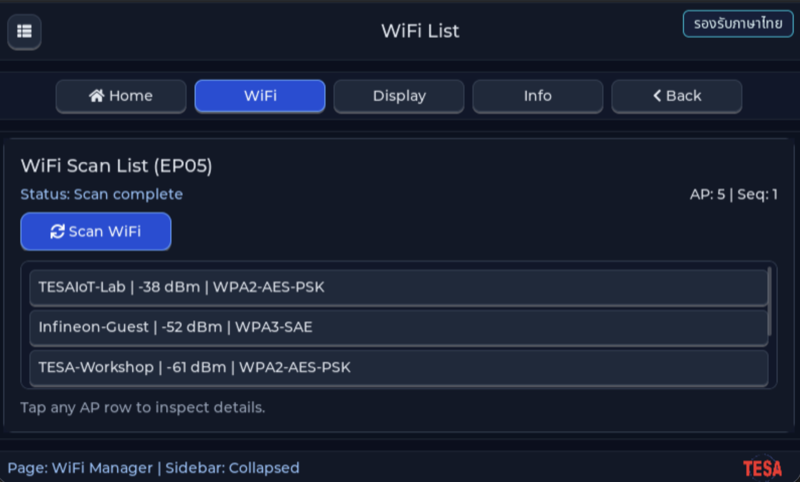
Before reading the code, guess what objects this screen has, and what changes when the user taps it or when a sensor value changes.
Try a change
Section titled “Try a change”- Guess before you change anything: pick one value the example’s README explains in the How section, and write down what you expect to change on the screen or in the log.
- Change and run: build + flash, then compare against your guess. If it does not match, find which part you misunderstood.
- Extend: add one thing the example does not yet have, and keep a photo or video in your portfolio.
Check your understanding
Section titled “Check your understanding”- Which is better, an RSSI of -45 dBm or -85 dBm?
- Why should you not scan for Wi-Fi directly inside a button’s callback?
- What does the security type in the list tell the user?
The answers are in the example’s README and in the code. If you cannot answer one, go back and read the Why / What / How section again.
References
Section titled “References”- Episode README · code folder · commit
9a8e3ed - Open this example on the Developer Hub
- The code belongs to the Developer Hub and is referenced by link, not copied into this repository
Review questions
Answer on your own first, then open the answer.
-
Why does example_main() call wifi_scan_service_preinit() before building the UI? (Objective 1)
- เพื่อสแกนเครือข่ายรอบแรกตั้งแต่ boot
- เพื่อเชื่อมต่อ AP ที่บันทึกไว้
- เพื่อเตรียม SDIO และ cy_wcm_init() ซึ่งกินเวลาไว้ตั้งแต่ boot ผู้ใช้จะไม่เห็นจอค้างตอนแตะ Scan ครั้งแรก ถ้าล้มเหลวก็แค่ log และ UI ยังเปิดได้
- เพราะ LVGL ต้องใช้ Wi-Fi ก่อนวาดจอ
Show answer
Answer: C. เพื่อเตรียม SDIO และ cy_wcm_init() ซึ่งกินเวลาไว้ตั้งแต่ boot ผู้ใช้จะไม่เห็นจอค้างตอนแตะ Scan ครั้งแรก ถ้าล้มเหลวก็แค่ log และ UI ยังเปิดได้
preinit เรียก wifi_scan_radio_init_once() ที่ตั้ง SDIO host แล้ว cy_wcm_init() แบบ STA ครั้งเดียว (มี mutex กันเรียกซ้อน) โดยยังไม่สแกนจริง ถ้า preinit ล้ม wifi_scan_service_start() จะลอง init อีกครั้งตอนผู้ใช้กด Scan
-
wifi_scan_callback() is called by cy_wcm from a WCM task, not the LVGL task. How does the code hand results to the UI safely? (Objective 2)
- callback เรียก lv_label_set_text() ตรง ๆ เพราะเร็วพอ
- callback คัดลอกข้อมูล AP ลง array ของ service ภายใน critical section และตั้งธง scan_done_pending ส่วน lv_timer ทุก 150 ms ใน LVGL context เรียก wifi_scan_service_process() แล้ววาดรายการใหม่
- callback สร้าง FreeRTOS task ใหม่เพื่อวาดรายการ
- UI หยุด LVGL ชั่วคราวระหว่างที่ callback ทำงาน
Show answer
Answer: B. callback คัดลอกข้อมูล AP ลง array ของ service ภายใน critical section และตั้งธง scan_done_pending ส่วน lv_timer ทุก 150 ms ใน LVGL context เรียก wifi_scan_service_process() แล้ววาดรายการใหม่
ในโค้ดที่ commit นี้ callback ไม่แตะ LVGL เลย มันเขียนแค่ข้อมูลและธงภายใน taskENTER_CRITICAL() ส่วน ui_wifi_poll_timer_cb() ที่สร้างด้วย lv_timer_create(…, UI_WIFI_POLL_MS = 150) เป็นผู้ตรวจธงแล้วเรียก ui_wifi_render_ap_list() ใน LVGL context ซึ่งเป็นที่เดียวที่เรียก LVGL ได้อย่างปลอดภัย
-
The user taps Scan again while the first scan is still running. What happens? (Objective 2)
- ครั้งที่สองถูกเพิกเฉย: service->scanning ยังเป็น true wifi_scan_service_start() จึงคืน false และ UI log ว่า SCAN_IGNORED busy (ปุ่มยังถูก disable ระหว่างสแกนด้วย)
- เริ่มสแกนใหม่ซ้อนกัน ผลจึงซ้ำสองชุด
- ยกเลิกการสแกนแรกแล้วเริ่มใหม่
- บอร์ดรีเซ็ตเพราะ cy_wcm ถูกเรียกซ้อน
Show answer
Answer: A. ครั้งที่สองถูกเพิกเฉย: service->scanning ยังเป็น true wifi_scan_service_start() จึงคืน false และ UI log ว่า SCAN_IGNORED busy (ปุ่มยังถูก disable ระหว่างสแกนด้วย)
wifi_scan_service_start() ตรวจ service->scanning ก่อนเสมอ และ ui_wifi_scan_click_cb() ใส่ LV_STATE_DISABLED ให้ปุ่มจนกว่า poll timer จะเห็นว่าสแกนจบ การกันซ้อนไว้ที่ service ทำให้ปลอดภัยแม้ฝั่ง UI จะลืม disable ปุ่ม
-
A scan finds Cafe at -85 dBm, Lab at -45 dBm and Office at -67 dBm. Put them in the order they appear in the list, top to bottom. (Objective 3)
- Cafe -85 dBm
- Lab -45 dBm
- Office -67 dBm
Show answer
Correct order: B. Lab -45 dBm → C. Office -67 dBm → A. Cafe -85 dBm
เมื่อสแกนจบ callback เรียก wifi_scan_sort_by_rssi_desc() ซึ่งเรียงจาก RSSI มากไปน้อย ค่า dBm เป็นลบ ยิ่งใกล้ 0 ยิ่งแรง -45 dBm จึงแรงที่สุดและน่าเลือกเชื่อมต่อที่สุด ส่วน -85 dBm อ่อนมาก อาจต่อได้แต่หลุดง่ายและช้า
-
Which statements about the list this example produces are true? (choose all that apply) (Objective 1)
- ถ้ามี AP รอบตัว 20 ตัว รายการเก็บได้สูงสุด 12 ตัว และเป็น 12 ตัวแรกที่การสแกนรายงาน ไม่ใช่ 12 ตัวที่แรงที่สุดเสมอ
- AP ที่ซ่อน SSID แสดงเป็น <hidden>
- รายการเรียงตามตัวอักษรของ SSID
- SSID ที่มีไบต์นอกช่วง ASCII ที่พิมพ์ได้ เช่นชื่อภาษาไทย จะไม่ถูกใส่ในรายการ
- AP แบบ OPEN ถูกกรองออกเพื่อความปลอดภัย
Show answer
Answer: A. ถ้ามี AP รอบตัว 20 ตัว รายการเก็บได้สูงสุด 12 ตัว และเป็น 12 ตัวแรกที่การสแกนรายงาน ไม่ใช่ 12 ตัวที่แรงที่สุดเสมอ · B. AP ที่ซ่อน SSID แสดงเป็น <hidden> · D. SSID ที่มีไบต์นอกช่วง ASCII ที่พิมพ์ได้ เช่นชื่อภาษาไทย จะไม่ถูกใส่ในรายการ
callback เพิ่ม AP เฉพาะเมื่อ ap_count < WIFI_SCAN_MAX_APS (12) และ wifi_scan_is_ssid_printable() ผ่าน ซึ่งยอมเฉพาะไบต์ 0x20–0x7E การเรียงตาม RSSI เกิดตอนสแกนจบ จึงเรียงเฉพาะ 12 ตัวที่เก็บได้ SSID ว่างถูกแทนด้วย <hidden> และชนิด security ทุกแบบรวมถึง OPEN ถูกแสดงเป็นข้อความ
Cite this lesson
If you teach from this lesson or reuse it in slides or documents, credit it with the text below. If you changed it, add (adapted) after the title.
"Wi-Fi scan and a network list" from TESA Open Knowledge by the Thai Embedded Systems Association (TESA), https://github.com/tesaiot/tesa-qualification-program, licensed under CC BY-NC 4.0
Thai attribution: "สแกน Wi-Fi และแสดงรายการเครือข่าย" จาก TESA Open Knowledge โดยสมาคมสมองกลฝังตัวไทย (Thai Embedded Systems Association: TESA) https://github.com/tesaiot/tesa-qualification-program สัญญาอนุญาต CC BY-NC 4.0
This lesson adapts the source below; keep its credit too.
https://github.com/tesaiot/developer-hub/blob/9a8e3ed1d813bfd67fabf6b7ac15c6ff9750b465/hmi_ep05_wifi_list · Code stays in the Developer Hub and is linked at pinned commits, never copied: the episodes, practice codes and main-branch examples are Apache-2.0; the master template and the OPTIGA client carry Infineon/Cypress EULAs.
TESA Open Knowledge · © 2026 สมาคมสมองกลฝังตัวไทย (TESA) · CC BY-NC 4.0
Content is licensed CC BY-NC 4.0. Reuse it non-commercially and credit the Thai Embedded Systems Association (TESA) every time. · How to cite TESA