Navigation shell: menu bar, pages and page routing
Objectives
Section titled “Objectives”- Build navigation with lv_menu that creates every page once and switches the visible page from the menu
- Keep layout, navigation logic and pages apart, following the episode file structure
- Add one page to the menu without changing the existing pages
Concepts
Section titled “Concepts”The real code uses the lv_menu widget, not four nested containers as the upstream README describes
Section titled “The real code uses the lv_menu widget, not four nested containers as the upstream README describes”The episode’s README on the Developer Hub says, in its How section, that the code creates four empty containers
(header/nav/stage/footer) and calls lv_obj_clean() plus rebuilds content every time the page switches. The
actual code at commit 9a8e3ed instead uses lv_menu, LVGL’s ready-made widget built specifically for
multi-page navigation — every page is created up front with lv_menu_page_create(menu, title), and switching is
done purely with lv_menu_set_page(menu, target_page), with no widget ever deleted or recreated. This lesson
follows the actual code, not the upstream README’s How narrative.
The screen layout: a fixed header, a fixed top nav, lv_menu in the middle, and a footer
Section titled “The screen layout: a fixed header, a fixed top nav, lv_menu in the middle, and a footer”ui_menu_navigation_create() lays the screen out as a vertical column (LV_FLEX_FLOW_COLUMN): a header (a
settings icon plus a title), a top nav row (Home/WiFi/Display/Info/Back buttons that are “always visible for
simple navigation in class”, per the source’s own comment), a content area holding the lv_menu, and a footer
status strip. lv_menu itself is configured with lv_menu_set_mode_header(menu, LV_MENU_HEADER_TOP_FIXED) and
lv_menu_set_mode_root_back_button(menu, LV_MENU_ROOT_BACK_BUTTON_DISABLED), and both of its own internal headers
(lv_menu_get_main_header(), lv_menu_get_sidebar_header()) are hidden with LV_OBJ_FLAG_HIDDEN, because the
header and top nav we drew ourselves already do that job — forget to hide them and you get two headers stacked on
top of each other.
Two entry points into the same destination: top nav and sidebar
Section titled “Two entry points into the same destination: top nav and sidebar”Besides the always-visible top nav, the code also builds a hidden sidebar page (“Navigate”) that opens and
closes via the settings icon in the header’s corner. The sidebar links to the same three destinations as the top
nav (WiFi/Display/Device) — each entry point calls a different callback (for example, the top nav’s WiFi button
and the sidebar’s WiFi link both call menu_nav_logic_wifi_btn_event_cb), but both ultimately call the exact
same menu_nav_set_page(). Same destination, two doors in.
Active-state highlighting must stay in sync in two places at once
Section titled “Active-state highlighting must stay in sync in two places at once”Because there are two entry points (top nav and sidebar), every page change must have
menu_nav_apply_active_state() update the style of both the top nav button and the sidebar link at once,
comparing against state->current_page. Update only one side and a user who switches pages from the sidebar will
see the top nav button still highlighting the previous page (or vice versa).
Why the page switch is deferred with lv_async_call
Section titled “Why the page switch is deferred with lv_async_call”The most subtle part of this episode is menu_nav_queue_page_switch(), which does not call
lv_menu_set_page() immediately inside the callback. It stores pending_page first, then calls
lv_async_call(menu_nav_async_apply_pending_page, state). The source comment states the reason directly: “Always
defer actual page switching to avoid lv_menu state race after sidebar transitions.” lv_async_call() hands a
function to LVGL to run on the next tick instead of running it right there — every top nav button calls
menu_nav_set_page(state, page_id, true), which may collapse the sidebar (collapse_sidebar = true) before
switching pages. Switching the page synchronously inside the very function that just told the sidebar to collapse
would collide with lv_menu’s own internal layout state, which has not finished adjusting yet. Deferring by one
tick lets the sidebar transition finish first, then switches the page.
The footer status label is printf-style through lv_label_set_text_fmt
Section titled “The footer status label is printf-style through lv_label_set_text_fmt”menu_nav_update_status() calls lv_label_set_text_fmt(state->status_label, "Page: %s | Sidebar: %s", ...) every
time after a page switch or a sidebar toggle, so the footer is the single place that reports both pieces of state
together.
Worked example
Section titled “Worked example”This episode’s code lives on the Developer Hub (pinned to commit 9a8e3ed) — read the Why section of the
upstream README
to understand the episode’s purpose, but the excerpts below are copied from the actual files so they match
what really builds (Apache-2.0, tesaiot/developer-hub, same commit).
nav/menu_nav_logic.c — deferring the page switch with lv_async_call:
static void menu_nav_async_apply_pending_page(void *user_data){    menu_nav_state_t *state = (menu_nav_state_t *)user_data;
    if(state == NULL || !state->page_switch_pending) {        return;    }
    state->page_switch_pending = false;    menu_nav_apply_page_now(state, state->pending_page);}
static void menu_nav_queue_page_switch(menu_nav_state_t *state, menu_nav_page_id_t page_id){    if(state == NULL || state->menu == NULL) {        return;    }
    state->pending_page = page_id;
    if(!state->page_switch_pending) {        state->page_switch_pending = true;        lv_async_call(menu_nav_async_apply_pending_page, state);    }}
Hiding lv_menu’s own two internal headers, because the hand-drawn header/top nav already do that job:
lv_obj_t *main_header = lv_menu_get_main_header(state->menu);if(main_header != NULL) {    lv_obj_add_flag(main_header, LV_OBJ_FLAG_HIDDEN);}
lv_obj_t *sidebar_header = lv_menu_get_sidebar_header(state->menu);if(sidebar_header != NULL) {    lv_obj_add_flag(sidebar_header, LV_OBJ_FLAG_HIDDEN);}
nav/ui_menu_navigation.c — creating lv_menu and all four pages up front:
lv_obj_t *menu = lv_menu_create(content);lv_menu_set_mode_header(menu, LV_MENU_HEADER_TOP_FIXED);lv_menu_set_mode_root_back_button(menu, LV_MENU_ROOT_BACK_BUTTON_DISABLED);
lv_obj_t *home_page = create_full_content_page(menu, "Home", "Home", ...);lv_obj_t *page_wifi = create_full_content_page(menu, "WiFi Manager", "WiFi Manager", ...);lv_obj_t *page_display = create_full_content_page(menu, "Display Setting", "Display Setting", ...);lv_obj_t *page_device = create_full_content_page(menu, "Device Info", "Device Info", ...);
lv_menu_set_page(menu, home_page);main_example.c,nav/menu_nav_logic.handnav/ui_menu_layout.h(every component’s layout constants) — see the full folder athmi_ep04_menu_navigation/nav/
Common mistakes
Section titled “Common mistakes”- Trusting the upstream README’s How section completely — it says the code uses header/nav/stage/footer
containers with
lv_obj_clean()plus rebuild on every page switch, but the real code useslv_menu, which creates every page up front and only ever callslv_menu_set_page()— no clean/rebuild at all. When the code and the prose disagree, trust the code. - Forgetting to hide
lv_menu’s own internal headers — withoutlv_obj_add_flag(main_header, LV_OBJ_FLAG_HIDDEN)(and the sidebar one), you get two headers stacked on top of each other, becauselv_menuships its own. - Calling
lv_menu_set_page()right after toggling the sidebar without going throughlv_async_call— this collides withlv_menu’s own internal layout state, which has not finished adjusting after the sidebar transition, producing unpredictable behavior. - Updating the active-state style on only one side (top nav or sidebar) — both must be updated together every time, because there are two entry points into the same destination.
Build and flash
Section titled “Build and flash”# In the master template folder (see lesson 1.1)# 1) Delete the old episode's files in proj_cm55/apps/# 2) Copy all of this episode's files into proj_cm55/apps/make buildmake program # flash through KitProg3Or open this example on the Developer Hub and flash the ready-made firmware.
See it work first
Section titled “See it work first”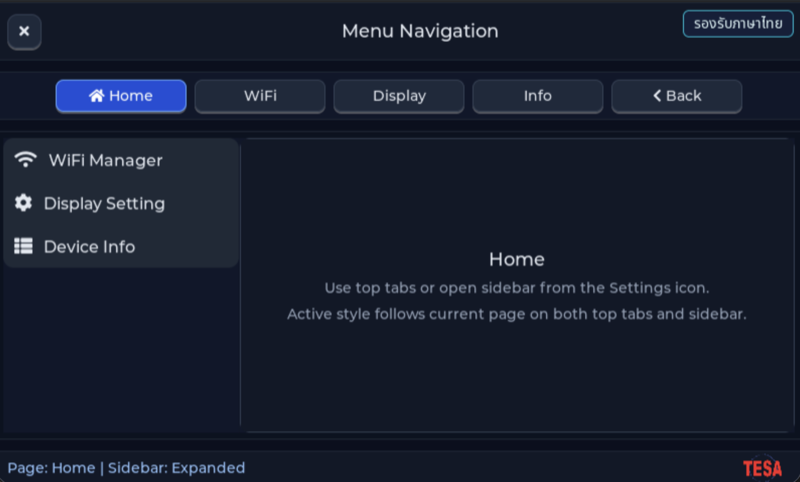
Before reading the code, guess what objects this screen has, and what changes when the user taps it or when a sensor value changes.
Try a change
Section titled “Try a change”- Guess before you change anything: pick one value the example’s README explains in the How section, and write down what you expect to change on the screen or in the log.
- Change and run: build + flash, then compare against your guess. If it does not match, find which part you misunderstood.
- Extend: add one thing the example does not yet have, and keep a photo or video in your portfolio.
Check your understanding
Section titled “Check your understanding”- How does lv_menu keep all the pages, and what are the pros and cons of building every page just once?
- If you add a new page, which files must you change?
- If you instead created a new page every time the menu switched, without deleting the old one, what would happen to memory?
The answers are in the example’s README and in the code. If you cannot answer one, go back and read the Why / What / How section again.
References
Section titled “References”- Episode README · code folder · commit
9a8e3ed - Open this example on the Developer Hub
- The code belongs to the Developer Hub and is referenced by link, not copied into this repository
Review questions
Answer on your own first, then open the answer.
-
In this episode's code (commit 9a8e3ed), how does the centre content change when the WiFi tab is tapped? (Objective 1)
- ลบ child ทั้งหมดของ stage ด้วย lv_obj_clean() แล้วสร้างหน้าใหม่
- สร้างหน้าใหม่ทับหน้าเดิมโดยไม่ลบ
- หน้าทั้งสี่ถูกสร้างไว้ตั้งแต่เริ่มด้วย lv_menu_page_create() การแตะแท็บเพียงสั่ง lv_menu_set_page() ให้แสดงหน้าที่มีอยู่แล้ว
- ซ่อนหน้าอื่นด้วย LV_OBJ_FLAG_HIDDEN ทีละหน้าใน callback ของปุ่ม
Show answer
Answer: C. หน้าทั้งสี่ถูกสร้างไว้ตั้งแต่เริ่มด้วย lv_menu_page_create() การแตะแท็บเพียงสั่ง lv_menu_set_page() ให้แสดงหน้าที่มีอยู่แล้ว
ui_menu_navigation.c สร้าง home_page, page_wifi, page_display และ page_device ครั้งเดียว แล้ว menu_nav_apply_page_now() เรียก lv_menu_set_page() กับหน้าที่เลือก README ของ episode ยังบรรยายแบบ stage + lv_obj_clean() ซึ่งไม่ตรงกับโค้ดที่ commit นี้ ให้ยึดโค้ดเป็นหลัก ข้อดีคือค่าที่ผู้ใช้กรอกในหน้าไม่หายเมื่อสลับไปมา ข้อเสียคือทุกหน้ากินหน่วยความจำตลอดเวลา
-
Why don't the tab callbacks call lv_menu_set_page() directly, and go through lv_async_call() instead? (Objective 1)
- เพราะ lv_menu_set_page() ใช้ได้เฉพาะใน FreeRTOS task อื่น
- เพื่อเลื่อนการสลับหน้าไปทำหลัง event ปัจจุบันจบ (รอบ LVGL ถัดไป) หลังพับ sidebar แล้ว กันสถานะของ lv_menu ชนกัน ตามที่ comment ในโค้ดเขียนไว้
- เพื่อให้การสลับหน้ามี animation
- เพื่อให้สลับหน้าได้แม้ LVGL ยังไม่ถูก init
Show answer
Answer: B. เพื่อเลื่อนการสลับหน้าไปทำหลัง event ปัจจุบันจบ (รอบ LVGL ถัดไป) หลังพับ sidebar แล้ว กันสถานะของ lv_menu ชนกัน ตามที่ comment ในโค้ดเขียนไว้
menu_nav_set_page() พับ sidebar ก่อน แล้ว menu_nav_queue_page_switch() เก็บ pending_page และเรียก lv_async_call() comment ระบุว่า Always defer actual page switching to avoid lv_menu state race after sidebar transitions งานที่ถูกเลื่อนยังทำใน LVGL context เดิม แค่ย้ายไปรอบถัดไป
-
The user taps WiFi and then Display immediately, before LVGL runs the async call. Which page ends up shown? (Objective 1)
- WiFi เพราะคำสั่งแรกชนะ
- WiFi แล้วสลับเป็น Display (สลับสองครั้ง)
- Home เพราะคำสั่งที่ซ้อนกันถูกยกเลิก
- Display โดยสลับครั้งเดียว เพราะมี async call ค้างได้ตัวเดียว และ pending_page ถูกเขียนทับด้วยค่าล่าสุด
Show answer
Answer: D. Display โดยสลับครั้งเดียว เพราะมี async call ค้างได้ตัวเดียว และ pending_page ถูกเขียนทับด้วยค่าล่าสุด
menu_nav_queue_page_switch() ตั้ง pending_page ทุกครั้ง แต่เรียก lv_async_call() เฉพาะเมื่อ page_switch_pending ยังเป็น false เมื่อ async call ทำงานจึงอ่าน pending_page ค่าล่าสุดแล้วสลับครั้งเดียว
-
The team wants a new colour for the active tab (top bar and sidebar) without touching the page-switch logic. Where do they change it? (Objective 2)
- ค่าคงที่สีใน ui_menu_layout.h เช่น UI_MENU_NAV_ACTIVE_BG_HEX ซึ่งฟังก์ชันจัดสไตล์ใน menu_nav_logic.c อ่านไปใช้
- ใน callback ของแต่ละแท็บ
- ใน main.c ของ master template
- ใน lv_conf.h
Show answer
Answer: A. ค่าคงที่สีใน ui_menu_layout.h เช่น UI_MENU_NAV_ACTIVE_BG_HEX ซึ่งฟังก์ชันจัดสไตล์ใน menu_nav_logic.c อ่านไปใช้
menu_nav_set_top_tab_style() และ menu_nav_set_sidebar_link_style() อ่านสีจาก #define ใน ui_menu_layout.h การรวมค่าคงที่ของ layout ไว้ที่เดียวทำให้เปลี่ยนธีมได้โดยไม่แตะลำดับการสลับหน้า
-
You add a fifth page, ‘Sensors’, without changing the existing pages. What must you do? (choose all that apply) (Objective 3)
- เพิ่มค่า MENU_NAV_PAGE_SENSORS ใน enum และเพิ่ม case ใน menu_nav_get_page_obj() กับ menu_nav_page_name()
- สร้างหน้าด้วย create_full_content_page(menu, …) แล้วเก็บ pointer ไว้ใน state
- เพิ่มปุ่มแท็บพร้อม callback ที่เรียก menu_nav_set_page(state, MENU_NAV_PAGE_SENSORS, true) และให้ menu_nav_apply_active_state() ไฮไลต์ปุ่มนี้ด้วย
- เรียก lv_obj_clean() กับหน้าเดิมทุกหน้าก่อนแสดงหน้า Sensors
- แก้ main.c ของ master template ให้รู้จักหน้าใหม่
Show answer
Answer: A. เพิ่มค่า MENU_NAV_PAGE_SENSORS ใน enum และเพิ่ม case ใน menu_nav_get_page_obj() กับ menu_nav_page_name() · B. สร้างหน้าด้วย create_full_content_page(menu, …) แล้วเก็บ pointer ไว้ใน state · C. เพิ่มปุ่มแท็บพร้อม callback ที่เรียก menu_nav_set_page(state, MENU_NAV_PAGE_SENSORS, true) และให้ menu_nav_apply_active_state() ไฮไลต์ปุ่มนี้ด้วย
โครงของ episode ใช้ enum ของหน้าเป็นศูนย์กลาง หน้าใหม่ต้องมีค่า enum, object ของหน้า, ทางแมปจาก enum ไปยัง object และปุ่มที่สั่งสลับ โดยไม่ต้องแตะเนื้อหาหน้าอื่น lv_menu แสดงทีละหน้าอยู่แล้วจึงไม่ต้องลบหน้าเดิม และ main.c ของ master ไม่รู้จักหน้าใดของ episode
Cite this lesson
If you teach from this lesson or reuse it in slides or documents, credit it with the text below. If you changed it, add (adapted) after the title.
"Navigation shell: menu bar, pages and page routing" from TESA Open Knowledge by the Thai Embedded Systems Association (TESA), https://github.com/tesaiot/tesa-qualification-program, licensed under CC BY-NC 4.0
Thai attribution: "โครง navigation: แถบเมนู หน้า และการสลับหน้า" จาก TESA Open Knowledge โดยสมาคมสมองกลฝังตัวไทย (Thai Embedded Systems Association: TESA) https://github.com/tesaiot/tesa-qualification-program สัญญาอนุญาต CC BY-NC 4.0
This lesson adapts the source below; keep its credit too.
https://github.com/tesaiot/developer-hub/blob/9a8e3ed1d813bfd67fabf6b7ac15c6ff9750b465/hmi_ep04_menu_navigation · Code stays in the Developer Hub and is linked at pinned commits, never copied: the episodes, practice codes and main-branch examples are Apache-2.0; the master template and the OPTIGA client carry Infineon/Cypress EULAs.
TESA Open Knowledge · © 2026 สมาคมสมองกลฝังตัวไทย (TESA) · CC BY-NC 4.0
Content is licensed CC BY-NC 4.0. Reuse it non-commercially and credit the Thai Embedded Systems Association (TESA) every time. · How to cite TESA