Values out, commands back: MQTT on a public broker
Module 1 — Existing UI-based Application · Slides: slides.md · Module overview · Course page
Publish real knob and tilt values from the board to a public MQTT broker for your team’s web page to read, then take commands from that page back to drive the buzzer and LEDs on the board, trusting the sender on no line at all.
Objectives
Section titled “Objectives”By the end of this lesson you will be able to:
- Run 05_value_leaves_the_board.py until all three steps of the ladder (WiFi has an IP, broker connected, publishing) are green and the knob and az values on your team’s web page move with your hand, or, if it fails, tell from the screen which step it stopped at and why
- Explain the four rules of a public broker (a unique topic, never subscribe to everything with #, no secrets, a client_id that never collides) and what happens when each one is broken
- Run 06_command_comes_back.py and trigger beep and led from the web page, and explain why get_message() must be polled often and why non-JSON messages or LED numbers the board does not have must end as text on the screen, not a crash
- Complete is_usable() in 03_your_link_rule.py so it checks both “connected” and “has a usable IP” until “your rule reported” equals “should report” (2), and explain which problem in the tape is missed when NEED becomes 5
Before you start
Section titled “Before you start”You must already have file 01 from lesson 1.4 working: the board can join your team’s hotspot and has an IP address. Also set up a value for TEAM first: lowercase English letters and digits, 4–16 characters, unique to you —
for example a nickname followed by a random 4-digit number (nok4821) — because other learners are also using the same public broker and the same set of topics (if you are learning in a group, use the team number your organiser hands out).
In files 05 and 06, edit the top three lines WIFI_SSID, WIFI_PASS, TEAM (BROKER is already set). If you forget to edit TEAM, the file stops at the very first step and says so on screen.
On a laptop or phone, open the my_first_reader.html page and add ?team= to the end of the link, followed by the same code as TEAM — nothing to install.
(The page published on the AIC website only accepts the teamNN shape; if you are using your own code, download this repo’s own shared/web/my_first_reader.html and open that instead.)
A fact worth knowing beforehand: the round-trip time to the broker was measured from the educator’s Mac on the desk (188–191 ms), but nobody has yet run files 05 and 06 on the board with this broker, and it is not yet known whether your organisation’s network lets ports 1883 and 8884 out.
- Equipment: an Eva Kit or TESAIoT Dev Kit board with the BENTO MicroPython firmware installed, or the BENTO Emulator in BENTO IDE (the Emulator at ide.tesaiot.dev can now reach the real broker over wss 8884; it appends
-emuto its own client_id so it never kicks your team’s real board off, and if it cannot connect within 5 seconds it falls back to its built-in simulated broker and says so in the Console) - Before this: Lesson 1.4 — Leaving the desk: the first WiFi connection
See it work first
Section titled “See it work first”Run 05_value_leaves_the_board.py and watch the three-step ladder on the board’s screen turn from grey to green, then turn to your team’s web page.
Have one person turn the knob and another tilt the board, and watch the knob and az numbers on the web page follow along. This is a real value that just left this desk, not a random number anyone could argue with.
Note the n at which the web page saw its first message. If any step turns red, read the reason on screen and write it down — that outcome is a valid result too.
Concepts
Section titled “Concepts”Today’s messages travel two ways over two different ports. The board speaks plain MQTT on port 1883, but a web page cannot open a raw TCP socket, so it speaks MQTT over WebSocket instead,
at wss://broker.hivemq.com:8884/mqtt. Both directions publish to the same set of topics; the broker forwards them regardless of which way each side came in.
This broker is public with no password — anyone who knows the topic name can read and write instantly, so there are four rules: the topic must be unique to you (bento-aiot/<team>/telemetry and .../cmd),
never subscribe to #, because that means asking for every message in the world, never send a secret, because every message travels unencrypted, and client_id can collide with anyone on the whole internet,
and when it collides the broker kicks the old one off with no warning message. That is why the file sets DEVICE_ID = "bento-aiot-" + TEAM.
05 is a three-step ladder that must never be reordered: WiFi must have an IP first, then mqtt.connect(BROKER, port=1883, client_id=DEVICE_ID, keepalive=60) can introduce the board to the broker,
and only then can mqtt.publish(TOPIC, body) send anything. Whichever step fails turns red with a reason, and the program then ends politely instead of hanging silently — this is the shape a real front-line program must be written in.
The value sent is a real one from sensors.snapshot() (the knob, and the z-axis acceleration from the BMI270); it checks with in before picking out a key, and uses -1 and -99 to mean “could not read this round”.
json.dumps() turns our dict into text every language can read. There are two traps: the argument name is username=, not user= (get it wrong and you get an immediate TypeError),
and when the link drops, publish() does not return False — it raises OSError, so you must catch both. The firmware cannot publish with retain, so a web page that opens late only sees the next message onward, which is why the file sends 60 messages, 2 seconds apart.
Watch out for a network that needs a browser login: wifi.connect() returns True and gets a normal IP address, but the clock in the top bar never appears, and mqtt.connect() never reaches the broker.
The WiFi icon in the top bar answers “can it join the network”, while the clock that follows answers “can it actually reach the internet”.
06 completes the loop with a way back. mqtt.subscribe(TOPIC_CMD) must always come after connect(), and must be repeated if the link drops and reconnects. mqtt.get_message() never blocks;
it returns None right away when nothing has arrived, so the loop must ask again often (POLL_MS = 100), because the inbox has room for only one message — a message that arrives before we pick up the old one overwrites it, it is not queued.
This is the answer to the “everyone sends a message at once” game from lesson 1.4. The message you get back is (topic, payload), where payload is bytes and must be .decode()d before json.loads().
The board understands three commands, beep, led, say. Half of this file is about not trusting the sender: a message that is not JSON, JSON that is not an object, an LED number the board does not have,
and text too long for the label — all of these must end as text on the screen, and before the file ends it always turns every light off. 05 paired with 06 closes the whole loop; our job is not about radios or protocols,
because the firmware already handles all of that — our job is deciding what to send out, and which commands to accept back.
03 is the practice companion to 02 in lesson 1.4, but without a real network connection. It replays a 24-round tape of link checks recorded from a real board, so running it again and again gives the same result every time — a rule you cannot test repeatably is a rule you do not yet know is right.
A usable link must be connected and have a usable IP address; the "0.0.0.0" trap from file 01 comes back as a problem here, because a link with no IP is a link publish() can never reach anywhere with.
The code reports when bad_streak == NEED (using ==, not >=, so you get exactly one line at the moment things start going wrong). 07 is optional further reading: the settings store of tesaiot lives on flash and survives a power cycle,
but tesaiot.connect() always connects over TLS on port 8883 or 8884; it never reads the port key and never blocks. The value it returns means “the command was accepted”, not “connected already” — so today it cannot reach broker.hivemq.com.
Worked example
Section titled “Worked example”The slides continue on from lesson 1.4 in this order: 05_value_leaves_the_board.py (about 25 minutes) → 06_command_comes_back.py (about 25 minutes) → 03_your_link_rule.py (about 20 minutes).
07_platform_in_one_call.py is optional further reading. The help gets smaller step by step: 05 and 06 are the full real thing, while 03 and 07 are up to you.
Before running 06 with POLL_MS = 3000, predict first how many messages will show up if you press the button three times in quick succession within one second, then count and compare.
In 03, the board’s own screen is the answer key — edit and rerun until the two numbers match. You do not need to wait for the educator. If your team’s web page does not work, you can use HiveMQ’s own test page instead: set host broker.hivemq.com, port 8884,
turn SSL on, and subscribe to bento-aiot/<your team>/#. Use the backup broker test.mosquitto.org only when the educator announces it.
| File | What this file teaches |
|---|---|
| examples/03_your_link_rule.py | This file runs, but it cannot see the second kind of problem |
| examples/05_value_leaves_the_board.py | A value measured on this desk shows up on someone else’s machine |
| examples/06_command_comes_back.py | Someone else types a command from far away, and a light on our desk turns on |
| examples/07_platform_in_one_call.py | The board remembers on its own where to connect, even after a power cycle |
The slides for this lesson also refer to files that live in other lessons:
- m01-ui-application/l04-wifi-first-connect/examples/01_wifi_first_connect.py — take the board online for the first time, then read its own address
- m01-ui-application/l04-wifi-first-connect/examples/02_link_uptime.py — “connected” and “still connected” are not the same question
- m01-ui-application/l04-wifi-first-connect/examples/04_scan_the_room.py — have the board listen to the whole room, and say who is where
- shared/web/my_first_reader.html — reads values from the board
Screens from the BENTO Emulator for this lesson’s examples (click a file name to open the code)
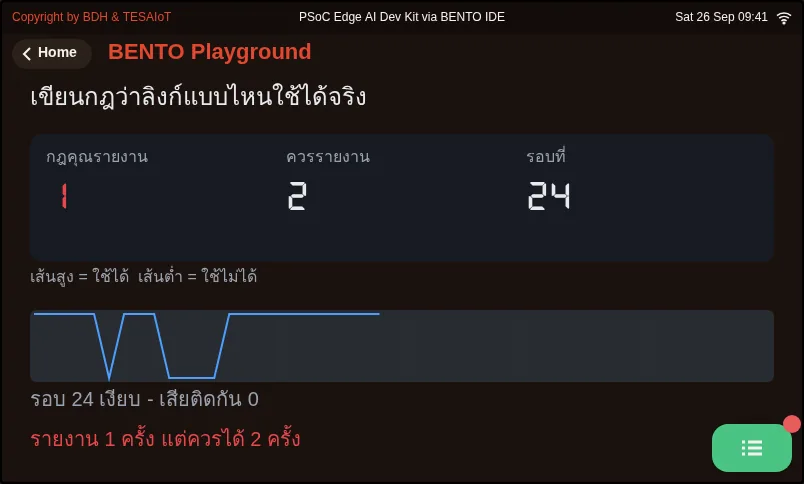
03_your_link_rule.py This file runs, but it cannot see the second kind of problem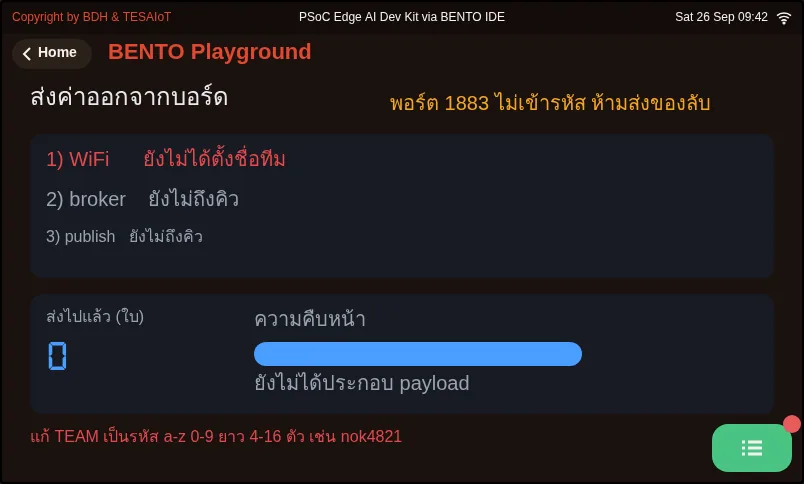
05_value_leaves_the_board.py A value measured on this desk shows up on someone else's machine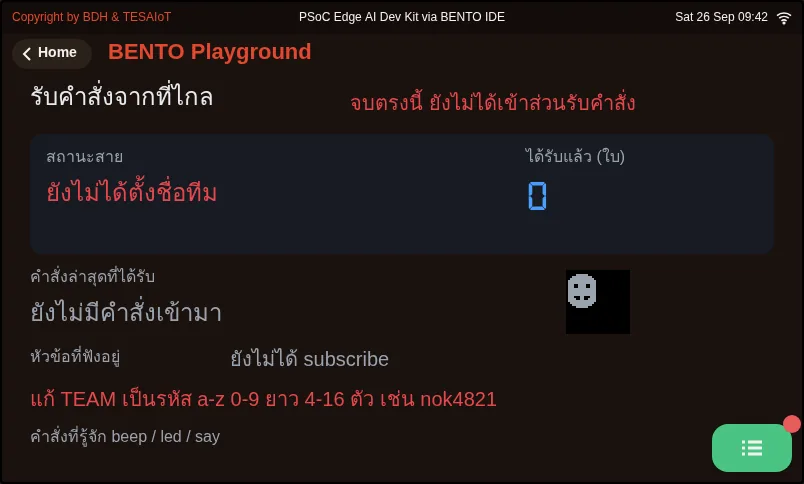
06_command_comes_back.py Someone else types a command from far away, and a light on our desk turns on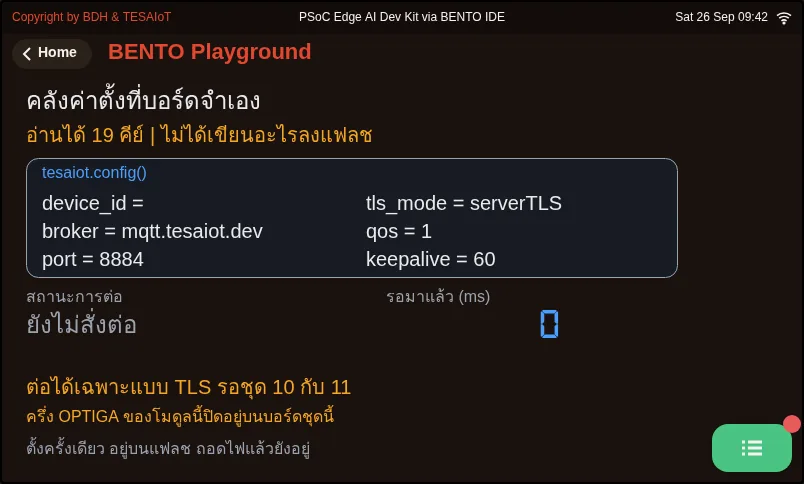
07_platform_in_one_call.py The board remembers on its own where to connect, even after a power cycleCheck your understanding
Section titled “Check your understanding”The same questions are in quiz.yaml for automatic marking.
-
The board connects to an organisation’s WiFi that needs a browser login. Step 1 of file 05 turns green with an IP address, but step 2 turns red, saying it cannot connect to the broker. What is the most likely cause? (choose one · objective 1)
- A) The board has an IP address but cannot actually reach the internet, because there is no browser to click “accept” with, so it never reaches the broker
- B) user= was written instead of username= in mqtt.connect()
- C) It forgot to subscribe to the topic before connecting
- D) The knob value could not be read, so it is -1
Solution
A — A network that needs a login lets connect() return True and get a normal IP address, but the clock never appears and mqtt.connect() never reaches the broker. This is a case of passing the first check but failing the second, which is why every team uses a phone hotspot today.
-
Which statements are correct about using the public broker broker.hivemq.com in this lesson? Choose every correct one. (choose all that apply · objective 2)
- A) Your team’s web page should listen to bento-aiot/team03/#, not a bare #, which is the same as asking for every message in the world
- B) You can put your team’s WiFi password in the payload, because your team’s topic is unique
- C) If your client_id collides with anyone else’s on the same broker, the broker kicks the old one off with no warning message
- D) The broker keeps the latest message for you, so a web page opened later sees the value right away
Solution
A, C — Listen only to your team’s topic, and set a client_id that never collides with anyone on the whole internet. Every message travels unencrypted and anyone who subscribes to the same topic can see it, so you must never send a secret. The firmware cannot publish with retain, so a web page opened late only sees the next message onward.
-
You set POLL_MS = 3000 in file 06, then press the button on the web page three times in quick succession within one second. What is the counter on the board’s screen likely to show? (choose one · objective 3)
- A) All three messages, because the broker queues them for you
- B) Fewer than three, because the inbox has room for only one message, and a message that arrives before we pick up the old one overwrites it
- C) Nothing at all, because get_message() blocks until it times out
- D) The program crashes with OSError from sending too fast
Solution
B — get_message() never blocks and returns None when nothing has arrived. The inbox has room for only one message; a new one is not queued, it overwrites the old one, which is why the loop must ask often, such as the default 100 ms.
-
What does file 06 do to stop a message from a stranger from crashing the program? Choose every correct one. (choose all that apply · objective 3)
- A) Call .decode() on the payload, which is bytes, before handing it to json.loads()
- B) Catch ValueError when the message is not JSON, and show “not JSON” on screen
- C) Check that the LED number n is an integer and within the range this board actually has before calling gpio.led(n)
- D) No checking is needed, because only your team’s own web page knows the cmd topic name
Solution
A, B, C — On a public broker, anyone who knows the topic name can send to it. The sender might make a typo, send something that is not JSON, or command a light that does not exist. Every one of these cases must end as text on screen, not a program crash.
-
Which is_usable(online, ip) makes file 03 report exactly 2 times, matching the tape? (choose one · objective 4)
- A) return online and ip != “0.0.0.0”
- B) return online and ip
- C) return online
- D) return online or ip != “0.0.0.0”
Solution
A — A usable link must be connected and have a usable IP address at the same time. “0.0.0.0” is a non-empty string, so Python treats it as true, which means “and ip” alone would let everything through. You must compare it with “0.0.0.0” directly.
Values out, commands back. Record every result in your learning log.
-
05: all three steps of the ladder turn green; turning the knob or tilting the board movesknoborazon your team’s web page. Note thenat which you saw the first message (if any step is red, note the step and the reason on screen) -
05your turn: agree with a nearby team to temporarily setTEAMto the same value on purpose, run both boards at once, note who gets kicked off and what your side sees, then change it back -
06: press to sound the buzzer and switch LED 0 on and off from the web page; the board beeps and the light follows (if you cannot see LED 0, try the numbers whose names start withRGB_from the sharedmqtt_dashboard.htmlpage) -
06your turn: setPOLL_MS = 3000, press the button three times in quick succession within one second, and count how many messages appear on screen compared with the three actually sent -
03: completeis_usable()until “your rule reported” equals 2, matching “should report”, then changeNEEDto 5 and write down which stretch of the tape gets missed - (optional further reading)
07: run it withPLATFORM_BROKERleft empty, note theportandtls_modethe screen shows, and explain why thatportmight not be the portconnect()actually uses
Going further
Section titled “Going further”Lesson 1.6 is module 1’s closing lab: take a real value off the board using your team’s practice file, then wrap up everything the module has covered.
The .../event topic starts being used in lessons 2.1–2.3, and the access-control and encryption a public broker does not offer waits in lessons 4.4–4.6 and 4.7–4.9.
Next lesson: Lesson 1.6 — Hands-on: a real value leaves the board, module 1 wrap-up
Reflect
Section titled “Reflect”- In your own work, what values should be sent out for others to see, and what must never leave the board at all until it is encrypted?
- Anyone can publish to the
cmdtopic. What kind of command should your board never obey, even if it arrives as perfectly valid JSON? - What is the difference between “connected” and “able to send data” in your own system, and does your screen show viewers these as two separate things yet?
Review questions
Answer on your own first, then open the answer.
-
The board joins an organisation WiFi that requires a web login. Step 1 of file 05 turns green with an IP, but step 2 turns red saying the broker is unreachable. What is the most likely cause? (Objective 1)
- บอร์ดได้เลข IP แต่ออกอินเทอร์เน็ตไม่ได้ เพราะไม่มีเบราว์เซอร์ให้กดยอมรับ จึงไปไม่ถึง broker
- เขียน user= แทน username= ใน mqtt.connect()
- ลืม subscribe หัวข้อก่อน connect
- ค่า knob อ่านไม่ได้ จึงเป็น -1
Show answer
Answer: A. บอร์ดได้เลข IP แต่ออกอินเทอร์เน็ตไม่ได้ เพราะไม่มีเบราว์เซอร์ให้กดยอมรับ จึงไปไม่ถึง broker
เครือข่ายที่ต้อง login ให้ connect() คืน True และได้เลข IP ตามปกติ แต่นาฬิกาไม่ขึ้นและ mqtt.connect() ไปไม่ถึง broker คือกรณีติดข้อแรกแต่ไม่ผ่านข้อสอง วันนี้ทุกทีมจึงใช้ Hotspot มือถือ
-
Which statements about using the public broker broker.hivemq.com in this lesson are correct? Choose all that apply. (Objective 2)
- หน้าเว็บของทีมควรฟัง bento-aiot/team03/# ไม่ใช่ # เปล่า ๆ ซึ่งเท่ากับขอรับข้อความทั้งโลก
- ใส่รหัส WiFi ของทีมใน payload ได้ เพราะหัวข้อของทีมไม่ซ้ำใคร
- ถ้า client_id ซ้ำกับใครก็ตามบน broker เดียวกัน broker จะเตะตัวเก่าออกโดยไม่มีข้อความเตือน
- broker เก็บใบล่าสุดไว้ให้ หน้าเว็บที่เปิดทีหลังจึงเห็นค่าทันที
Show answer
Answer: A. หน้าเว็บของทีมควรฟัง bento-aiot/team03/# ไม่ใช่ # เปล่า ๆ ซึ่งเท่ากับขอรับข้อความทั้งโลก · C. ถ้า client_id ซ้ำกับใครก็ตามบน broker เดียวกัน broker จะเตะตัวเก่าออกโดยไม่มีข้อความเตือน
ฟังเฉพาะหัวข้อของทีม และตั้ง client_id ที่ไม่ชนใครทั้งอินเทอร์เน็ต ทุกใบวิ่งแบบไม่เข้ารหัสและใครที่ subscribe หัวข้อเดียวกันก็เห็น จึงห้ามส่งความลับ ส่วนเฟิร์มแวร์ส่งแบบ retain ไม่ได้ หน้าเว็บที่เปิดช้าเห็นแค่ใบถัดไป
-
You set POLL_MS = 3000 in file 06 and press the web button three times within one second. What will the counter on the board most likely show? (Objective 3)
- ขึ้นครบสามใบ เพราะ broker ต่อคิวให้
- ขึ้นน้อยกว่าสามใบ เพราะกล่องรับมีช่องเดียว ใบที่มาถึงก่อนเราหยิบจะทับใบเก่าทิ้ง
- ไม่ขึ้นเลย เพราะ get_message() บล็อกจนหมดเวลา
- โปรแกรมตายด้วย OSError เพราะส่งถี่เกินไป
Show answer
Answer: B. ขึ้นน้อยกว่าสามใบ เพราะกล่องรับมีช่องเดียว ใบที่มาถึงก่อนเราหยิบจะทับใบเก่าทิ้ง
get_message() ไม่บล็อกและคืน None เมื่อยังไม่มีอะไรมา กล่องรับมีช่องเดียว ใบใหม่ไม่ได้ต่อคิวแต่ทับของเดิม ลูปจึงต้องถามถี่ ๆ อย่างค่าตั้งต้น 100 ms
-
What does file 06 do so that a message from a stranger cannot crash the program? Choose all that apply. (Objective 3)
- เรียก .decode() กับ payload ที่เป็น bytes ก่อนส่งให้ json.loads()
- ดัก ValueError เมื่อข้อความไม่ใช่ JSON แล้วขึ้นบนจอว่า "ไม่ใช่ JSON"
- ตรวจว่าเลขดวง n เป็นจำนวนเต็มและอยู่ในช่วงดวงที่บอร์ดนี้มีจริงก่อนสั่ง gpio.led(n)
- ไม่ต้องตรวจอะไร เพราะมีแต่หน้าเว็บของทีมที่รู้ชื่อหัวข้อ cmd
Show answer
Answer: A. เรียก .decode() กับ payload ที่เป็น bytes ก่อนส่งให้ json.loads() · B. ดัก ValueError เมื่อข้อความไม่ใช่ JSON แล้วขึ้นบนจอว่า "ไม่ใช่ JSON" · C. ตรวจว่าเลขดวง n เป็นจำนวนเต็มและอยู่ในช่วงดวงที่บอร์ดนี้มีจริงก่อนสั่ง gpio.led(n)
บน broker สาธารณะใครที่รู้ชื่อหัวข้อก็ส่งเข้ามาได้ คนส่งอาจพิมพ์ผิด ส่งของที่ไม่ใช่ JSON หรือสั่งดวงที่ไม่มี ทุกกรณีต้องจบที่ข้อความบนจอ ไม่ใช่โปรแกรมตาย
-
Which is_usable(online, ip) makes file 03 report both problems in the tape (2 reports)? (Objective 4)
- return online and ip != "0.0.0.0"
- return online and ip
- return online
- return online or ip != "0.0.0.0"
Show answer
Answer: A. return online and ip != "0.0.0.0"
ลิงก์ที่ใช้ได้ต้องต่ออยู่และมีเลข IP ที่ใช้ได้พร้อมกัน "0.0.0.0" เป็นสตริงที่ไม่ว่าง Python จึงถือว่าจริง การเขียน and ip จึงผ่านหมด ต้องเทียบกับ "0.0.0.0" ตรง ๆ
Cite this lesson
If you teach from this lesson or reuse it in slides or documents, credit it with the text below. If you changed it, add (adapted) after the title.
"Values out, commands back: MQTT on a public broker" from TESA Open Knowledge by the Thai Embedded Systems Association (TESA), https://github.com/tesaiot/tesa-qualification-program, licensed under CC BY-NC 4.0
Thai attribution: "ค่าออกไป คำสั่งกลับมา: MQTT บน broker สาธารณะ" จาก TESA Open Knowledge โดยสมาคมสมองกลฝังตัวไทย (Thai Embedded Systems Association: TESA) https://github.com/tesaiot/tesa-qualification-program สัญญาอนุญาต CC BY-NC 4.0
This lesson adapts the source below; keep its credit too.
https://github.com/Advance-Innovation-Centre-AIC/embedded-systems-for-aiot-developer/blob/a80bbe88a34bcb9bb8d991f42f9252b77cdab079/session-02.html (slides 14–26)
TESA Open Knowledge · © 2026 สมาคมสมองกลฝังตัวไทย (TESA) · CC BY-NC 4.0
Content is licensed CC BY-NC 4.0. Reuse it non-commercially and credit the Thai Embedded Systems Association (TESA) every time. · How to cite TESA