Six-axis motion from the BMI270
Objectives
Section titled “Objectives”- Read the BMI270 accelerometer and gyroscope and display them in real time
- Tell acceleration (g) from angular rate (°/s) and predict the values of a board at rest
- Match the screen refresh rate to the sensor read rate
Concepts
Section titled “Concepts”What the BMI270 is, and what its spec numbers mean
Section titled “What the BMI270 is, and what its spec numbers mean”The BMI270 is a six-axis IMU (Inertial Measurement Unit) from Bosch: a 3-axis accelerometer (selectable range
±2g/±4g/±8g/±16g, 16-bit resolution) and a 3-axis gyroscope (±125 to ±2000 degrees per second). This episode uses
the library’s default configuration, mtb_bmi270_config_default(), which is ±2g and ±2000 dps (the widest
range for each sensor, not ±4g/±500dps as the upstream README states). That is a good teaching choice because it
accepts hard shakes without clipping, at the cost of coarser per-bit resolution than a narrower range would give.
Polling every 200 ms with one lv_timer, same as the DPS368 — not 100 Hz through a FreeRTOS task
Section titled “Polling every 200 ms with one lv_timer, same as the DPS368 — not 100 Hz through a FreeRTOS task”Just like lesson 3.1 (DPS368), this episode uses lv_timer_create(bmi270_poll_sensor_cb, BMI270_SAMPLE_PERIOD_MS, NULL) on a single LVGL thread, with BMI270_SAMPLE_PERIOD_MS = 200 (5 times a second) — not every 10 ms (100 Hz)
through a FreeRTOS task, a queue and lv_async_call() as the upstream README describes. The source comment states
the reason directly: “Poll slower to reduce redraw pressure on small HMI panel” — redrawing a small screen too
often stutters and burns resources needlessly.
Reading every cycle but drawing only some of them: throttling kept separate from sampling
Section titled “Reading every cycle but drawing only some of them: throttling kept separate from sampling”bmi270_config.h has one more constant, BMI270_UI_UPDATE_DIV = 2. The sensor callback still reads every 200 ms
(and still uses every reading to decide the ALERT state), but it only calls bmi270_view_update_sample() to
redraw the widgets every 2nd sample — meaning the screen is only redrawn every 400 ms. The reason: “Update
LVGL widgets every N samples to reduce visible flicker.” Reading the sensor and drawing the screen do not need to
share the same period — if reads happen faster than the eye can tell apart, keep reading (for logging or other
logic) but draw the screen only as often as the eye actually needs.
The motion alert uses two hysteresis thresholds, not one
Section titled “The motion alert uses two hysteresis thresholds, not one”The code has a feature the upstream README never mentions at all: a MOTION ALERT. If the magnitude of the
accelerometer or gyroscope reading crosses a threshold, an alert label appears on screen — but the ON threshold
(BMI270_ALERT_ACC_ON_G = 1.45g, BMI270_ALERT_GYR_ON_DPS = 280) and the OFF threshold
(BMI270_ALERT_ACC_OFF_G = 1.25g, BMI270_ALERT_GYR_OFF_DPS = 220) are different values — this is called
hysteresis. With a single threshold, a reading that oscillates right around that value (say, light shaking
near 1.4g) would flicker the alert ON/OFF rapidly. Having two thresholds means the reading must drop well below
the OFF line before the alert actually turns off.
The screen shows each sensor’s “combined magnitude”, not six per-axis bars
Section titled “The screen shows each sensor’s “combined magnitude”, not six per-axis bars”bmi270_view.c creates only two bars (accel and gyro), each ranged 0–350, plus one chart with two series
(accel in green, gyro in orange) — not six per-axis x/y/z bars as the upstream README describes. What is shown is
the combined magnitude (acc_mag_g, gyr_mag_dps), computed as √(x²+y²+z²) across all three axes, not the raw
per-axis values (those are still logged over serial, just not drawn on screen).
Worked example
Section titled “Worked example”This episode’s code lives on the Developer Hub (pinned to commit 9a8e3ed) — read the Why section of the
upstream README
to understand its purpose, but the excerpts below are copied from the actual files (Apache-2.0,
tesaiot/developer-hub, same commit), because the poll rate, the sensor ranges and the on-screen widgets differ
from what the upstream README describes.
app_sensor/bmi270/bmi270_config.h — the real constants:
/* Poll slower to reduce redraw pressure on small HMI panel. */#define BMI270_SAMPLE_PERIOD_MS           (200U)
/* Update LVGL widgets every N samples to reduce visible flicker. */#define BMI270_UI_UPDATE_DIV              (2U)
/* mtb_bmi270_config_default() uses ACC=+-2g and GYR=+-2000dps by default. */#define BMI270_ACC_RANGE_G                (2.0f)#define BMI270_GYR_RANGE_DPS              (2000.0f)
/* Motion thresholds with hysteresis to avoid ON/OFF toggling noise. */#define BMI270_ALERT_ACC_ON_G             (1.45f)#define BMI270_ALERT_ACC_OFF_G            (1.25f)#define BMI270_ALERT_GYR_ON_DPS           (280.0f)#define BMI270_ALERT_GYR_OFF_DPS          (220.0f)
app_ui/bmi270/bmi270_presenter.c — the two-threshold hysteresis for the alert:
static bool bmi270_should_alert(const bmi270_sample_t *sample, bool is_alert_active){    if (is_alert_active)    {        bool below_acc = (sample->acc_mag_g < BMI270_ALERT_ACC_OFF_G);        bool below_gyr = (sample->gyr_mag_dps < BMI270_ALERT_GYR_OFF_DPS);        return !(below_acc && below_gyr);    }
    return ((sample->acc_mag_g >= BMI270_ALERT_ACC_ON_G) ||            (sample->gyr_mag_dps >= BMI270_ALERT_GYR_ON_DPS));}
Reading every cycle but redrawing only some of them:
s_ui_update_div_counter++;if ((s_ui_update_div_counter >= BMI270_UI_UPDATE_DIV) || (sample.sample_count <= 1U)){ bmi270_view_update_sample(&sample); s_ui_update_div_counter = 0U;}main_example.chands the I2C handle tobmi270_presenter_start(), exactly as the upstream README describesapp_sensor/bmi270/bmi270_driver.c— the bootstrap sequence (CHIP_ID, soft-reset, the ~8 KB config upload) matches what the upstream README describes; only the BMI270 needs this step (BMI160/BMI088 do not)- See the full folder at
int_ep02_bmi270_motion_visual/
Common mistakes
Section titled “Common mistakes”- Misremembering the poll rate as 100 Hz through a FreeRTOS task — the real code polls every 200 ms with a
single
lv_timeron the LVGL thread. - Assuming sensor reads and screen draws must share the same period — the code separates the two with
BMI270_UI_UPDATE_DIV: it reads every cycle (for logging and alerts) but draws less often. - Using a single threshold for the alert — without hysteresis (different ON/OFF thresholds), the alert flickers whenever the reading oscillates right around that one value.
- Assuming the screen shows per-axis x/y/z values — it shows only the combined magnitude of accel and gyro as two bars, not six per-axis bars.
Build and flash
Section titled “Build and flash”# In the master template folder (see lesson 1.1)# 1) Delete the old episode's files in proj_cm55/apps/# 2) Copy all of this episode's files into proj_cm55/apps/make buildmake program # flash through KitProg3Or open this example on the Developer Hub and flash the ready-made firmware.
See it work first
Section titled “See it work first”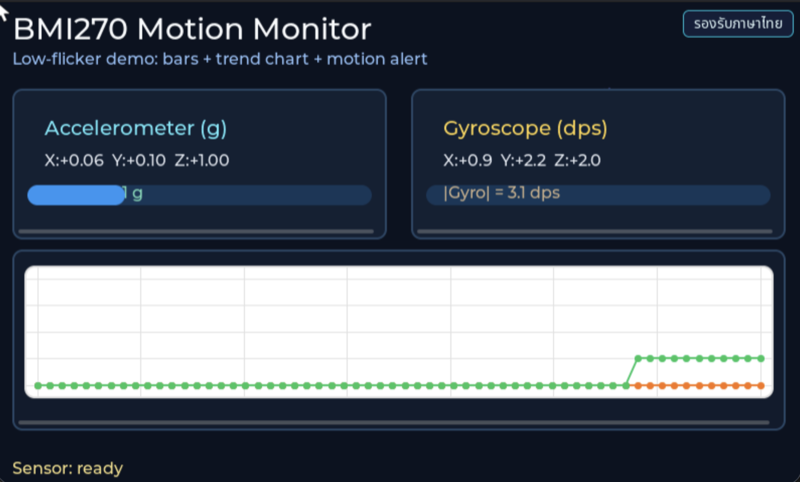
Before reading the code, guess what objects this screen has, and what changes when the user taps it or when a sensor value changes.
Try a change
Section titled “Try a change”- Guess before you change anything: pick one value the example’s README explains in the How section, and write down what you expect to change on the screen or in the log.
- Change and run: build + flash, then compare against your guess. If it does not match, find which part you misunderstood.
- Extend: add one thing the example does not yet have, and keep a photo or video in your portfolio.
Check your understanding
Section titled “Check your understanding”- With the board resting still on a table, which axis should read about 1 g?
- What does the gyroscope read when the board is not rotating?
- Why should the screen not be redrawn every time a sensor reading comes in?
The answers are in the example’s README and in the code. If you cannot answer one, go back and read the Why / What / How section again.
References
Section titled “References”- Episode README · code folder · commit
9a8e3ed - Open this example on the Developer Hub
- The code belongs to the Developer Hub and is referenced by link, not copied into this repository
Review questions
Answer on your own first, then open the answer.
-
The board lies still and flat on a table. What should the readings be? (Objective 2)
- accel ≈ 0 g ทุกแกน เพราะบอร์ดไม่ได้เคลื่อนที่
- accel ≈ 1 g ทุกแกนเท่ากัน
- gyro ≈ 1 °/s ที่แกนตั้ง เพราะโลกหมุน
- ขนาดของ accel (acc_mag_g) ≈ 1 g ส่วนใหญ่อยู่บนแกนที่ตั้งฉากกับแผ่นบอร์ด และ gyro ทั้งสามแกนใกล้ 0 °/s
Show answer
Answer: D. ขนาดของ accel (acc_mag_g) ≈ 1 g ส่วนใหญ่อยู่บนแกนที่ตั้งฉากกับแผ่นบอร์ด และ gyro ทั้งสามแกนใกล้ 0 °/s
accelerometer วัดแรงที่กระทำต่อชิปในหน่วย g ขณะวางนิ่งจึงเห็นแรงโน้มถ่วง 1 g ชี้ตั้งฉากกับพื้นโต๊ะ ส่วน gyroscope วัดอัตราการหมุนในหน่วย °/s บอร์ดไม่หมุนจึงใกล้ 0 เหลือแค่ offset เล็กน้อย การหมุนของโลกราว 0.004 °/s เล็กเกินกว่าจะเห็น
-
acc_mag_g reads 1.50 → 1.30 → 1.20 g over three samples (gyro stays low). What is the ALERT state after each? (Objective 2)
- ON → OFF → OFF
- ON → ON → OFF
- OFF → OFF → OFF
- ON → ON → ON
Show answer
Answer: B. ON → ON → OFF
bmi270_should_alert() ใช้ hysteresis: เปิดเมื่อ ≥ BMI270_ALERT_ACC_ON_G (1.45 g) แต่ปิดเมื่อ < BMI270_ALERT_ACC_OFF_G (1.25 g) และ gyro ต่ำกว่า 220 °/s ด้วย 1.30 อยู่ระหว่างสองเกณฑ์จึงยัง ON การมีสองเกณฑ์ทำให้ ALERT ไม่กระพริบเมื่อค่าแกว่งรอบเส้นเดียว
-
The example reads the sensor every 200 ms but updates widgets only every second sample (BMI270_UI_UPDATE_DIV = 2). Why? (Objective 3)
- ลดภาระการวาดและการกระพริบบนจอ ขณะที่ logic อย่าง ALERT ยังได้ใช้ทุกตัวอย่าง
- เพราะ BMI270 ส่งค่าใหม่ได้แค่ทุก 400 ms
- เพื่อเฉลี่ยสองตัวอย่างก่อนแสดง
- เพราะ I2C ต้องพักระหว่างการอ่าน
Show answer
Answer: A. ลดภาระการวาดและการกระพริบบนจอ ขณะที่ logic อย่าง ALERT ยังได้ใช้ทุกตัวอย่าง
comment ใน bmi270_config.h เขียนว่า Poll slower to reduce redraw pressure และ Update LVGL widgets every N samples to reduce visible flicker โค้ดไม่ได้เฉลี่ยค่า แค่ข้ามการวาด ตาคนไม่ต้องการภาพใหม่ถี่เท่าที่ logic ต้องการข้อมูล
-
If BMI270_SAMPLE_PERIOD_MS becomes 50 and BMI270_UI_UPDATE_DIV stays 2, how often are the widgets redrawn? (Objective 3)
- 25 ms
- 50 ms
- 100 ms
- 200 ms
Show answer
Answer: C. 100 ms
timer อ่านทุก 50 ms และวาดทุก 2 ตัวอย่าง จึงวาดทุก 100 ms (10 ครั้งต่อวินาที) ส่วนการอ่านและการตัดสิน ALERT เกิดทุก 50 ms ทั้งหมดนี้รันใน LVGL timer จึงต้องระวังไม่ให้การอ่านถี่เกินจนแย่งเวลาการวาด
-
Someone configures the BMI270 for ±4 g but leaves BMI270_ACC_RANGE_G at 2.0. With the board at rest, roughly what acc_mag_g does the screen show? (Objective 1)
- 1 g
- 2 g
- 4 g
- 0.5 g
Show answer
Answer: D. 0.5 g
bmi270_lsb_to_g() แปลงค่าดิบด้วย val × range / 2^(bits−1) โดยใช้ BMI270_ACC_RANGE_G ซึ่งต้องตรงกับค่าที่ตั้งในชิป (mtb_bmi270_config_default() ใช้ ±2 g) ที่ ±4 g ค่าดิบของ 1 g จะเหลือครึ่งหนึ่ง เมื่อคูณด้วย 2.0 จึงได้ราว 0.5 g ค่าคงที่ในโค้ดกับการตั้งค่าในชิปต้องเปลี่ยนคู่กันเสมอ
Cite this lesson
If you teach from this lesson or reuse it in slides or documents, credit it with the text below. If you changed it, add (adapted) after the title.
"Six-axis motion from the BMI270" from TESA Open Knowledge by the Thai Embedded Systems Association (TESA), https://github.com/tesaiot/tesa-qualification-program, licensed under CC BY-NC 4.0
Thai attribution: "ภาพการเคลื่อนไหว 6 แกนจาก BMI270" จาก TESA Open Knowledge โดยสมาคมสมองกลฝังตัวไทย (Thai Embedded Systems Association: TESA) https://github.com/tesaiot/tesa-qualification-program สัญญาอนุญาต CC BY-NC 4.0
This lesson adapts the source below; keep its credit too.
https://github.com/tesaiot/developer-hub/blob/9a8e3ed1d813bfd67fabf6b7ac15c6ff9750b465/int_ep02_bmi270_motion_visual · Code stays in the Developer Hub and is linked at pinned commits, never copied: the episodes, practice codes and main-branch examples are Apache-2.0; the master template and the OPTIGA client carry Infineon/Cypress EULAs.
TESA Open Knowledge · © 2026 สมาคมสมองกลฝังตัวไทย (TESA) · CC BY-NC 4.0
Content is licensed CC BY-NC 4.0. Reuse it non-commercially and credit the Thai Embedded Systems Association (TESA) every time. · How to cite TESA