Hands-on: real readings over an encrypted channel
Module 4 — IoT Platform Connectivity · Slides: slides.md · Module overview · Course page
Fill the five blanks in s11_secure_telemetry.py one move at a time until real sensor values reach the platform dashboard graph over TLS, then say in your own words what serverTLS protects and what it does not.
Objectives
Section titled “Objectives”By the end of this lesson you will be able to:
- Fill the five blanks in
s11_secure_telemetry.py, running after each move, until the board screen shows the device_id, the tls_mode and a counter that keeps rising, and the team’s device_id graph on the dashboard moves when the board is tilted - Use the two pages of pitfall tables to find the cause of at least three symptoms whose error does not point at the cause, such as a silent failure to connect, data without a graph line, and several boards dropping in turns
- Fill the 1883-versus-8884 table in the learning log from what you saw yourself, and answer without the slides what serverTLS protects, what it does not, and that port 8884 comes from tls_mode rather than the port key
- Explain the two limits of this work, that encryption does not make a measured value more correct, and that mqtt_pass is a copyable secret, unlike the private key in the OPTIGA chip that can never leave it
Before you start
Section titled “Before you start”This lesson is a lab following on from lessons 4.7–4.8. Before touching code, have the device’s four identity values in your learning log (device_id · api_key · mqtt_pass · the broker’s hostname),
from the device management page in your TESAIoT Platform account (see lesson 4.7 — if learning in a group, your organiser may have prepared it for you).
The board is already connected to WiFi, and the platform’s dashboard is open with your device selected and waiting. Review two things from lesson 4.8: connect() returns before the connection finishes;
the one that can really answer is is_connected(), and tesaiot.publish(payload) puts payload first, with no topic needed.
- Equipment: an Eva Kit or TESAIoT Dev Kit board with the BENTO MicroPython firmware installed, or the BENTO Emulator in BENTO IDE (filling in the blanks and watching the screen can be rehearsed on the Emulator, because the tesaiot module is simulated, but there is no real TLS handshake and the graph never reaches the dashboard — passing the MVP needs a real board with a
device_idalready from your TESAIoT Platform account, and the OPTIGA chip bonus needs a real board too) - Before this: Lesson 4.8 — The tesaiot module: MQTTs to the platform
Concepts
Section titled “Concepts”This set of lessons’ MVP has two halves: your device’s telemetry reaches the dashboard over TLS and you can say how it differs from lessons 4.4–4.6. The heart of it is being able to say what serverTLS protects and what it does not. If you cannot answer that, it means we have installed security without yet knowing what we bought or at what price.
The practice file has already drawn the screen in full; all five blanks are pure logic, and tesaiot.connect() is already given, not a blank — what we write is the loop that waits for it.
The order of filling in runs from easy to check to hard to check: identity first, because it can be checked without any network at all
(print(tesaiot.config()) and the table on screen); the wait loop is its own separate move, because “the connection is finished” happens after the command, not as a result of it;
real data is sent once the first two moves are confirmed — if the graph is still empty, you know for certain the problem is the shape of the JSON; and the last move is evidence on screen
letting someone else check the work without opening the code. Ordered this way, a failure always tells you its own location. The screen writes mqtt_pass as “set, but cannot read back” instead of leaving it blank,
because a blank field makes a viewer conclude it was never set. The disconnect button has a confirmation box that states what will happen; the reconnect button does not.
The level of confirmation comes from the price of a mistake, not from how important the button looks.
The two pages of pitfall tables have thirteen rows; ten of them are not a bug in the code at all, but a misunderstanding of the API’s boundaries, and almost none of them give an error that points to the cause,
so you must read it before hitting the problem. Common rows: sni_hostname not matching broker fails to connect silently · publishing before is_connected() is True
raises no error but leaves no data · a wait loop with no timeout hangs forever · several boards using the same default device_id drop and reconnect in turns ·
sending a value as a string means data shows up but leaves no graph line · wrapping the payload yourself with {"data": ...} gives measurement names starting with data_ · swapping to
tesaiot.publish(topic, payload) sends data to the wrong topic. The row about protected_update() on the Dev Kit is the one row where “no error”
means damage has already been done — never call it on either board.
Two limits must be stated clearly. First, encryption does not make data more correct — it only stops someone in the middle from reading it. If the measured value was wrong from the start,
it travels wrong, but safely, all the way to the destination. The system’s trustworthiness starts at the sensor, not at the certificate. Second, today’s mqtt_pass is a secret
that can be copied, while the private key in the OPTIGA Trust M chip can never leave the chip at all — the chip only agrees to sign with it. The chip also holds a factory certificate,
which is the piece mTLS needs. A device identity that cannot be copied must come from hardware, not from a string in a Python file.
Worked example
Section titled “Worked example”Open 07_real_reading_over_tls.py after the practice file can already send to the platform. This file closes the loop with a value really measured, instead of one made up: measuring every 200 ms
but sending every 5 seconds. The value sent is temperature from read_temp(); on the Dev Kit, it comes from the SHT40; the Eva Kit has no temperature sensor, so the knob plays that role instead
(0–100% = 15–45 °C), and the console says where the value came from. Before running, predict which source your team’s board will get its value from,
then open the destination and compare whether the number you see matches the number on the board’s screen. If using the Eva Kit, try turning the knob and ask yourself whether the destination
can tell this value is not really room temperature.
| File | What this file teaches |
|---|---|
| examples/07_real_reading_over_tls.py | A value really measured, going out in a form nobody in the middle can read |
Screens from the BENTO Emulator for this lesson’s examples (click a file name to open the code)
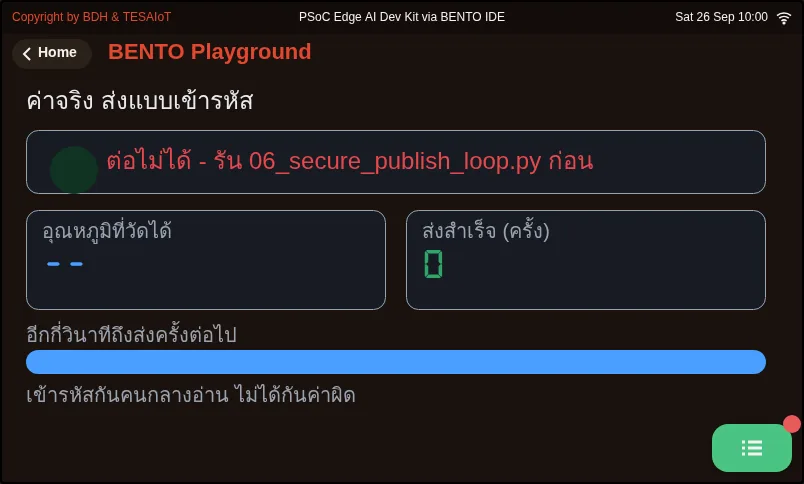
07_real_reading_over_tls.py A value really measured, going out in a form nobody in the middle can readPractice
Section titled “Practice”Open practice/s11_secure_telemetry.py and edit the five lines at the top of the file to your own (TEAM_NAME, DEVICE_ID, API_KEY, MQTT_PASS, BROKER),
then fill in one blank at a time — never fill in all five and run only once. On a path with TLS in the middle, there are more places that can break than before, and none of them make a sound.
- Blanks 1–2:
config_set()fordevice_id,api_key,mqtt_pass, then forbrokerandsni_hostname(the same name asbroker). Run it and check thatprint(tesaiot.config())shows every value, correctly spelled, and that the left-hand table on screen has no empty box - Blank 3: the loop
while not tesaiot.is_connected():, which after 30000 ms prints a warning andbreaks, otherwisetime.sleep_ms(500). Run it and time how many seconds until the “success” lamp lights; record it in your learning log - Blank 4: a flat dict of real numbers,
accel_x,heading,pot, per the comment in the file — never wrap it under{"data": ...} - Blank 5:
lcd.print("sent count", sent, "| mode", cfg["tls_mode"], "-> 8884"), then open the dashboard and watch the graph move together with the counter on screen
You know you are done when the “sent … messages” counter climbs every 5 seconds, the console says mode serverTLS, and the team’s device graph moves when the board is tilted.
If the left-hand table still shows blank values, blanks 1–2 are not yet complete.
| Practice file | Topic |
|---|---|
| practice/s11_secure_telemetry.py | Send telemetry to the platform over TLS (fill-in version) |
Solution
Section titled “Solution”Open the solution after trying on your own at least once, and read how to use the solutions first.
| Solution | Goes with |
|---|---|
| solution/s11_secure_telemetry.py | practice/s11_secure_telemetry.py |
Check your understanding
Section titled “Check your understanding”The same questions are in quiz.yaml for automatic marking.
-
Order the steps of completing the practice file
s11_secure_telemetry.pyso a failure tells you its own location. (order · objective 1)- A) Fill in the
is_connected()wait loop with a 30-second ceiling, then time the handshake - B) Edit the five lines at the top of the file to your own device’s values
- C) Fill in the payload and the on-screen evidence line, then open the dashboard to watch the graph
- D) Fill in
config_set()for identity, then run and checkprint(tesaiot.config())
Solution
B → D → A → C — The values at the top of the file must come first. Identity can be checked without any network. The wait loop is its own separate move, because “the connection is finished” happens after the command. Real data is sent once the first two moves are confirmed, so if the graph is still empty, you know for certain the problem is the shape of the JSON.
- A) Fill in the
-
Two boards both run correct code, but drop and reconnect in alternating turns. What is the real cause per the pitfalls table? (choose one · objective 2)
- A) Several boards share the same default device_id, so the broker kicks the old one off every time the new one joins
- B) Every board’s sni_hostname does not match broker
- C) WiFi is too slow for TLS
- D) time.sleep_ms(5000) was forgotten in the send loop
Solution
A — Boards leave the factory with identical default values. Reusing one means the broker keeps kicking the old one off in a loop; the fix is one provisioned device_id per board. A wrong sni_hostname gives the symptom of never connecting at all, not alternating drops.
-
Data reaches the platform, but there is no graph line, and some measurement names start with
data_. What are the possible causes? Choose every correct one. (choose all that apply · objective 2)- A) A value was sent as a string, such as “25.5”, instead of a real number
- B) The payload was wrapped yourself with
{"data": ...}, even though the bridge already wraps it - C)
sni_hostnamedoes not match the broker’s name - D) There is no
is_connected()wait loop
Solution
A, B — Data reaching the platform means the channel and the connection are already working, so the problem is in the data’s shape. A string shows a value but cannot be charted, and wrapping it again makes measurement names start with data_, so the units table cannot find them. A wrong SNI or a missing wait loop would mean data never arrives at all.
-
A team runs
tesaiot.config_set("port", "1883"), hoping to compare against the plain-text port, then runs the practice file normally. Which port does the board actually connect to? (choose one · objective 3)- A) 8884, because the port comes from tls_mode, which is serverTLS; the port key only changes the displayed label
- B) 1883, unencrypted, following the value set
- C) 8883, because the board switches to mTLS on its own
- D) It fails to connect, with an error saying the port is wrong
Solution
A — On the tesaiot path, the port is a result of tls_mode: server_tls gives 8884, mutual_tls gives 8883. Setting the port key does not error, but it does not change the real port connected to.
-
Which statements about this set of lessons’ limits are correct? Choose every correct one. (choose all that apply · objective 4)
- A) If the measured value was wrong from the start, TLS will safely carry that wrong value all the way to the destination
- B) mqtt_pass is a copyable secret; whoever gets it can impersonate our device
- C) The private key in the OPTIGA chip can never leave the chip; the chip only agrees to sign with it
- D) TLS also checks that the sensor value sent is correct
Solution
A, B, C — Encryption only stops someone in the middle from reading it; it does not make data more correct, so trustworthiness starts at the sensor. A copy-proof identity must come from a key in hardware, not a password that is a string in a Python file.
MVP: telemetry over TLS. Do this on a real board that already has an identity, and keep evidence in your learning log.
- The team’s
device_idgraph moves on the real platform’s dashboard, and moves when the board is tilted - The board’s screen shows
device_id, thetls_modemode, and a counter that keeps rising - The identity-value box in your learning log has all four values, and
device_iddoes not collide with another team’s - The 1883-versus-8884 comparison table in your learning log is filled in all seven rows from what you saw yourself, not copied from the slides
- You can answer, without opening the slides, what serverTLS protects and what it does not
- You can answer what port 8884 is chosen from, and why it is not from the
portkey - Pick one item from the extensions: time three rounds of the handshake compared with
mqtt.connect()· break it one value at a time (device_id/mqtt_pass/sni_hostname) and build your team’s own symptom table · demonstrateoptiga.uid(),optiga.random(16),optiga.sha256()(never touchtesaiot.protected_update()) · design a schema for a real machine with its daily data volume
Going further
Section titled “Going further”Module 5 is the capstone: your team chooses your own industrial problem, then assembles sensor → screen → MQTT/MQTTs → platform into one complete system. Tell a classmate your answer to the extension task when starting lesson 5.1. Anyone who wants to go deeper can watch the TLS clips from Computerphile and Practical Networking at the end of the slides.
Next lesson: Lesson 5.1 — From a real problem to a design: canvas, schema and designing for failure
Reflect
Section titled “Reflect”- If our device’s
mqtt_passleaked out, how would we know, and what should be done first? - Who should decide to revoke a device’s access — the platform administrator or the firmware developer?
- If there were 10,000 devices that each needed a unique identity, what should the factory’s provisioning process look like?
Review questions
Answer on your own first, then open the answer.
-
Order the steps of the s11_secure_telemetry.py practice so that any failure tells you where it is. (Objective 1)
- เติมลูปรอ `is_connected()` ที่มีเพดาน 30 วินาที แล้วจับเวลาการจับมือ
- แก้ห้าบรรทัดบนหัวไฟล์ให้เป็นค่าของอุปกรณ์คุณ
- เติม payload กับบรรทัดหลักฐานบนจอ แล้วเปิด dashboard ดูกราฟ
- เติม `config_set()` ของตัวตน แล้วรันดู `print(tesaiot.config())`
Show answer
Correct order: B. แก้ห้าบรรทัดบนหัวไฟล์ให้เป็นค่าของอุปกรณ์คุณ → D. เติม `config_set()` ของตัวตน แล้วรันดู `print(tesaiot.config())` → A. เติมลูปรอ `is_connected()` ที่มีเพดาน 30 วินาที แล้วจับเวลาการจับมือ → C. เติม payload กับบรรทัดหลักฐานบนจอ แล้วเปิด dashboard ดูกราฟ
ค่าบนหัวไฟล์ต้องมาก่อน ตัวตนตรวจได้โดยไม่ต้องใช้เน็ต ลูปรอแยกเป็นท่าของตัวเองเพราะต่อเสร็จเกิดทีหลังคำสั่ง และส่งข้อมูลเมื่อสองท่าแรกยืนยันแล้ว ถ้ากราฟยังว่างจึงรู้แน่ว่าปัญหาอยู่ที่รูปร่าง JSON
-
Two boards both run correct code, yet they drop in turns. What is the real cause according to the pitfalls table? (Objective 2)
- หลายบอร์ดใช้ `device_id` ค่าเริ่มต้นตัวเดียวกัน broker จึงเตะตัวเก่าออกทุกครั้งที่ตัวใหม่เข้ามา
- `sni_hostname` ของทุกบอร์ดไม่ตรงกับ `broker`
- WiFi ช้าเกินไปสำหรับ TLS
- ลืมใส่ `time.sleep_ms(5000)` ในลูปส่ง
Show answer
Answer: A. หลายบอร์ดใช้ `device_id` ค่าเริ่มต้นตัวเดียวกัน broker จึงเตะตัวเก่าออกทุกครั้งที่ตัวใหม่เข้ามา
บอร์ดออกจากโรงงานด้วยค่าเริ่มต้นเดียวกันหมด ถ้าใช้ซ้ำ broker จะเตะตัวเก่าออกวนไปเรื่อย ๆ ทางแก้คือหนึ่งบอร์ดหนึ่ง device_id ที่ provision มา ส่วน sni_hostname ผิดให้อาการต่อไม่ติดเลย ไม่ใช่หลุดสลับกัน
-
Data reaches the platform, but there is no graph line and some measurement names start with data_. Which causes are possible? Choose all that apply. (Objective 2)
- ส่งค่าเป็นสตริง เช่น "25.5" แทนตัวเลขจริง
- ห่อ payload เองด้วย `{"data": ...}` ทั้งที่ bridge ห่อให้อยู่แล้ว
- `sni_hostname` ไม่ตรงกับชื่อ broker
- ไม่มีลูปรอ `is_connected()`
Show answer
Answer: A. ส่งค่าเป็นสตริง เช่น "25.5" แทนตัวเลขจริง · B. ห่อ payload เองด้วย `{"data": ...}` ทั้งที่ bridge ห่อให้อยู่แล้ว
ข้อมูลที่ขึ้นแพลตฟอร์มได้แปลว่าช่องทางและการต่อทำงานแล้ว ปัญหาจึงอยู่ที่รูปร่างข้อมูล สตริงขึ้นค่าได้แต่วาดกราฟไม่ได้ และการห่อซ้ำทำให้ชื่อวัดขึ้นต้น data_ จนตารางหน่วยหาไม่เจอ ส่วน SNI ผิดหรือไม่มีลูปรอจะทำให้ข้อมูลไม่ขึ้นเลย
-
A team calls tesaiot.config_set("port", "1883") hoping to compare with the plain port, then runs the practice file as usual. Which port does the board connect to? (Objective 3)
- 8884 เพราะพอร์ตมาจาก `tls_mode` ที่เป็น serverTLS คีย์ `port` เปลี่ยนแค่ป้ายที่แสดง
- 1883 แบบไม่เข้ารหัส ตามค่าที่ตั้ง
- 8883 เพราะบอร์ดสลับไปใช้ mTLS เอง
- ต่อไม่ได้และขึ้น error ว่าพอร์ตผิด
Show answer
Answer: A. 8884 เพราะพอร์ตมาจาก `tls_mode` ที่เป็น serverTLS คีย์ `port` เปลี่ยนแค่ป้ายที่แสดง
บนเส้นทาง tesaiot พอร์ตเป็นผลลัพธ์ของ tls_mode server_tls ได้ 8884 และ mutual_tls ได้ 8883 ตั้งคีย์ port ได้โดยไม่ error แต่มันไม่ได้เปลี่ยนพอร์ตที่ต่อจริง
-
Which statements about the limits of this work are correct? Choose all that apply. (Objective 4)
- ถ้าค่าที่วัดผิดตั้งแต่ต้น TLS จะส่งค่าผิดนั้นไปถึงปลายทางอย่างปลอดภัย
- `mqtt_pass` เป็นความลับที่คัดลอกได้ ใครได้ไปก็ใช้แทนอุปกรณ์ของเราได้
- กุญแจส่วนตัวในชิป OPTIGA ออกจากชิปไม่ได้ ชิปยอมเซ็นให้เท่านั้น
- TLS ตรวจให้ด้วยว่าค่าเซนเซอร์ที่ส่งถูกต้อง
Show answer
Answer: A. ถ้าค่าที่วัดผิดตั้งแต่ต้น TLS จะส่งค่าผิดนั้นไปถึงปลายทางอย่างปลอดภัย · B. `mqtt_pass` เป็นความลับที่คัดลอกได้ ใครได้ไปก็ใช้แทนอุปกรณ์ของเราได้ · C. กุญแจส่วนตัวในชิป OPTIGA ออกจากชิปไม่ได้ ชิปยอมเซ็นให้เท่านั้น
การเข้ารหัสแค่ทำให้คนกลางอ่านไม่ได้ ไม่ได้ทำให้ข้อมูลถูกต้องขึ้น ความน่าเชื่อถือจึงเริ่มที่เซนเซอร์ ส่วนตัวตนที่ก๊อปไม่ได้ต้องมาจากกุญแจในฮาร์ดแวร์ ไม่ใช่รหัสผ่านที่เป็นสตริงในไฟล์ Python
Cite this lesson
If you teach from this lesson or reuse it in slides or documents, credit it with the text below. If you changed it, add (adapted) after the title.
"Hands-on: real readings over an encrypted channel" from TESA Open Knowledge by the Thai Embedded Systems Association (TESA), https://github.com/tesaiot/tesa-qualification-program, licensed under CC BY-NC 4.0
Thai attribution: "ลงมือทำ: ส่งค่าจริงผ่านช่องทางเข้ารหัส" จาก TESA Open Knowledge โดยสมาคมสมองกลฝังตัวไทย (Thai Embedded Systems Association: TESA) https://github.com/tesaiot/tesa-qualification-program สัญญาอนุญาต CC BY-NC 4.0
This lesson adapts the source below; keep its credit too.
https://github.com/Advance-Innovation-Centre-AIC/embedded-systems-for-aiot-developer/blob/a80bbe88a34bcb9bb8d991f42f9252b77cdab079/session-11.html (slides 28–45)
TESA Open Knowledge · © 2026 สมาคมสมองกลฝังตัวไทย (TESA) · CC BY-NC 4.0
Content is licensed CC BY-NC 4.0. Reuse it non-commercially and credit the Thai Embedded Systems Association (TESA) every time. · How to cite TESA